free mbox to pst converter

(Average Rating 4.6 Based on 628 Reviews)

Screens

Video

Guide

FreeViewer MBOX to PST Converter

MBOX (Mailbox) is an open-standard email storage format but Microsoft Outlook cannot open MBOX files natively. FreeViewer MBOX to PST Converter is a standalone tool that converts single or bulk MBOX files directly to Outlook PST format. No email client installation is required, and the free trial version lets you convert the first 25 emails per folder before purchasing.

Purchase Now 30 Days Money Back*
Download for Mac Safe & Secure
Purchase Now 30 Days Money Back*
  • Convert MBOX to PST and Other Email Formats: MSG, EML, NSF, EMLX
  • Export MBOX File Data in Document Formats: PDF, HTML, CSV
  • Provides a Preview of MBOX Emails Along with Attachments
  • Export Email Content from Multiple MBOX Files & Folders
  • Permits Users to Convert MBX, MBS, MBOX to PST For Outlook
  • Auto-Detect Common Email Clients Configured on System
  • Default Mode to Create an Outlook PST for Each MBOX File
  • Multiple View Modes to View MBOX File with Details
  • Multiple Filter Options to Convert Selective Data from MBOX to PST File
  • After Conversion Use Output PST File in All Classic Outlook Versions
  • MBOX to Outlook PST Converter Supports Windows 11 and Below Versions
🔐

If you are a Mac OS user then use Mac MBOX converter and launch it on Mac OS system.

MBOX to PST Converter - Working

Steps to Convert MBOX to PST Format for Classic Outlook

1

Browse MBOX File

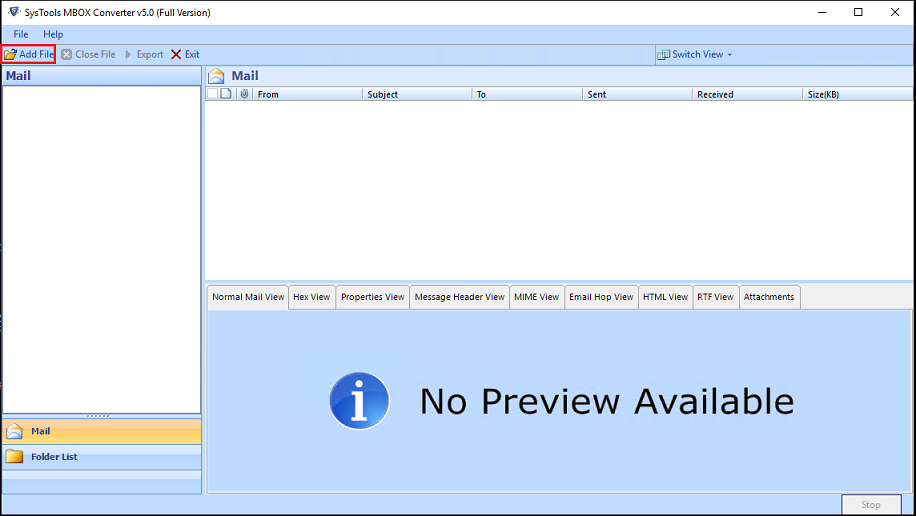
Install and launch the MBOX to PST converter software and click on "Add File" to browse MBOX file.

2

Load MBOX Files

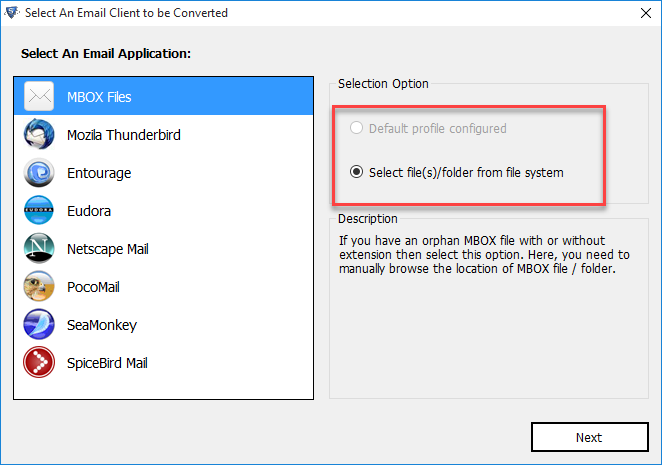
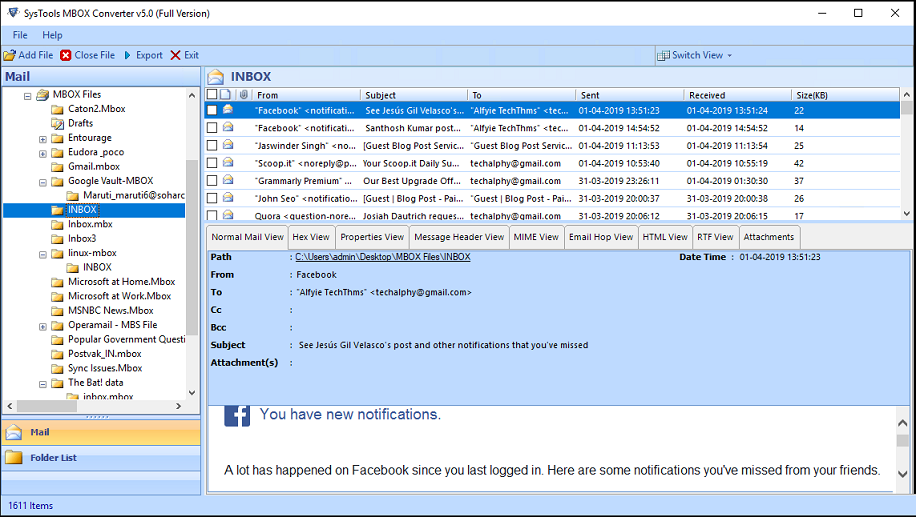
Select Email Client for Auto-detection or Load MBOX files from storage directory. Verify the browsed MBOX file data in the software panel.

3

Choose Export Option

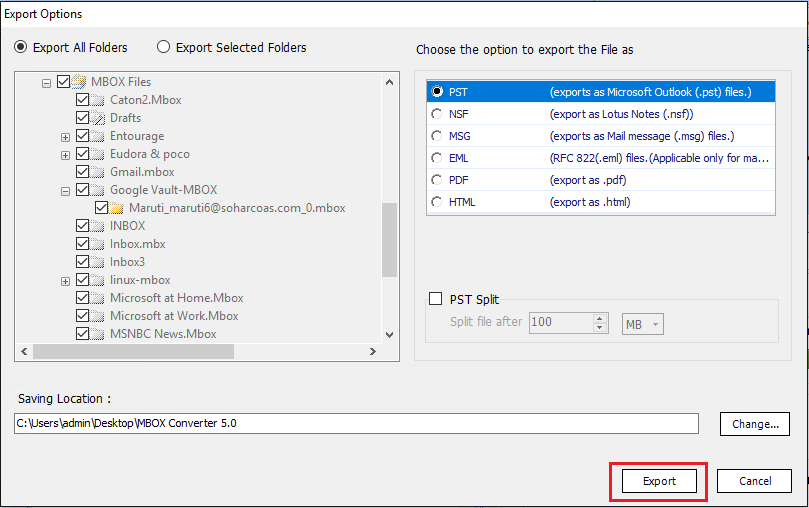
Choose PST from the list of export options. After this, apply advanced setting and browse path to save output PST file.

Supports All Mail Client's MBOX File

Convert MBOX to PST Irrespective of Source of MBOX File

  • bat The Bat
  • becky Becky! Internet Mail
  • cone ConeP
  • mulberry Mulberry
  • kmail Kmail
  • backupify Backupify(*.mbox)
  • evolution Evolution

Multiple Email Clients: One Solution

Convert MBOX to Outlook & Other formats of 21+ Email Applications

  • Supports All MBOX Variants:
  • No extension MBOX Files
  • MBOX Files with Extension
  • MBS Files
  • MBX Files
  • SBD Folders
  • netscape Netscape
  • powermail PowerMail
  • spicebird Spicebird
  • takeout Google Takeout(*.mbox)
  • postbox Postbox
  • google vaultGoogle Vault(*.mbox)
  • claws Claws Mail

Customize Creation of Outlook Data File As Per Your Choice

Customize The Conversion Process to Generate Useable Output PST File

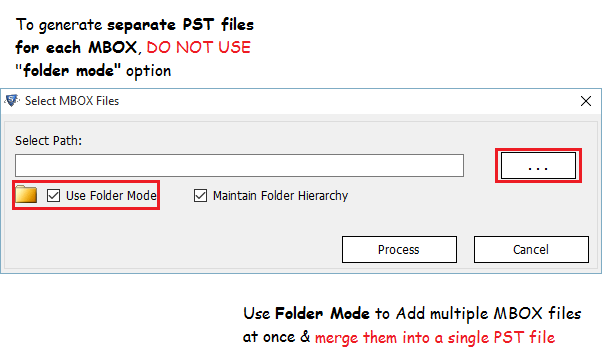
With MBOX to Outlook converter full version, the user can export MBOX files to Outlook format along with the attachments. Moreover, for user convenience, the tool permits the user to select any way to import data. One can select "File Mode" or "Folder Mode" option.

  • File Mode: Permits the user to create a separate Outlook file for each MBOX file.
  • Folder Mode: Choose this option to convert the data from root folder and all sub folders at once.

Another option to create a single output file is to select "Yes" when the software asks for "Merging All Added MBOX files". This option is viewable after clicking on the "Export" button.

MBOX to Outlook free

FreeViewer Awards & Reviews

Best Software to Analyze and Convert MBOX to PST File

One-Click

“Soft32 rates MBOX to Outlook converter as 100% safe and reliable utility to open, view and export MBOX files to Outlook file format.”

easy to use

“This software is awarded by Softpedia for rendering Ad/Spyware/Virus free solution.”

100% safe software

“Software Informer rates the software with 4-star rating for its high-performance and accuracy to migrate MBOX to PST for Outlook.”

download the software

“SoftwareSuggest recommends MBOX to PST transfer utility to all the users who need to migrate MBOX email messages to Outlook without any data loss.”

MBOX to PST Converter - Feature Explanation

Best Software to Convert Multiple MBOX files to Outlook PST in One Go

easy to use software

Convert MBOX Files to PST Seamlessly

One can easily convert MBOX files to PST along with attachment via FreeViewer MBOX to Outlook transfer tool. The software is capable to export .mbx, .mbs, .mbox, MBOX file without extension into Outlook file format. The user can import the mailbox files with the help of two given options: "File Mode" and "Folder Mode".

created single pst for multiple mbox files

Create Outlook File via Dual Approach

The software provides two different ways to export MBOX emails to PST for Outlook format. The tool permits the user to export all MBOX files into a single Outlook file or create individual Outlook files for each MBOX file via Folder Mode. The user can select any of the options as per the requirements and choice and convert unlimited files to Outlook.

Auto-Detect All Email

Auto-Detect All Email Client MBOX File

This software works on advanced algorithms due to which it is capable to detect the email client supporting MBOX file configured on the local machine. The user can also select the configured email client on the system instead of searching the file using the Default Profile Configured option.

verify data before conversion

Preview MBOX File Data Before Conversion

One can easily export MBOX emails along with attachments before the migration process. The MBOX to Outlook converter free and full version makes it easy for users to view data directly from the software’s interface. Moreover, one can easily export MBOX data without any data loss.

export in multiple formats

Transfer MBOX to Multiple Formats

The MBOX to Outlook PST transfer utility allows the user to migrate MBOX files into different file formats. The user can convert multiple MBOX to PST, EML, NSF, MSG, PDF, HTML file format in a seamless manner. One just has to select the desired file format to perform the migration.

selective data conversion

Select and Convert Particular Emails

In some situations, the user needs to convert only selected MBOX email messages. Thus, to make it easy for all the users, this software is integrated with "Selective Export" features. This feature permits the user to export selective MBOX emails into the desired file format.

resize output data file

Allows Splitting Output File

While converting files with MBOX to Outlook converter tool, the user can also split the resultant file. For this, the user just needs to select the Split File option. This feature permits the user to split large PST file according to a specific size selected by the users so that one can transfer MBOX to Outlook easily.

easy to manage mbox file folders

Multiple Directory View Actions

This software provides a different option to view and organize the MBOX folder list. One can right-click on any of the MBOX files and make use of options such as Collapse All, Expand All, Close All. These options make it simple for the user to manage the MBOX folder list as per the choice so that converting MBOX files can be done easily.

date filters for selective conversion

Date Filter to Move Selective Emails

Sometimes, it becomes a challenging task for the users to filter out the MBOX files from other file types. But, MBOX to Outlook transfer free / license software makes this task hassle-free for the users. This software is capable to filter out MBOX files among various file types.

standalone software

No Email Client Dependency

The user can easily migrate MBOX to Outlook and other file formats via the software without any email client installation. There is no dependency on any email application. You can import the output file to Outlook later or simply use free PST viewer tool to access them.

supports all windows os versions

Compatible With All Windows OS X

This tool supports all Windows Operating Systems without any compatibility issues. One can easily export MBOX emails to Outlook on Windows 11/10/8.1/8/7. The converter tool supports 32 and 64-bit Windows Operating system versions.

verify report after conversion

Generate Export Report

The MBOX to Outlook converter software generates an export report with all the details associated with MBOX export process. Once the process gets done, the user can save the report on the system in CSV or HTML format.

MBOX to PST Converter – Specification

Requirements to Launch This Software on Mac and Windows OS

Processor

Processor

Intel® Core™ 2 Duo CPU E4600 @ 2.40GHz 2.39GHz

Memory & Storage

Memory & Storage

2 GB of RAM recommended | 200 MB of free hard disk space required

Deployment Prerequisites Pre-Requisites

Supported Editions

Supported Editions

FAQs

Q: Is Anti-Virus blocking the export process?

Disable Anti-Virus temporarily or whitelist the software in your settings for proper functionality.

Q: Unable to create output in destination?

Avoid using NAS, SAN, or Network drives. Ensure the source file is on the local migration machine to perform successful migration.

Software Download

Release v9.0 | File Size: 107.42 MB

Download for Windows

Download for Mac

Trial Limitations

The Free MBOX to PST converter demo version lets user to view emails for free but limits to convert 25 emails/folder of MBOX to PST file.


Electronic Delivery

Electronic Delivery

The delivery of product is automated. You will receive an email containing both the link to download and the activation key within a few minutes.

MBOX to PST Converter Tool - Comparison

Understand The Feature Difference Between Free and Paid Version

Features

Free

Full Version

Browse MBOX File in Software Panel

Scan MBOX File(s) & Folder(s)

Supports MBX/MBS/MBOX (with/without extension)

Fetches Mozilla SBD Files

Auto-Detect Email Clients Mailbox

Specify Output File Size

Convert MBOX to PST for Outlook First 25 Emails

Convert to Other Formats (PDF, EML, MSG, NSF, HTML, CSV, EMLX, MHT, & TXT) First 25 Emails

Cost FREE $39

Frequently Asked Questions

Know How to Convert MBOX to PST Using This Software

What Customers Are Saying

Get an Overview of MBOX File to Outlook PST Software

4.6
628 Ratings
5 Star 70%
4 Star 26%
3 Star 3%
2 Star 0%
1 Star 1%