How to Unlock eBook PDF Ethically?


Readers often download eBook PDFs, novels, and more from leading platforms. Remember, the eBooks are encrypted with a password and DRM protection. Now, you must be wondering how to unlock eBook PDF for better accessibility and read the book without any restrictions. The stepwise guide explains basic to advanced methods to remove protection from eBook and other digital books without depending on the author, publisher, etc. So, let’s dive into it.
Why are eBooks Password Protected?
eBooks are commonly protected with different types of security, preventing tampering, content plagiarism, sharing, and more. The authors use the best PDF Locker tool to secure their eBooks and other material. In simple terms, security acts as a shield layer against unauthorized access. Below are the reasons for applying the protection to the eBook:
- Secure the Copyright Material: Whether you’re a publisher or author, you may have fears of tampering or copyright. To preserve privacy, document owners need to implement security measures to reduce the risk of copyright violations or further losses.
- Protect Against Unauthorized Access: The eBooks contain original and premium content, mainly accessible to paid readers. In the absence of protection, unauthorized viewers can either create pirated copies or print them. Hence, it becomes essential to protect the eBook from any direct access.
- Adhere to DRM Standards: Most eBook platforms, such as Google Play Books, Kindle, Kobo, Internet Archive, and more, must comply with DRM and other data protection standards to limit copyright issues.
In summary, eBook password security is essential these days for safeguarding the original content from plagiarism. Hence, it grows trust between the author and the reader, preventing the chances of any content piracy and illegal distribution.
Types of Protection on eBook PDF
Before jumping into the types, let’s understand the meaning of a password-protected eBook. In simple words, locked eBooks restrict unauthorized access. Only legitimate viewers or readers can use the correct credentials to open the password-protected eBook PDF. This controls the viewer’s activities on copyrighted content.
There are different types of protection applied to eBooks; read them below:
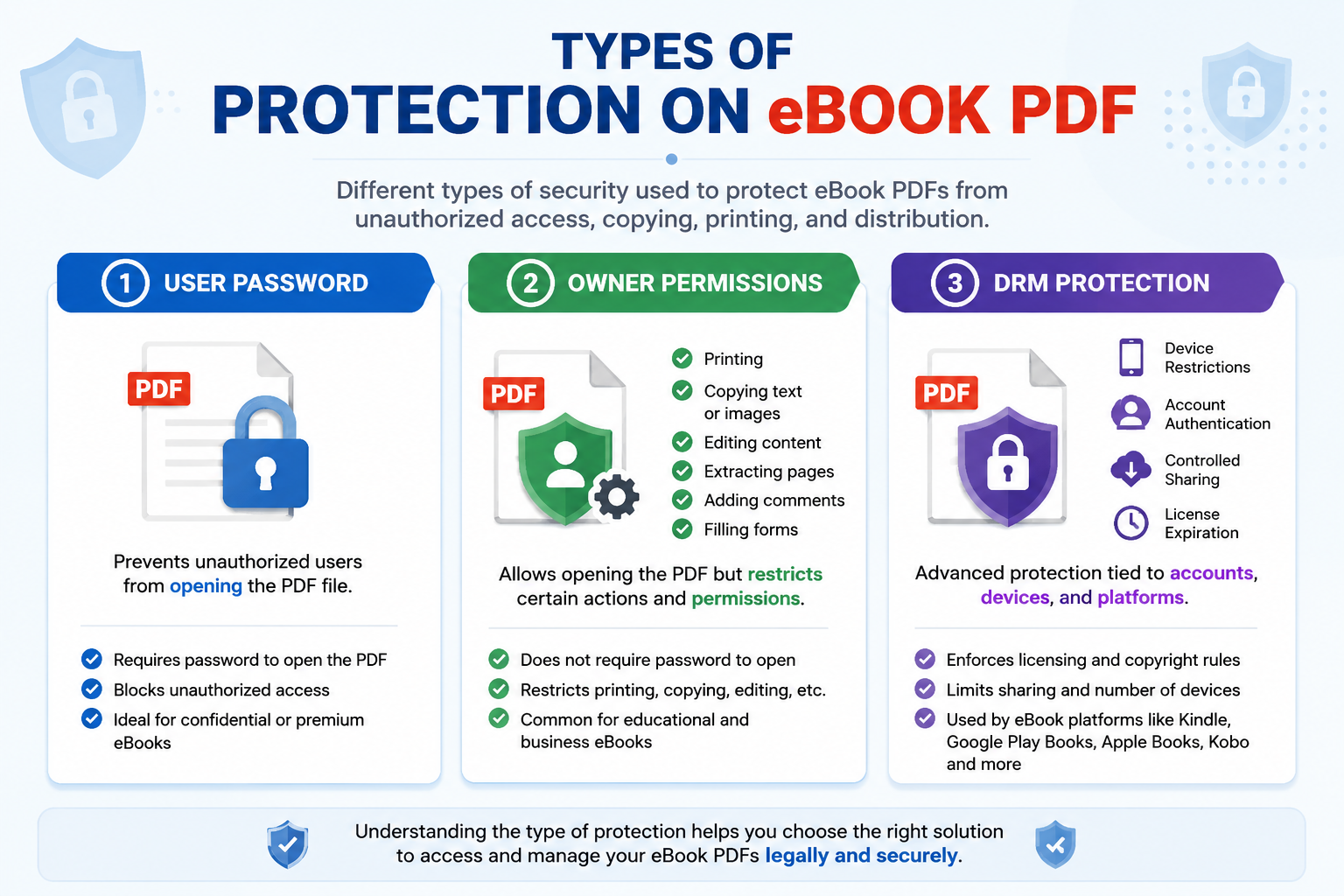
- User or Open Document Password: In this protection, the reader requires the correct credentials or password to open the locked eBook. Without a user password, viewers can’t open or read the eBook. Using this protection, publishers can ensure that only paid users can use the exact passkey to open the copyrighted content.
- Owner Permission Protection: The owner protection simply controls the actions of viewers. It prevents content from being copied, repurposed, printed, edited, and more at once. This way, readers can read or view the information in the eBook. The protection primarily applies to research papers and educational resources.
- DRM Security: It stands for Digital Rights Management, commonly used on eBooks to control access, printing, and more across different devices. Under the DRM protection, the eBook PDF is secured with PDF encryption and prevents copying, printing, and sharing of eBook material. This security is highly used and preferred by eBook platforms to safeguard content.
In other words, these protections are useful to protect the copyrighted eBook. However, it may add obstacles for readers when reading or sharing them. Now, let’s understand the reasons to remove protection from eBook PDF.
Why Remove eBook Protection?
eBooks are secured with protection to limit access. It often becomes difficult to manage the eBook protection. Below are the benefits of unlocking eBook PDF:
- Open eBook for Free: The paid readers buy the eBook for free access and learning. Here, the restrictions act as a barrier, removing the protection from the eBook, allowing them to read, open, or highlight the content without entering the password every time.
- Make Printable Copies of eBook: Sometimes users need to share the eBook or research material with students or fellow researchers in printed form. Hence, it is necessary to unlock eBook PDF for accessibility and distribute the printable document without asking for permissions.
- Use eBook on Multiple Devices: Readers or viewers require eBook access on various PC or devices. The DRM protection may cause restrictions; removing the DRM from the eBook allows readers to open or read the digital book on multiple devices without a timestamp or expiration.
Overall, these are the benefits of removing the protection from the eBook. Now, if you’re wondering how to remove DRM from eBooks, follow the guide below.
How to Unlock eBook PDF – 3 Effective Methods
If you’re looking for methods to remove eBook protection, here are the basic to ethical ways. Whether you’re an occasional reader or a professional reader, it includes free online and dedicated offline tools to unlock the eBook.
Here are the ways to unlock eBook in 3 instantly:
- Free Online PDF Websites
- Adobe Acrobat Pro Utility
- Dedicated Offline Tool (Reliable)
Now, let’s understand these methods.
#1 How to Remove eBook Protection Online – Free PDF Platforms
Online PDF websites are among the best and go-to choices for readers. With minimal steps, you can remove permissions password from PDF or eBook PDFs. It won’t require a costly subscription to Adobe Acrobat; the tool is completely online—no offline installation.
Whether it’s a large eBook or multiple files, these platforms can handle the document. Hence, you can download the unprotected eBook PDF with ease. So, follow the quick steps to unlock eBook PDF online:
- Firstly, search for and visit the free online PDF platforms.
- Use the drag or drop option to browse your eBook PDF.
- Use the eBook credentials and hit Unlock.
Why Online Tools are Not Recommended?
- The eBook contains copyrighted content and sensitive data, and uploading the file on an unknown third-party server leads to data loss or content piracy.
- These free PDF platforms won’t support advanced encryption or the removal of DRM from eBooks. Hence, it is suggested to choose offline and reliable tools for unlocking the eBook PDFs.
- Lastly, the online websites put restrictions on the number of usages. For a large volume of eBooks, you need to upgrade the plans or online services.
#2 How to Remove DRM Protection from eBook – Try Adobe Acrobat Pro Utility
To unlock eBook PDF, Adobe Acrobat is another alternative to try. This is an offline and professional solution to remove protection from eBook. Whether it is user or owner permissions, the software efficiently works with both types of protection. Since publishers or authors seek for the reliable and privacy-focused platforms, the tool covers everything for them. Now, follow the detailed steps to remove eBook password protection using Adobe:
- Download the Adobe Acrobat utility on your desired system.
- Upload the eBook PDF and enter the respective password.
- Move to File and look for the Properties feature.
- Navigate to Security and then, click No Security.
- Finally, reconfirm the password and press the Ok button to download the unprotected eBook.
Drawbacks of Acrobat Pro Solution:
- Adobe Acrobat is very an expensive utility for authors, publishers, and occasional readers.
- It can’t handle the advanced DRM protection.
- The dashboard is complex, making it difficult to operate.
#3 How to Remove eBook Protection – Expert Solution
If you’re wondering how to unlock eBook PDF, try Free PDF Unlocker by FreeViewer. It is an offline and secure utility to remove security from eBooks or digital books. This independent tool is available for both Windows and macOS operating systems. Using the software, you can easily remove user and owner permissions, encryption, and basic eBook DRM protection that limit the editing, content copying, printing, etc.
In other words, the tool allows authors, publishers, or readers to bypass eBook protection in one go. With clean buttons or an interface, the process becomes easier for readers. Most importantly, it only works on eBook protection; therefore, the master copy of the eBook PDF remains the same. So, let’s move to learn the steps.
Instant Guide on How to Unlock eBook Password
- Download and start the aforementioned software on your machine.

- Choose any: Add Files or Folders to upload the eBook PDF.

- Provide the exact password of the eBook and pick Save button.

- Navigate to Change and then hit Unlock to access eBook for free.
Pro Tip: If you forgot PDF password or lost the credentials of the eBook, use the FreeViewer PDF Password Recovery Tool. The advanced and ethical way of recovering the eBook password. Using the tool, you can find the eBook credential up to 15 characters. After accessing the password, you can use an offline tool to remove eBook protection.
Final Words
In the above guide, we have shared 3 ways on how to unlock eBook PDF. From free online to advanced solutions, you can choose any based on your preference. Among all the methods, the automated method is reliable, offline, and privacy-focused for all. So, use the utility for unlocking the digital books.