How to Open If Forgot PDF Password? Stepwise Guide


Managing the secured PDFs isn’t easy every time. There is a risk of losing the document password. It certainly prevents access to the PDF file. Here, many professionals search for how to open if forgot PDF password on various community platforms like Reddit.
This is a complete step-by-step that covers everything related to why you forgot your password and an ethical way of accessing the lost credentials. With this, you can regain the password and remove permissions from PDF file. So, let’s dive into it.
Why PDF Protection Becomes a Problem?
Protecting the PDF with a user or open document password is a smart and secure choice to ensure security. But it may turn into a barrier if you forget the PDF password. In many situations, users can’t manage the secured PDF files. The consequences include losing credentials, which means no more access.
Moreover, professionals post queries on technical or community platforms, such as Reddit. Below is one example of how security becomes a frustration.
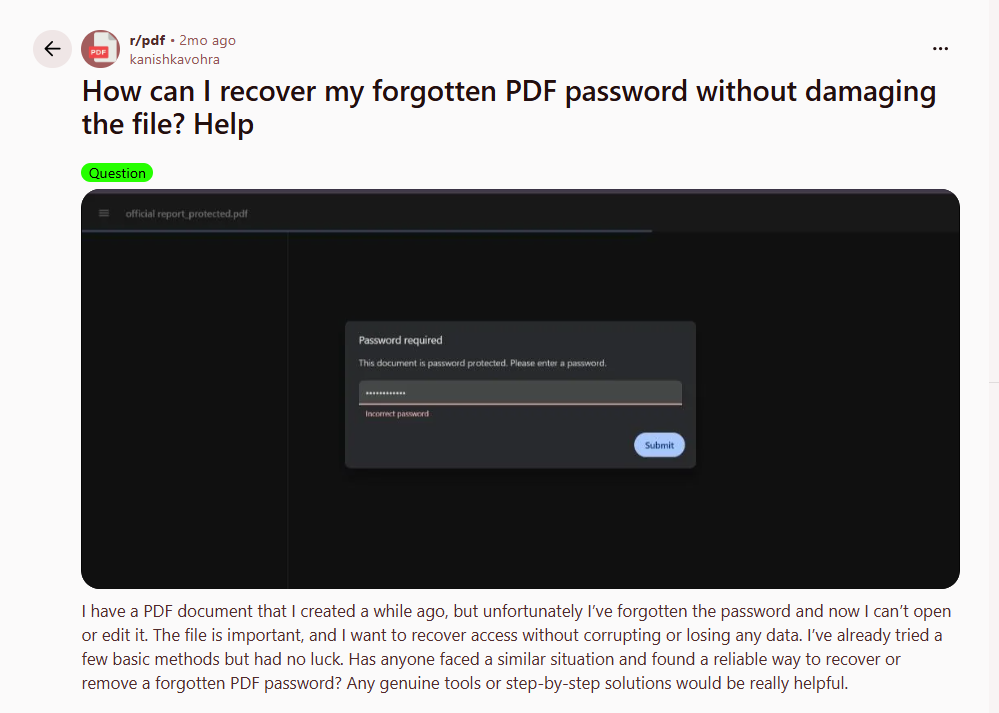
Now, let’s discover what happens when the PDF password is forgotten due to improper PDF management.
What Happens If Forgot PDF Password?
Document security is useful if you properly store credentials. In other scenarios, the fear of forgetting a password is high. This results in the inaccessibility of the PDF document in the absence of a password. Hence, the document remains secure in status.
Here’s what happens if lost PDF password:
- Without password, users can’t access or open the entire PDF document. Hence, it shows an error whenever credentials are entered.
- The situation of a forgotten PDF password is quite dangerous if immediate access is needed. It further causes a delay in file access, especially confidential documents.
- Attempting the wrong password may result in data loss or corruption. So, it requires a dedicated tool to get the forgotten password.
Overall, losing the document password is risky if it contains sensitive information. Now, let’s deeply understand the challenges if you forget the credentials of your PDF document.
Common Problems After Forgetting the PDF Password
Forgetting a password is a serious concern. Moreover, this blocks the direct access of viewers or owners due to incorrect credentials. Whether it is an ordinary or sensitive document, you may struggle to access the PDF file. Here are the common problem you may face when losing the right PDF password:
- No Accessibility: When you forgot PDF password, it means you can’t read, view, or open the document for free. In other words, you are unable to access the information.
- Disrupt the Workflow: Losing the credentials directly causes a delay in the workflow. Moreover, you can’t change or modify the PDF until you have the right password.
- Risk of File Damage: If you repeatedly attempt to open the document with the wrong credentials, revoke access. Additionally, it results in file corruption or damage.
In short, accessing the document is difficult if PDF file password forgot. Before jumping on dedicated solutions, let’s first try the quick methods to regain credentials.
What to do If “Lost My Password PDF”?
When you forgot the PDF password, you may attempt to open it. Below are the practical tips to try when you lost PDF password:
- Look for Backup Copy: If you forgot the credential, then search for the backup copy to access the document without delay.
- Try All Password Patterns: Instead of taking stress, try all major combinations to regain credentials. Also, separate the wrong passwords to avoid mistakes.
- Ask Creator: If you’re a viewer, then ask the creator for the exact PDF password. This way, you might open the PDF if forgot the password.
PDF Password Forgot How to Open – 5 Methods to Try
If you’re wondering how to find lost PDF password, here are the 5 effective techniques. Moreover, it includes simple, free, and advanced solutions to get the forgotten password. This way, you can open or read the content without depending on owners. Below are the way to get forgotten PDF password instantly:
- Using a Dedicated or Advanced Software
- Online Tools to Regain Access
- Contact Document Creator
- Brute Force Technique (Manual)
- Python Script (Code-Based)
Now, let’s walk through these methods. Remember, you must have legitimate authority to open the document if the credentials are lost. Without consent, it may be considered a legal issue or an unlawful activity.
#1 Forgot PDF Password How to Open – Try Automated Tool (Recommended)
Struggling how to open a PDF if you forgot the password, use best PDF Password Recovery by FreeViewer. This is a dedicated and offline utility, desired for a Windows or macOS machine. Using this robust software, professionals can get the lost PDF password in seconds.
Moreover, the tool provides two major modes, i.e., Brute Force or Mask Attack. Using the right feature, you can access the exact credentials in one go. If you’ve completely forgotten your password, the brute-force option is recommended to all.
Here, the utility automatically tests the combinations using the Adobe Reader and provides the right passkey. This way, users can ethically open the document without risk of corruption. Now, let’s understand the working steps.
How to Find Lost PDF Password in Seconds – Stepwise Guide
- Firstly, install and start the professional-grade tool on your system.

- Use the “Browse” button to add the protected file to the dashboard.

- Navigate to Recovery Mode > pick Brute Force (Unknown or Forgot Password).

- Finally, hit the Recover icon to get the lost password.
Fortunately, this is a secure and trustworthy tool to try if you forgot the PDF password. Moreover, there is no risk of formatting or other failure. Hence, use this ideal or cost-effective solution to get the credentials.
Pro Tip: Download the Free PDF Unlocker of FreeViewer to reduce the risk of losing the PDF password. This way, you can save the unsecured document with peace of mind. Moreover, it is another fast processing and reliable solution to unlock PDF for printing or other purposes. Now, manage your documents like a pro.
#2 Forgot PDF Password How to Open Using Online Tools
If you’re wondering for the ways to open the PDF when lost the password, try a free online tool. Many online websites allows users to get access to the PDF document. Here, you don’t need to download third-party or other software.
Remember, online tools aren’t effective if you lost PDF password. Moreover, it requires the passkey to open the PDF file. Follow the steps to try when forgot the PDF password:
- Open or visit the free online PDF websites.
- Now, drop the PDF document in the platform.
- After this, enter the forgotten password.
- Now, download the PDF without any kind of protection.
Free online tools are useful if you want to bypass all types of security. But if you have lost the PDF file password. These websites aren’t ideal or effective. Besides this, there is a chance of data formatting or tampering with the document. So, use the offline solution to get the password.
#3 Forgot My PDF File Password – Directly Ask Owner
If you’re in a situation where you have forgotten the PDF password, immediately contact the owner. The document creator either has the correct credentials or a backup file. This way, you can get a chance to open the document. Remember, if owners don’t have the exact password, then use the dedicated utility to find lost PDF password without delay.
#4 How to Access Lost PDF Document Password Using Brute Force
Try the brute force technique if you forgot PDF password completely. In this approach, the document creator must manually try all possible patterns and password combinations. Below is the breakdown of how the brute force method works:
- Manually attempt all the characters or combinations.
- Don’t lose your patience until you find the right credential to open the file.
- First, try a simple password, then attempt the complex patterns.
#5 Forgot Document Open Password PDF – Open PDF Using Python Script
If you’re searching for “forgot my PDF password how to open without software”, try Python Script. This is a technical approach to finding out the exact credentials. Moreover, if you are aware of programming languages and dictionary attacks, you can use Python libraries to regain the lost password. Here’s how to use the Python Script for accessing the forgotten credentials:
- Use libraries, such as PyPDF2
- After this, attempt or guess the possible passkey
- If get the right password, open the PDF file
Final Words
In the above guide, we have listed 5 ways to try if forgot PDF password. Using these techniques, you can open or view the document. Remember, a manual solution takes time. Additionally, there is no success, so try the automated tool. It significantly eliminates the failure and allows users to open the PDF if they have forgotten the password.