What is PDF Encryption and Its Types? Complete Guide


Every day, thousands of research papers, business reports, academic, and financial files are shared in portable PDF format. Most people, including professionals, always fear data formatting or compromise. With modern PDF encryption, users can secure confidential information from direct access. Follow this guide to learn about what is PDF encryption, types, and encryption standards or examples. The bonus tips include effective ways for encrypting and decrypting PDFs. So, let’s walk through the guide.
What is PDF Encryption?
PDF Encryption is a process of converting the plain content into an unreadable, encoded, or encrypted format. This PDF document has only scrambled mathematical values, making it difficult to read without a decryption password. In simple words, the PDF encryption is more like a digital shield or lock to safeguard the sensitive file.
There are various PDF encryption types to secure the documents. Read the section below to understand how PDF encryption works and its types.
How Does PDF Encryption Work?
The PDF file encryption is mainly used to convert readable content or elements, like images, links, text, videos, and metadata, into ciphertext using encoded algorithms. This document encryption standard uses a strong password to prevent unauthorized access. Here’s how it works.
While encrypting the PDF document, the software enables the encryption algorithm with a key, commonly considered as a random string of characters or binary code. This effectively mitigates unauthorized activities while sharing the information. Here’s how PDF Encryption works:
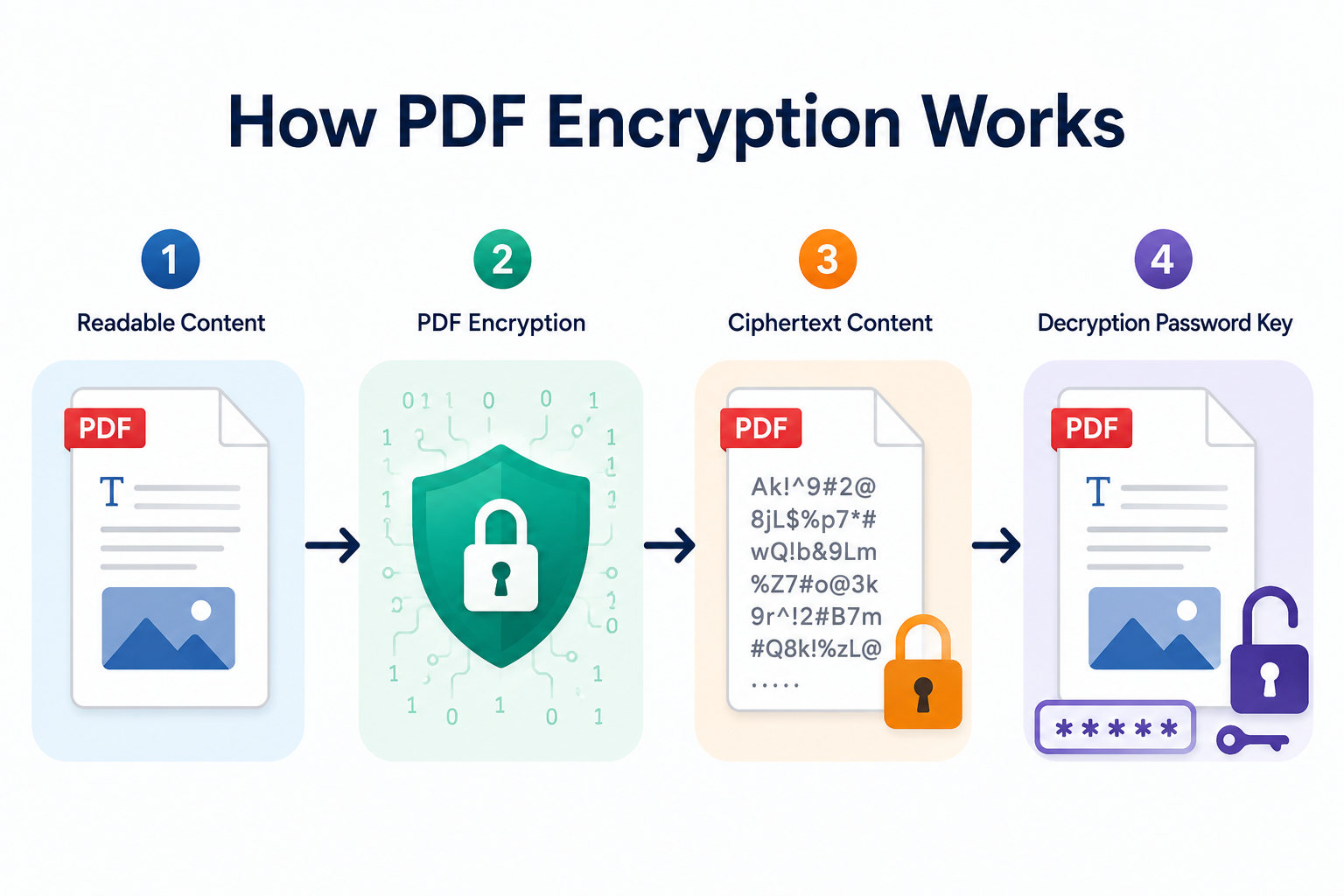
- Readable Content: Firstly, the text remains readable and accessible.
- PDF Encryption: In this process, the powerful encryption algorithms make the content unreadable or scramble it using binary or mathematical keys.
- Ciphertext Content: Lastly, the professionals can share the encrypted PDF document fearlessly.
- Decryption Password Key: Once the receiver opens the document, they need the correct decryption key to access the content in a readable format.
The above is the basic understanding. Below are the forms of PDF encryption:
- PDF Encryption Password: Under this protection, anyone with the password can open, review, and share the encrypted PDF with ease.
- Certificate PDF Encryption: For business professionals or organizations, the PDFs are encrypted with a digital certificate (private key). Here, the legitimate users with the decryption key can access the document.
Now, let’s dive into discovering the PDF encryption types. This way, you can easily find out the right document encryption for sensitive files.
Common PDF Encryption Types & Standards
Previously, we have talked about what is PDF encryption. Here is the detailed understanding of types. So, read all the encryption standards below:
- 40-bit RC4 (High-Vulnerability): This is among the earliest forms of PDF encryption and is now obsolete. The older versions of PDF (PDF 1.1 – 1.4) support 40-bit RC4. Moreover, this short key protection is compromised by brute-force or other cracking tools. Hence, it is not recommended today for securing the PDFs.
- 128-bit RC4 (Not Recommended): After 40-bit RC4, this security became popular for protecting documents. The 128-bit RC4 supports 1.4 -1 .6 PDF versions. The RC4 protection is known for security weaknesses and vulnerabilities. Therefore, this protection is not suitable for confidential PDF files, including the latest versions.
- 128-bit AES (Strong): This is a modern and standard encryption standard that protects content with 10 rounds of cipher blocks. Moreover, it supports the 1.6 version of PDF document. Compared to RC4, the 128-bit AES (Advanced Encryption Standard) is stronger and is trusted by businesses and professionals to enable security.
- 256-bit AES (Recommended & Strongest): AES 256 PDF encryption is one of the most powerful security algorithms to secure sensitive files. This encryption is applied to modern PDF 1.7 and above versions. Using this protection, professionals can ensure robust file encryption that prevents brute-force or masking attacks from breaking it. Moreover, this protection is used by even businesses, enterprises, and government agencies.
Pro Tip: It is recommended to apply 256-bit AES PDF Encryption to secure the document and prevent unauthorized access while sharing the information. This is among the unbreakable security measures to use for secret documents.
Why Does PDF File Encryption Protection Matter?
PDF file encryption is becoming a crucial security standard while sharing sensitive files via email, online platforms, and messaging applications. It offers data protection and assurance while transmitting the data across different platforms.
Here are the common benefits of applying PDF encryption protection:
- Safeguard Secret Files: Professionals such as legal advisors, HRs, hospitals, and even more need to protect the personal information. Here, it becomes necessary to apply the PDF encryption example or standards, like AES 128 and 256-bit.
- Ensure Secure Sharing: When sharing secret documents, there is a chance of data compromise.
Moreover, PDF encryption provides digital security when transmitting information to anyone. Hence, it is another reason to apply PDF file encryption. - Meet Data Protection Compliance: Most industries or enterprises need to meet security compliance to secure personal documents from direct access. With PDF AES 128-bit and 256-bit encryption, professionals can ensure unbreakable protection and data privacy.
Overall, PDF encryption improves data security and transmission. Now, let’s understand when to use encryption standards.
Who Should Use AES Encryption Standards on PDF?
Previously, we have explained about what is PDF encryption, types, and how it works. Before jumping into how to apply the document encryption. Here is a breakdown of which industry or individual should use PDF file encryption for protection.
- Individuals or Business Workers: Whether you’re in IT or any other business, you need to share reports, invoices, or client proposals. Without security, these documents easily get compromised. So, it is recommended to use encryption standards to safeguard content.
- Legal Advisors or Firms: In the legal sector, lawyers need to share confidential case files, notices, hearing records, and other necessary documents. Here, PDF encryption ensures the secure transmission of information in the courtroom or law firms.
- Finance Sector: Banking or other financial sectors hold highly sensitive transaction or financial information. To mitigate the chances of data theft, it is recommended to apply PDF file encryption. This further allows these institutions to meet data compliance or regulation standards.
In summary, document encryption protection is a kind of security layer. Most industries, including finance, healthcare, law, and enterprises, should adopt PDF file encryption standards to ensure privacy.
How to Apply PDF Encryption?
If you want to enable strong PDF file encryption, use the professional Free PDF Locker by FreeViewer. This is an advanced and most reliable software solution, developed for Windows or macOS platforms. Moreover, this is a complete offline utility with smart features to encrypt PDF documents.
Using this software, users can apply powerful encryption algorithms, like 128-bit, 256-bit, and earlier RC4 protection in batch mode. Beyond encryption, this tool supports owner or PDF password protection. Hence, it is a one-stop utility to secure the PDF with professional-grade security. Below are the working steps:
- Start by downloading the automated utility on your PC or desired OS.
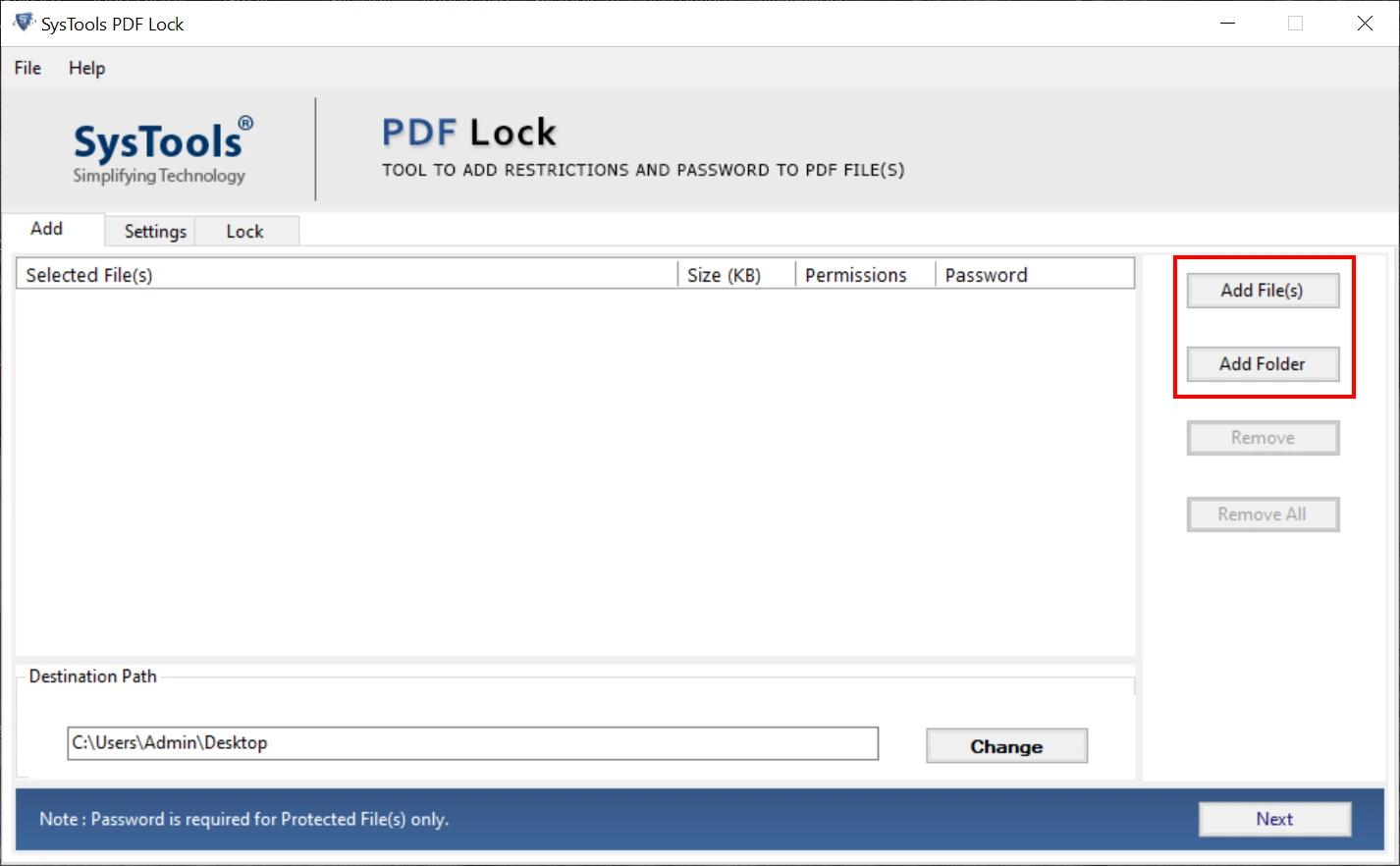
- Pick the “Add Files or Folders” function to upload the necessary PDF file.
- Tab Change to set the path for the output PDF and press the Next button.
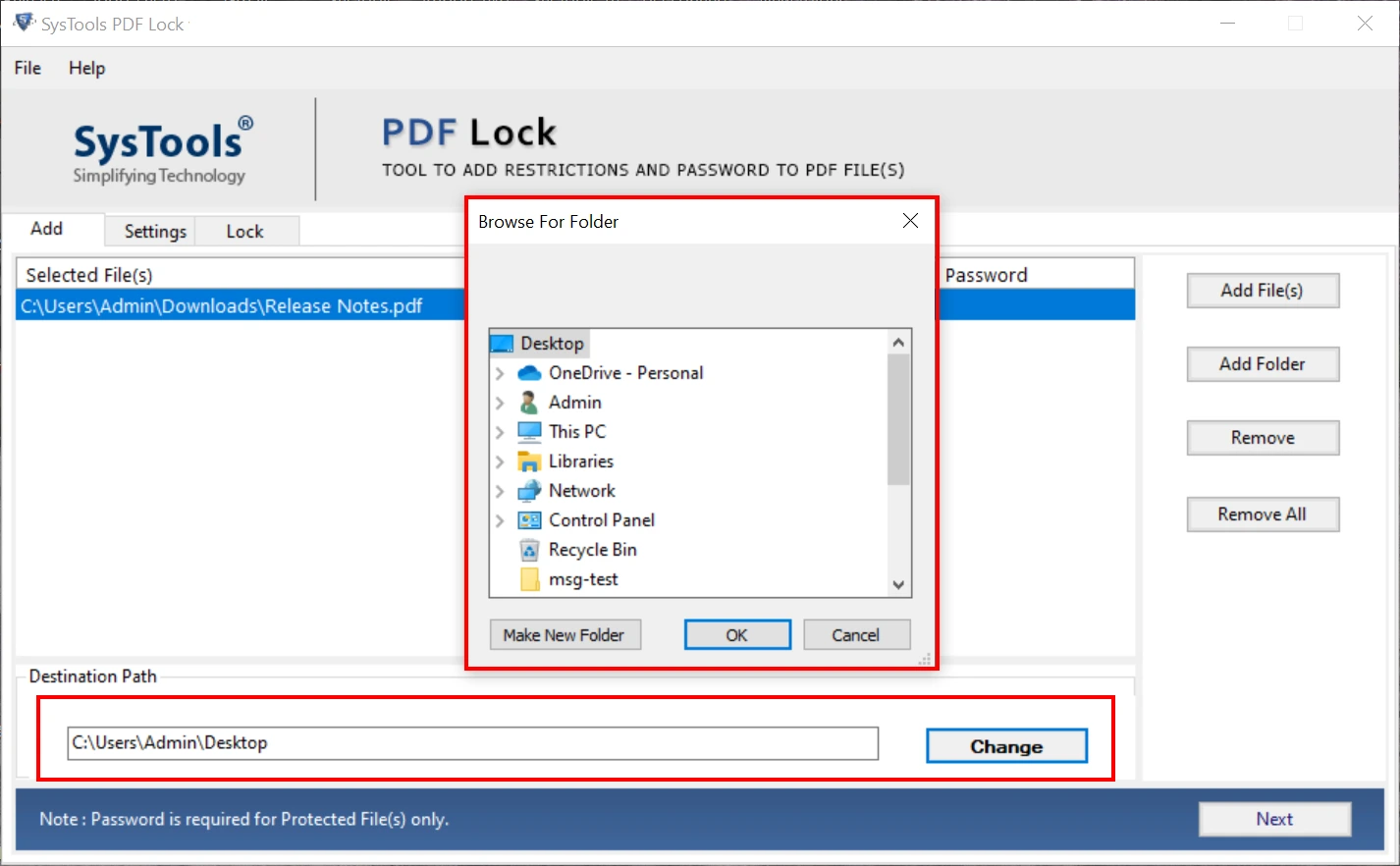
- In the next window, move to Encryption Type and choose any algorithm.
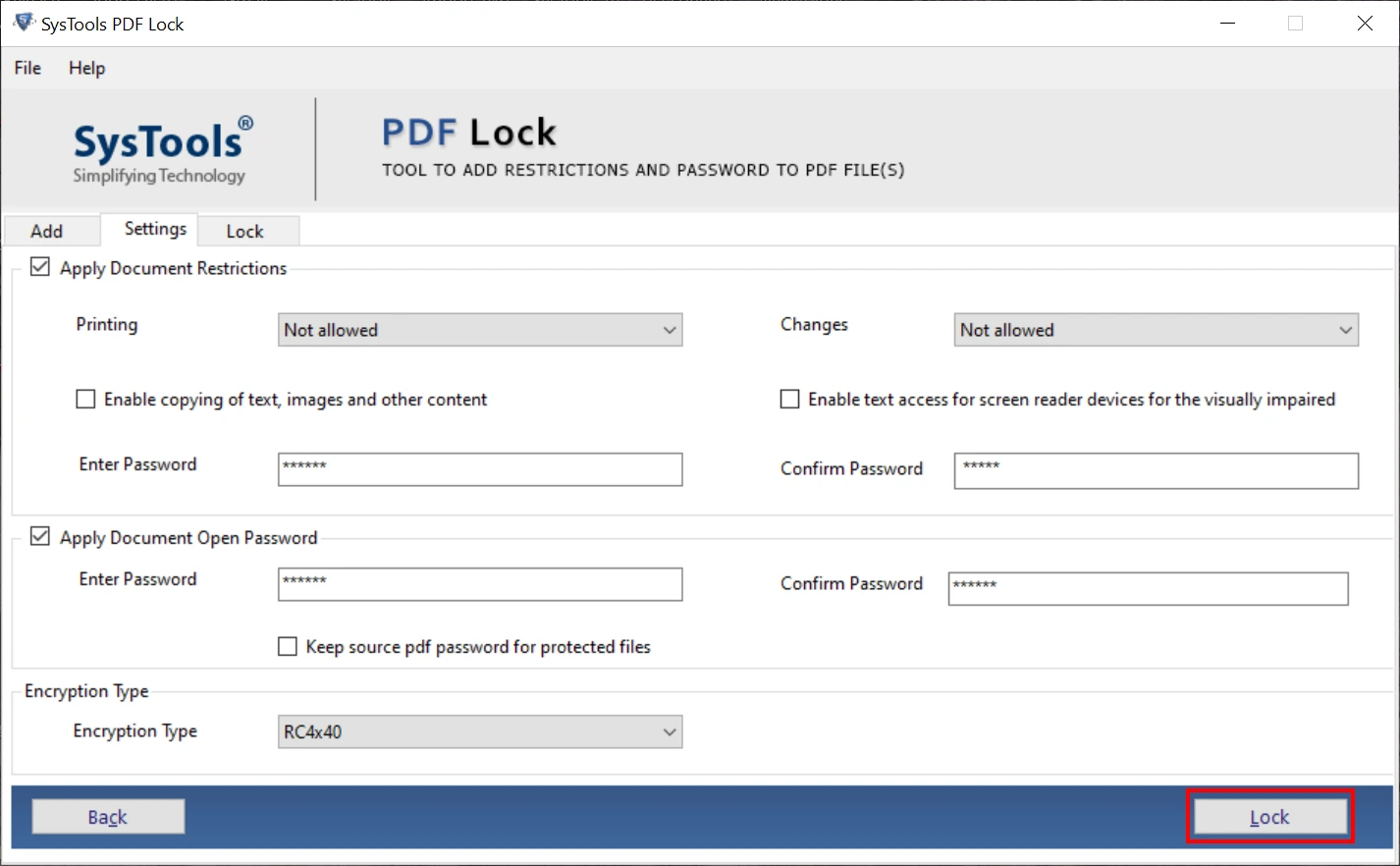
- Finally, use the Lock button to enable PDF encryption.
Bonus Tip: If you want to change security settings in PDF, you can use other reliable software named PDF Unlocker. Using this tool, owners can bypass or remove all types of encryption modes.
Final Words
In the above guide, we have precisely explained what is PDF encryption and how it works. Using this protection, professionals can share the confidential document via mail or other platforms without fear of any loss. Besides this, we have listed the best techniques to apply major modes of file encryption securely or ethically.