How to Unlock Payslip PDF (With or Without Password)?


Payslips are a financial snapshot of an employee; they are a detailed document of an employee’s salary issued by an employer. It mainly includes taxes, deductions, and other benefits. Moreover, it is used as proof of income when applying for a loan or paying taxes. But these payslips are often protected, preventing direct access. Here, you might seek for how to unlock payslip PDF to gain accessibility when sharing the salary slip with HRs, banks, etc.
This guide covers everything related to salary slips, protection, and methods to remove permissions password from PDF file. So, let’s walk through each segment.
Overview of Employee Payslip and Protection
An employee’s payslip or salary PDF is considered the official document that contains a brief breakdown of salary or deductions for a particular financial year. In other words, it includes earnings, taxes, increments, bonuses, deductions, and the employee’s net salary. Moreover, it is proof of income that brings transparency between employee and employer.
These payslips are available as a physical copy or an e-payslip when sharing with the employee. Beyond gross salary or earnings, it contains other information, like:
- Candidate/ Employee Name
- Employee ID
- Designation
- Department
- Joining Date
- Salary Breakdown
This way, employees can easily understand or calculate their gross income. In many organizations, e-payslips are protected when shared via email or other platforms. With this, employees ensure data security and privacy of their payroll. Now, let’s learn more about it.
Why is My Payslip Password Protected?
Many professionals or employees are unaware of password protection on salary slips. This may result in frustration or chaos when managing or sharing the income records. On platforms like Reddit, various employees have raised queries, such as “Why is my payslip protected?”:
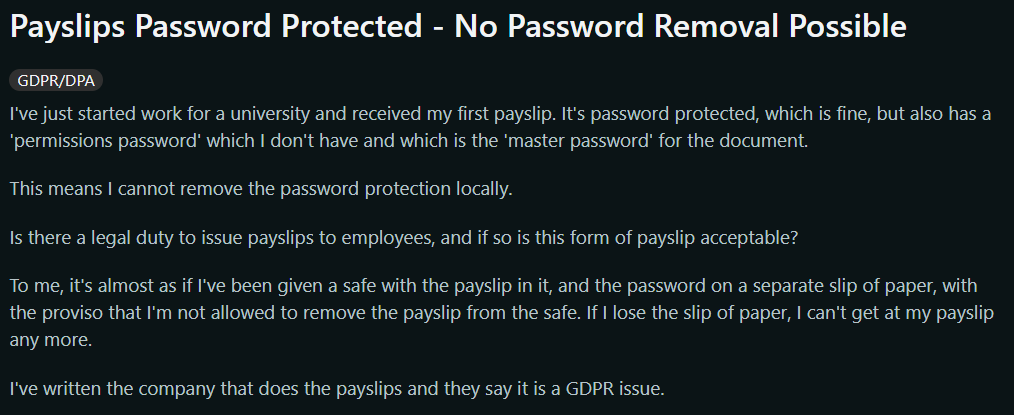
Today, organizations or companies extensively understand the sensitivity of salary slips. Since these PDFs contain employees’ personal information, it is essential to apply security to prevent unauthorized viewing or access. Below are the other reasons for protecting the payslips:
- Secure Financial Records: The salary slip provides detailed insights related to employee ID, taxes, bank details, earnings, and more. Tampering with this confidential information results in fraud or misuse of employee data. Hence, it is necessary to enable protection on e-payslips.
- Meet with Data Compliance Standards: Modern companies or organizations need to adhere data protection standards or laws, like HIPAA, GDPR (General Data Protection Regulation), and other Employee Privacy Policies. To meet these standards, the HR department or companies need to apply protection to employee records.
- Prevent Tampering with Salary Slip: Data protection is another reason to apply protection on the employee’s payslip. Moreover, unauthorized users can modify the original payroll. Therefore, companies use PDF Locker tools to make the protected payslip PDF.
Overall, these are the reasons why the salary slips are secured. This way, the employee data or payroll records stay protected and meet the data regulations. Now, let’s move on to learn the common reasons for unlocking the payslip PDF.
Common Reasons to Unlock Payslip PDF Document
Previously, we have listed the common reasons for protecting the employee’s salary slip. But, managing the locked payslip becomes a tedious task, especially when sharing records with HRs, banks, and other official organizations. Below are the reasons why professionals or employees seek to remove password from salary slip PDF:
- Making Copies of e-Payslip: Many professionals address the issue when printing the protected payslip. There are various situations where you need to share the printed copy of the salary slip with banks, applying for a home loan, income tax filing, and more. Hence, you need to unlock the income record for free access.
- Losing Password: “Forgot PDF passoword” is the common fear among employees. Moreover, the poor management of income statement credentials results in loss or being unable to open a salary slip. These passwords are complex, making it difficult to remember each time you open a payslip. Therefore, removing protection from the salary document allows instant access.
- Updating the Employee Details: There are several situations where HRs need to update the income or other details of an employee. Here, protection causes a barrier. Removing the password from the payslip allows the HR department to easily access or modify the records without entering the credentials every time.
In summary, the removal of payslip protection is legitimate under various circumstances. Before jumping into the methods, let’s first understand the password for the payroll statements.
What is the Password for My Payslip?
Today, most companies protect the salary slip PDF. While accessing or opening the payslip, it may ask for the correct password. Moreover, it offers inconvenience when you’re unaware about the password protection on the payslip or salary statement. Here, you need to contact the employee, especially the HR department.
The HR department mainly creates passwords for your payslip based on ID, name, bank, etc. Here is the breakdown of payslip password:
- DOB Password: Try the credential based on the date of birth, such as YYYYMMDD.
- Employee Name and ID: Some passwords are based on employee name and ID. For example, Rakesh (Name) & ID (20000789)- Rak2000
- Combination of Pan & Contact Number: Another password based on a pattern of your first 4 digits of Pan number + Contact number.
The other password combination includes Name + DOB, Joining Date, or company-generated custom passwords. Moreover, if you’re unable to open the protected payroll statement with the above patterns, reach out to the HR department. Now, let’s walk through the methods for unlocking the payslip PDF.
How to Unlock Payslip PDF – 4 Effective Methods (Free & Advanced Tools)
In the following section, we will list the practical techniques to remove password from salary slip PDF. It includes simple to advanced methods for unlocking the payroll statement. With this, you can access, open, or share the unprotected payslip with anyone. Here are the ways to remove salary slip password:
- Free Online PDF Tools
- Adobe Acrobat Pro Software
- Try Web Browser
- Dedicated Utility – The Expert Recommended
Now, let’s understand these practical solutions.
#1 How to Remove Password from Salary Slip PDF Online – Try Free Online PDF Websites
Many free online tools are available to unlock payslip PDF statement. These websites are completely web-based solutions and don’t require the installation of any offline tool. Without any file limitations, professionals can remove protection from an income document.
Whether it is user or owner-level security, these websites can easily handle batch unlocking of salary slips. Now, follow the stepwise guide to remove password from payslip using online tools:
- Visit any free online PDF website on any device.
- Drag or drop the payslip PDF statement in the dashboard.
- Enter the respective salary slip password combination.
- Finally, press the Start or Unlock button to access the payroll PDF instantly.
Limitations of Online Tools: Free websites aren’t trustworthy due to security risks. Since the payslip has confidential information related to the employee. It is essential to upload the document to offline and reliable platforms.
#2 Unlock Payslip PDF with Adobe Acrobat (Paid Tool)
Many professionals search for how to remove password from salary slip PDF securely, try the Adobe Acrobat Pro utility. It is a reliable and offline solution to bypass payroll statement protection with ease. This way, you can open or share the passwordless or unprotected payslip PDF. During the process, it keeps the original structure of the salary PDF document. Below are the steps on how to unlock payslip PDF using Adobe:
- Open the salary slip PDF with Adobe Acrobat Pro software.
- Use the Tools and then, Encrypt > tab Remove Security.
- Provide the password (i.e., payslip credentials) > press OK.
- Finally, download the unprotected payslip PDF file.
Drawbacks of Adobe Acrobat: The tool is based on a subscription plan or has a high cost. Individual professionals are unable to bear the pricing structure. Hence, it is recommended to use the other alternative of the Acrobat software.
#3 How to Save Payslip without Password Using Web Browser
If you’re searching for a reliable way to remove password from payslip PDF, use a web browser. It is another way to save a password-protected salary slip without a password. Remember, this method only works on basic protection. Here, you can use any web browser, such as Chrome, Edge, etc, for removing the protection from payslip statement. Now, follow the quick steps to open payslip PDF without password using Chrome:
- Open the payslip PDF with Chrome.
- Enter the credentials and open it.
- Press Ctrl + P for Windows and then, look for the Print menu.
- After this, use Save as PDF and download the file without a password.
- This isn’t the dedicated way to remove protection from payslip PDF file.
- The method won’t support a highly encrypted salary slip and may cause formatting issues or data loss.
- Sometimes, uploading the large-sized payslip PDF causes an error. Hence, it is suggested to use other offline tools.
#4 How to Remove Password from Salary Slip PDF – Automated Tool (Recommended)
To unlock payslip PDF, use FreeViewer PDF Unlocker software. This is an ultimate, professional-grade offline utility designed for Windows and macOS. Using the tool, you can ensure ethical removal of protection from the salary PDF file. Whether it is a password or restrictions, the tool allows unlocking of the payslip statement in batch mode.
Additionally, it is based on a one-time pricing structure, making it cost-effective for all. Since HR departments or companies need to follow the data protection standards. Luckily, this software meets all the necessary policies and secures the content during the removal. Most importantly, the process is offline, hence data remains locally on your system. So, try this Adobe & cloud-free method. Now, follow the working steps.
Fastest Way to Unlock Payroll PDF Statement
- Download and start the above-mentioned utility on your machine.

- Go to “Add Files or Folders” to upload the salary slip PDF.

- Enter the combination password under the password section.

- Navigate to Save and click on Change to find the location for the output file.
- Finally, use the Unlock button to remove password from payslip PDF.
How to Open Payslip Without Password?
There are various situations where professionals forget their pay slip credentials. Here, you might seek how to open or unlock payslip without password. Firstly, ask the HR department for the respective password of the salary slip if it is not found. Try the PDF Password Recovery Tool by FreeViewer, the powerful and most reliable solution for accessing the password if lost. This software has advanced modes, i.e., Brute Force or Mask Attack to get the lost paslip password.
With this, you can get the exact credentials in seconds. Below are the detailed steps to follow:
- Open the aforementioned utility on your Windows or macOS.

- Navigate to Browse to open the salary slip PDF file.

- In the section of Recovery Mode > tab, Brute Force.

- Finally, hit Recover to get the payroll password.
- After this, you can use a dedicated tool to unlock the payslip.
Concluding Words!
In the above detailed guide, we have listed 4 ways on how to unlock payslip PDF. Using any of these methods, you can get an unprotected salary slip document. Among all the solutions, the automated tool is highly recommended for safety and compliance. With this, you can batch unlock payslips in seconds. Hence, you can share the unprotected payroll PDF for loan applications or other purposes.
FAQs on How to Unlock Payslip PDF
Q. Can I unlock my salary slip PDF?
To remove password from payslip, download the offline professional software recommended by FreeViewer. This is a reliable and cost-effective utility for Windows or macOS machines. Using this utility, employees can effortlessly remove the protection from the salary slip in batch mode. Additionally, the tool can bypass all types of protection without affecting formatting. With this, you can access the unprotected payslip for quick submission and sharing.
Q. How can I save payslip without password?
If you’re wondering to open or save payslip without password, try the automated tool. Using the software, you can instantly remove security from the salary slip and download it without a password. With this, you can save the unprotected payroll slip without formatting and other issues.
Q. Why is my payslip password protected?
There are several reasons behind protecting the payslip. Since an employee’s payslip contains confidential information, financial statements, and earnings. Therefore, companies and HRs share the payslip statement with major password protection. However, you can use offline tools to unlock payslip PDF document with ease.