How to Unlock MS Access Database (MDB & ACCDB) Files?


Technology is growing rapidly, and working professionals use MS Access programs to create and manage databases. These MDB & ACCDB files store important data such as tables, queries, forms, reports, and other database objects. But what will happen if you forget the password and search for a solution to unlock the file security restrictions?
Unfortunately, after forgetting the password, you can’t unlock MS Access database (MDB & ACCDB) files. In this article, we’ll walk you through different solutions to open a locked Access database effortlessly. Using these methods, users can easily regain access to their password-protected database files. Now, let’s start with further discussions.
Table of Contents – Easy to Find
Quick Steps to Unlock MS Access Database
- Download & run the MS Access MDB Password Recovery tool.
- Browse & upload the database (MDB/ACCDB) files in the software.
- Choose the recover or reset option, whichever you need to select.
- Click on the Ok button to complete the process.
- Lastly, copy the Password to unlock Access database files.
Common Challenges in Unlocking Access Database Password
An Access database file is the best format for storing and managing data. At the same time, password protection is important for keeping crucial data safe & secure. It also introduces various difficulties when users urgently need to recover or remove passwords. These challenges make unlocking more complex for users to open the MDB & ACCDB files. Here are some challenges mentioned below:
- Strong Password & Case Sensitive
In many situations, even small differences in letters can block access, and guessing passwords is impossible. Many users create strong passwords for enhanced security. This makes the recovery process problematic if the password is misplaced or forgotten.
- Risk of Data Loss
Many users attempt to remove a password using various unreliable methods, which can lead to data loss and file corruption. Since Access databases are file-based, even a small amount of corruption can render tables, queries, or the data stored in the file.
- Legal & Ethical Considerations
It is essential to have legal access to the file. Several users try to open files without access, violating data privacy laws. So, before attempting to remove or recover a password, users’ password files should be backed up.
How to Unlock MS Access Database Password? 2 Best Ways
Manual Techniques to Unlock Access Database Password
You can use manual methods to unlock MS Access database ACCDB and MDB files within a few steps. However, manual methods have some drawbacks, but we will discuss them after providing the solution. The manual method simply unlocks an Access database without third-party tools. These techniques are usually suitable for older access versions or simple passwords. So, follow the steps mentioned below:
#1 Method: Unlock ACCDB Password
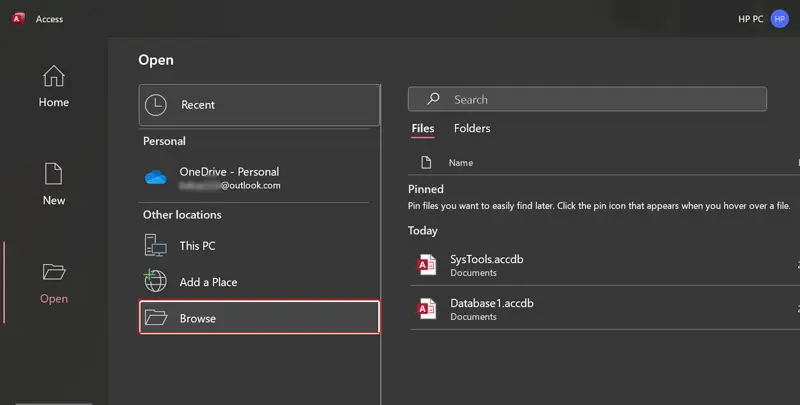
- Run the MS Access application and choose the Open >> Browse option.
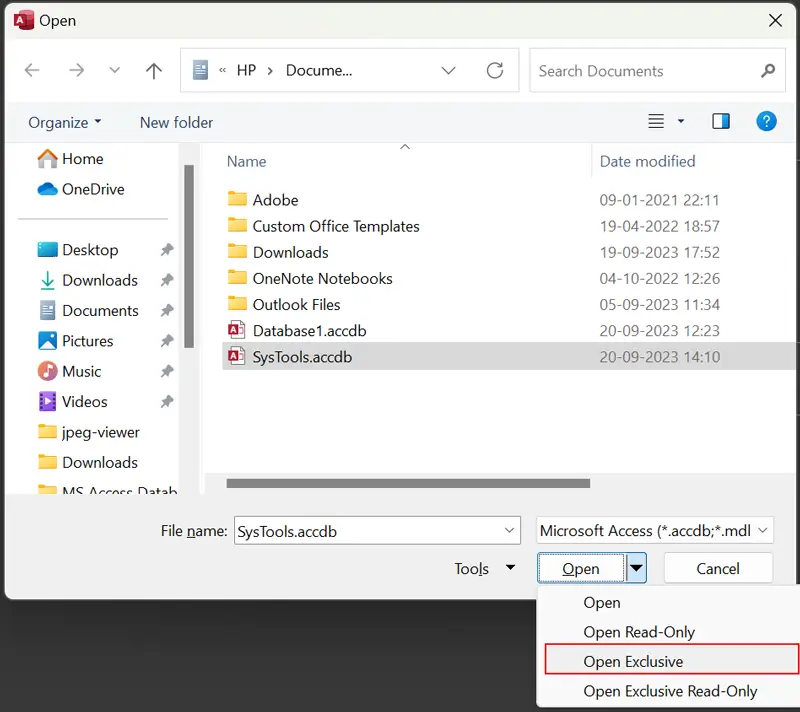
- Select the ACCDB database and open it using Open Exclusive mode.
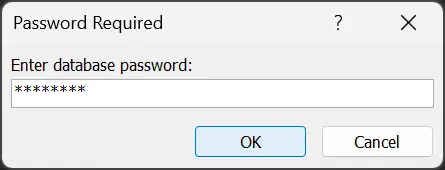
- Type a current password of MS Access ACCBD database.
- See ACCDB file data in the MS Access program.
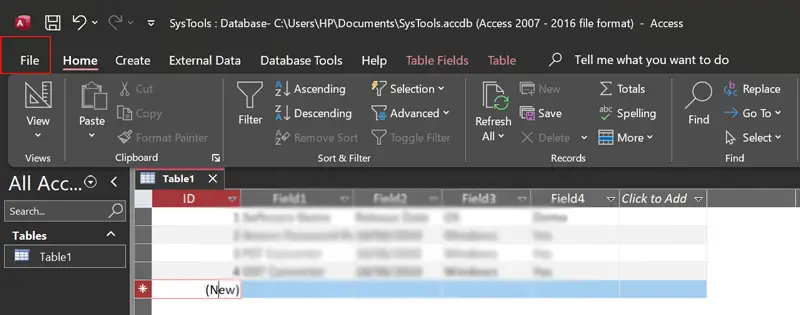
- Choose File >> Info >> Decrypt Database option.
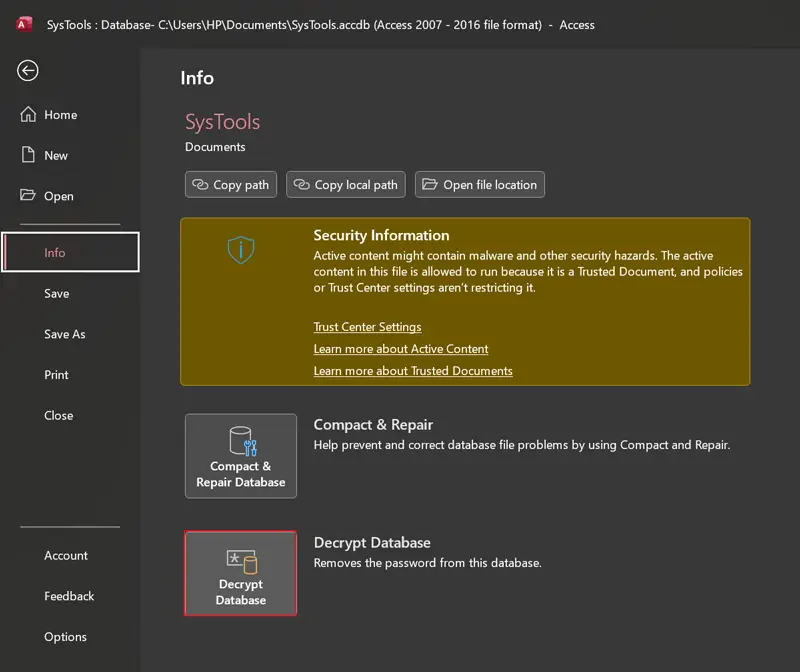
- Enter the MS Access ACCDB database password again.
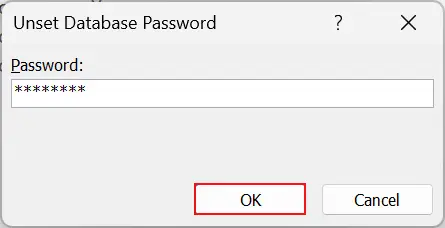
- Hit the OK button to unlock Access ACCDB database.
#2 Method: Unlock MDB File
- Start Microsoft Access and select the Open >> Browse button.
- Select MS Access MDB database and Open.
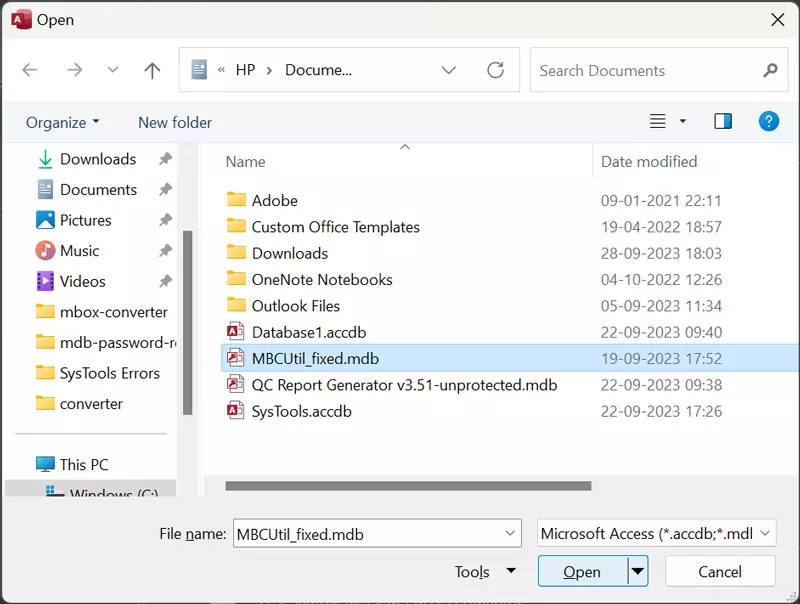
- Fill in the exact password to unlock MDB database and click OK.
- See MDB database information in the MS Access program.
Drawbacks of Manual Solutions
- These manual methods do not allow users to recover forgotten MS Access database passwords. However, this solution is quick and fast.
- Sometimes users try to unlock Access database for editing and receive a pop-up message, i.e., Not a valid password. You receive this error message when trying to access MDB database using the wrong password.
- These solutions do not unlock full access and permit you to unlock files one by one. Hence, these techniques are not useful for business and enterprise.
- If the user is not experienced, attempting manual unlocking methods may increase the chance of data loss or damage the database files.
Read Also: Tips and Tricks to Decode Access Database
Pro Method to Unlock MS Access Database (MDB & ACCDB ) Files
Many solutions are available over the internet to unlock database files. But when users need a reliable and secure way, they start looking for the best solution. Use the FreeViewer recommended solution for unlocking Access database passwords effortlessly. With the help of this software, you can quickly unlock full access to both MDB & ACCDB files.
This has come up with enriched features and instantly unlocks any kind of password-protected, such as lengthy, complex, ANSI, Unicode, and many more. However, using this advanced tool, you can also change Access database password within a few clicks. Moreover, you can download and utilize the software with any MS Access version.
How to Unlock Microsoft Access Database Password?
- Download & install the software on your system.
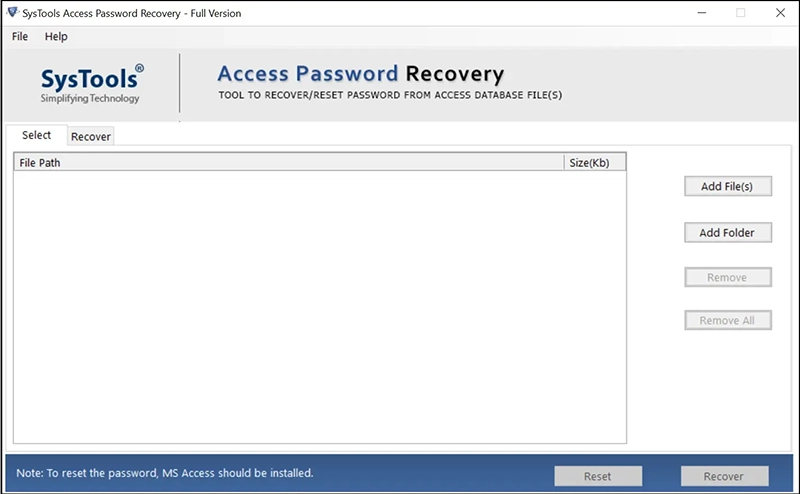
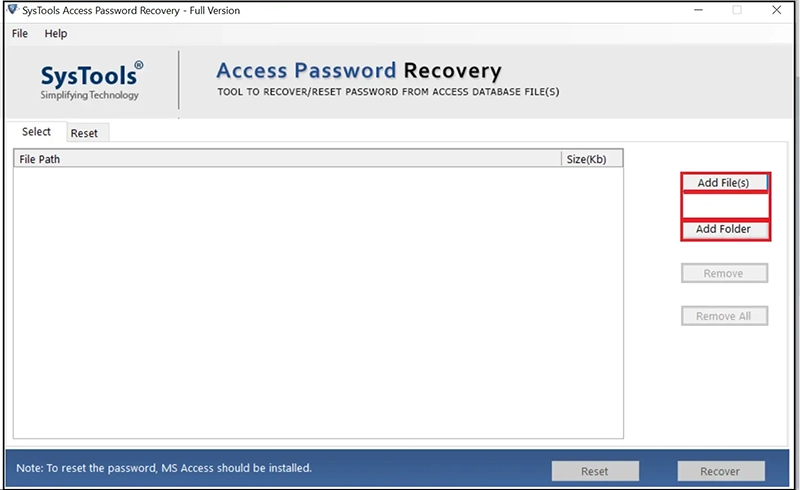
- Use the Add File(s) or Add Folder button for adding MDB databases.
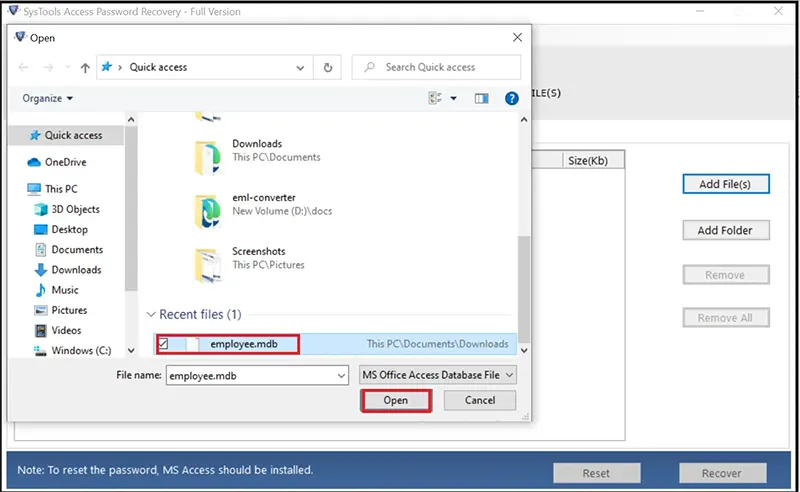
- Browse Access MDB databases and click Open to add them in GUI.
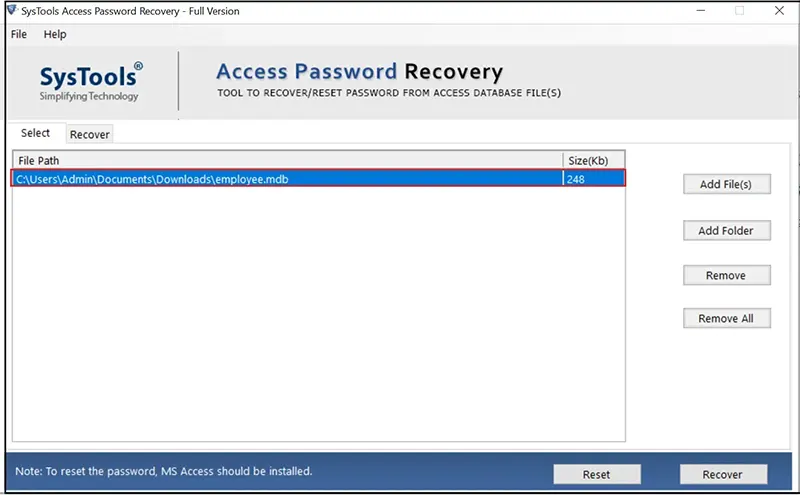
- Now you can view MDB databases in the software panel and select required.
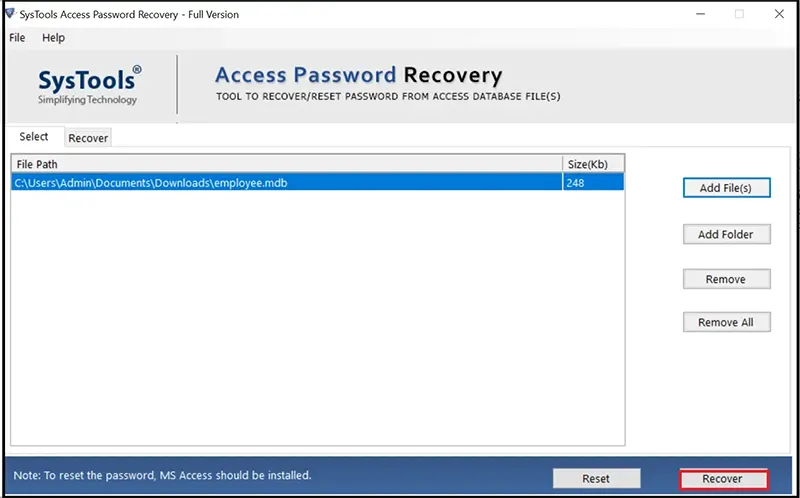
- Click the Recover button to unlock MDB password.
- See MS Access MDB database password unlocked successfully.
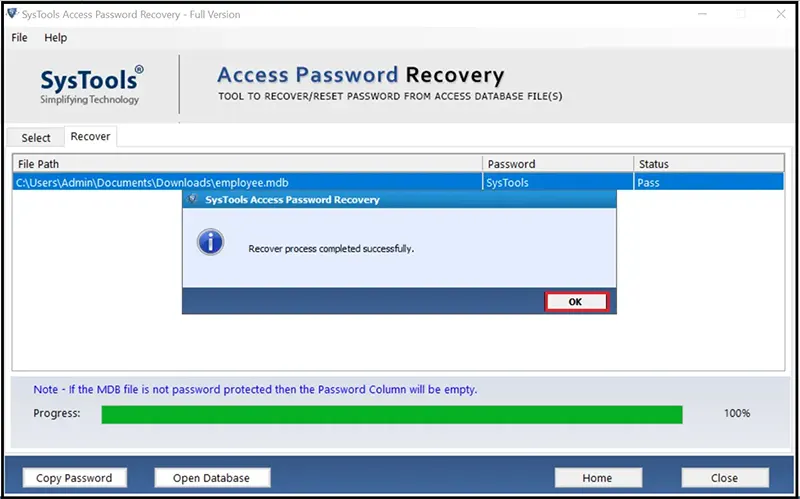
- Hit on the Copy Password button and copy its exact forgotten password.
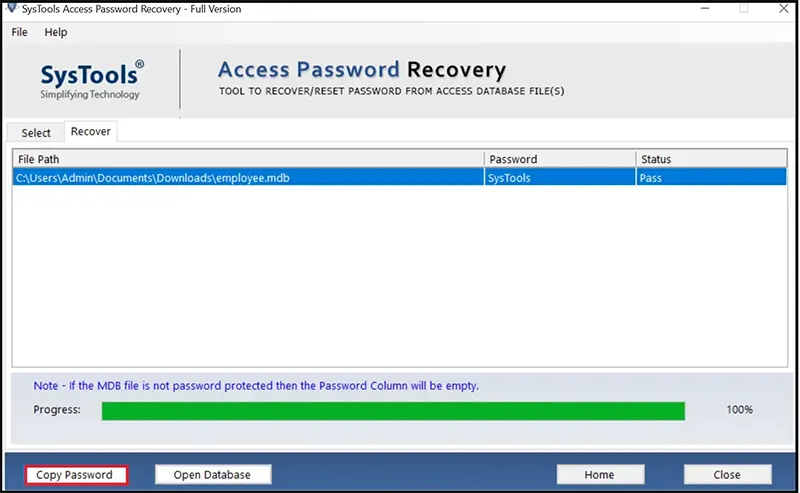
- Use the copied password to unlock MDB file of Microsoft Access.
Conclusion
Most of you are eager to know about the best techniques to unlock MS Access database MDB and ACCDB files. So, just go through this complete blog. Above, we have discussed different approaches to resolve this issue instantly. Mainly, we have emphasized the manual and automated methods to unlock MDB and ACCDB database files. But the free solutions always come with some limitations, so we recommend you choose a professional tool to make the process effortless. So, choose the method that suits your needs and preferences.
Frequently Asked Questions
Q 1: Why use software to unlock the MS Access database?
A: This is advisable to use software in the following cases:
- Sometimes users forget their passwords and want to unlock MDB files.
- Software is beneficial for batch unlocking Access database for editing.
Q 2: Does the manual method allow to unlock ACCDB and MDB databases?
A: Yes, the manual is capable of unlocking ACCDB and MDB databases.
Q 3: Can I unlock multiple Access databases using manual methods?
A: Yes, you can go with manual ways to unlock unlimited Access databases one by one. You must enter the exact password also.