How to Protect PDF from Sharing? Complete Guide


Once you share the PDF, anyone can forward or distribute its contents without your consent. This highlights the need to enable protection for the PDF document. In the following guide, we will share the effective methods on how to protect PDF from sharing and prevent direct access. With this, only legitimate viewers can access the document – no sharing or forwarding of sensitive information. So, let’s move to learn the methods.
Fastest Way to Protect PDF from Being Shared
- To prevent PDF file sharing, install the FreeViewer PDF Password Protector Tool on your system.
- Use Add Files or Folders to import the necessary PDF files.
- After this, use the Change button to browse the path for the resultant file > hit Next.
- Go to Apply Document Restriction > enable all the protections.
- After this, choose “Apply Document Open Password“, create a strong password, and finally, use the Lock button.
What Does “Locking PDF from Sharing” Mean?
Locking a PDF document from sharing or distribution simply means safeguarding data from unauthorized forwarding, which could lead to compromise. Without security, people can review, download and even distribute confidential data.
To limit document usage, it is necessary to apply sharing protection to the PDF document. It further allows users to protect PDF from printing and other actions. Overall, the sharing protection is another type of PDF encryption, applied by the owners to safeguard content from redistribution.
Why Protect PDF File from Sharing? Common Reasons
There are several reasons for locking a PDF document from sharing, forwarding, and redistributing. It prevents viewers from modifying or sharing the information with other unwanted individuals or wrongdoers. Below are the potential benefits of applying a share restriction to a PDF document.
- Personal & Business Requirements: Whether it’s personal or business documents, such as contract papers, bank or financial statements, Form 16, and more, require protection. Sharing them unprotected leads to unwanted redistribution and data theft.
- Prevent Modification: Another reason for controlling the readers’ activities is to prevent document changes and modifications. Hence, it is necessary to lock PDF from editing and sharing to ensure data protection and to allow viewers to review the information only.
- Reduce Document Leaks: Without sharing restrictions, anyone can make copies of sensitive files, resulting in leaks. To prevent these circumstances, it is essential to protect the PDF from being shared, forwarded, or redistributed at once.
Overall, these are the benefits of using share protection on a PDF document. It allows users to safeguard the information from misuse and unwanted forwarding. Now, let’s understand the methods.
How to Protect PDF from Sharing – 4 Effective Ways
If you’re wondering how to prevent PDF sharing, below are the detailed methods for securing the document from being shared or forwarded. It includes both online and practical methods to stop readers from data theft. These solutions are ideal for professionals, individuals, working professionals, etc.
Here’s how to prevent someone from sharing a PDF:
- Expert Solution (Recommended)
- Use DRM Protection
- Convert into Image Format
- Adobe PDF Acrobat Tool
Now, let’s learn all the methods.
#1 How to Prevent PDF Sharing – Expert Solution
To protect PDF file from being shared, use the automated tool recommended by FreeViewer. This is an offline utility, designed for Windows or macOS. Using the software, you can apply different types of protection to limit document sharing or forwarding. The tool supports users and owner protection along with intelligent encryption. Using all these protections allows you to reduce document sharing or forwarding. Here’s the prime feature of the utility:
- Protect PDF from sharing with User & Owner Permissions.
- Control viewer actions, such as text copying, printing, editing, form filling, etc.
- Support the protection of documents from sharing in batch mode.
- Secure embedded rich media, formatting, layout, and other metadata during the process.
- No file upload; completely offline and Adobe-free solution with 24*7 live chat support.
- Download the utility on your Windows or macOS system with ease.
Guide to Protect PDF from Sharing
- Download the above listed software on your system.
- Use “Add Files or Folders” to upload necessary documents.
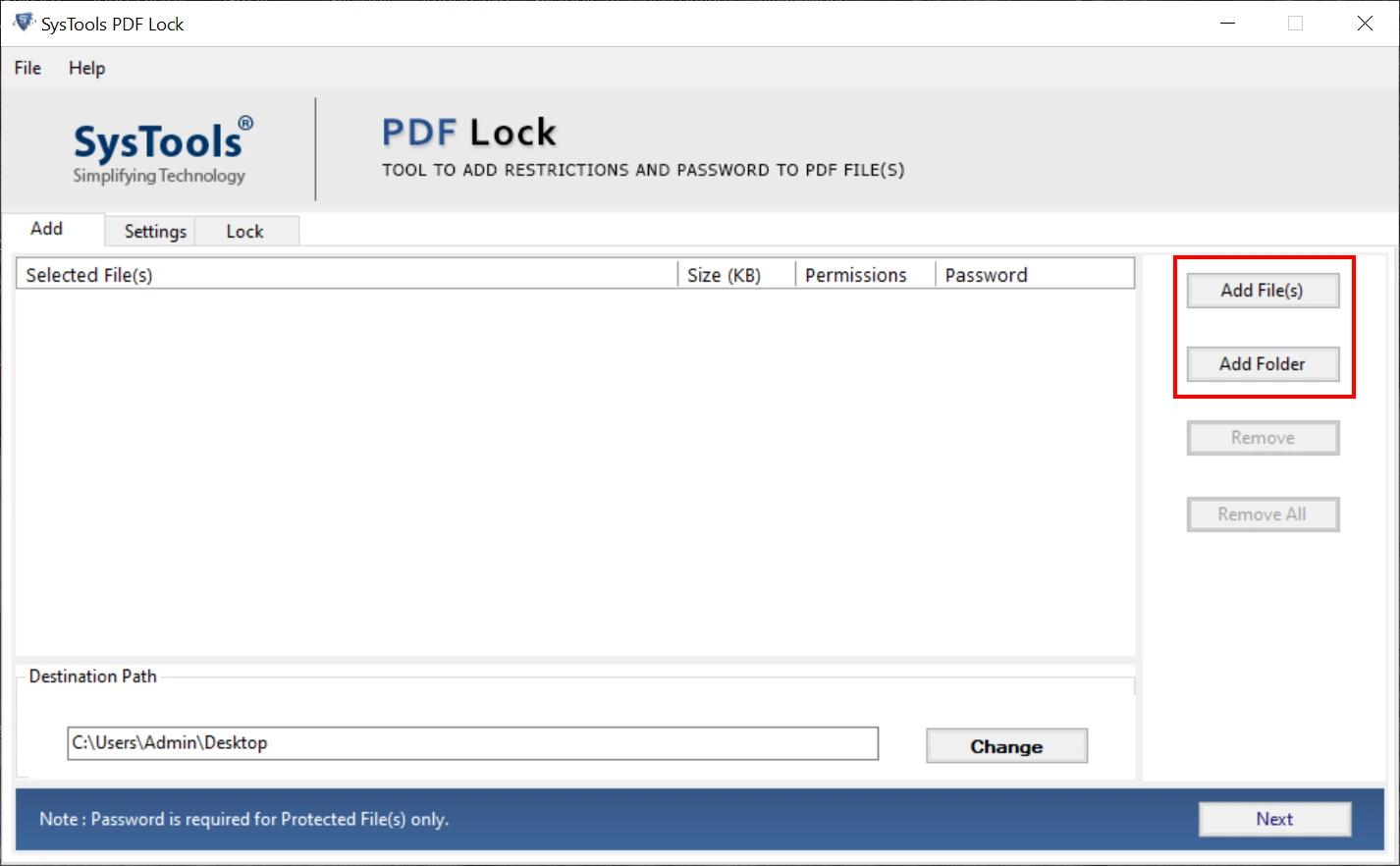
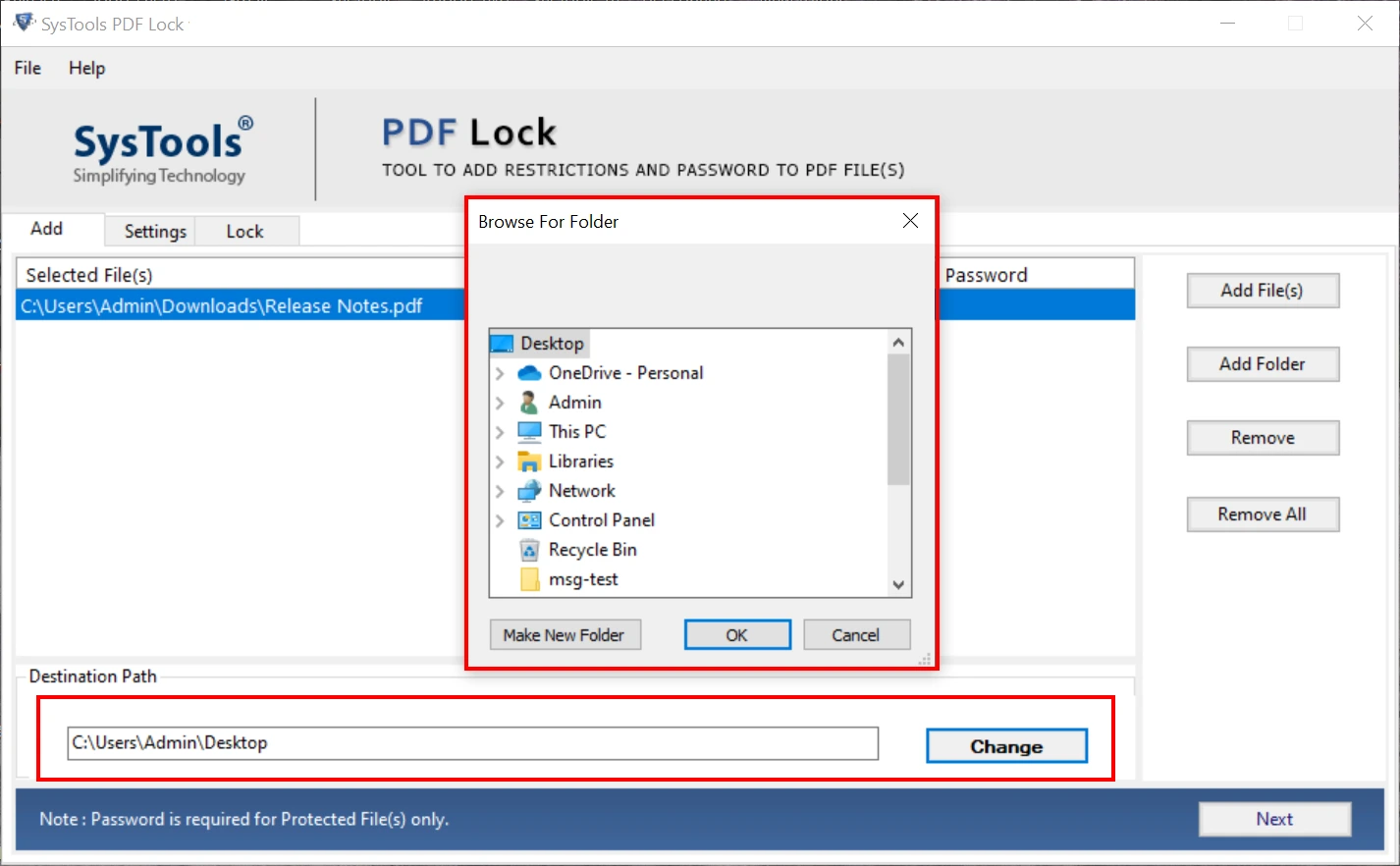
- Navigate to Change to browse the destination folder > hit the Next button.
- Go to Apply Open Document Password > create the credentials.
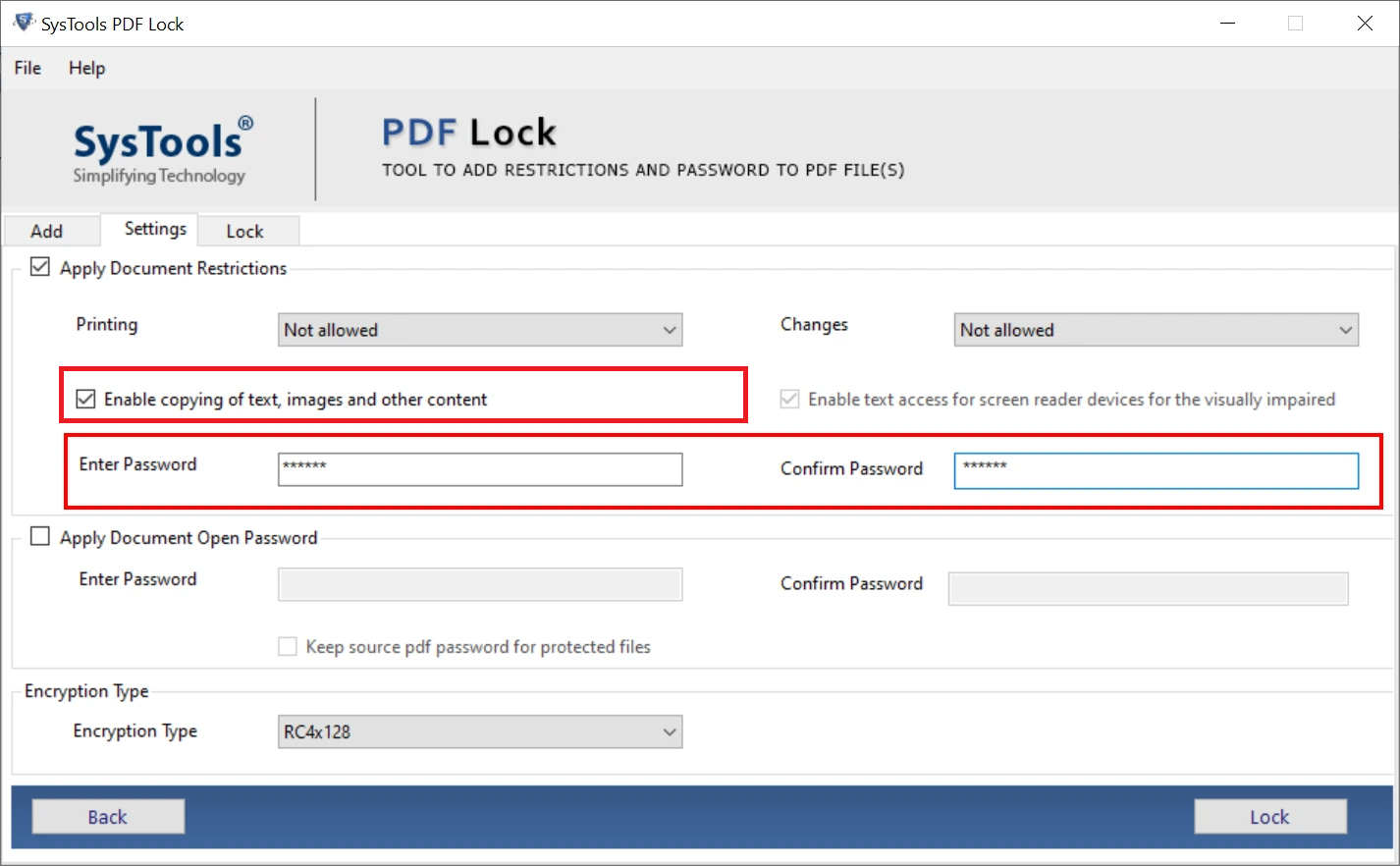
- Enable encryption, such as AES 256 > hit the Lock button.
#2 Try DRM Protection to Protect PDF from Being Shared
To experience the advanced document protection, use DRM or Digital Rights Management security. It is a powerful way of applying sharing protection to a PDF document. This way, no one can share your confidential file without consent.
In other words, DRM protection allows owners to control viewing, accessing, sharing, and other actions. Moreover, the core functions of DRM tools include device-based protection, print security, expiration dates, document monitoring, and time-based access controls. Below are the steps to use:
- Search for DRM tools and upload PDF into it.
- Put in the necessary protection to block PDF sharing.
- Finally, save the document.
Limitations of DRM Tools: The DRM services are highly expensive, mainly based on licensing. These tools aren’t recommended due to cost and complicated features.
#3 How to Protect PDF File from Sharing – Convert into Image
Converting into image is another way to prevent PDF sharing and redistribution. Remember, readers can make copies of the document, but can’t highlight or select the content. Below are the steps on how to prevent someone from sharing a PDF file:
- Open the document on your PC.
- Navigate to the File function and then, Print.
- After this, use Microsoft Print to PDF > go to Properties.
- Now, pick Print as Image > save the new document.
Drawbacks of the Above Method:
- This is not a dedicated solution to prevent PDF sharing.
- It lets users distribute the document while limiting copying and highlighting.
#4 How to Protect PDF from Being Shared – Adobe Acrobat Utility
If you’re wondering how to prevent PDF sharing or forwarding, you can use the advanced Adobe Acrobat utility. It is a reliable way of protecting the document from sharing while using user and owner protection. Moreover, the process is secure and maintains file formatting. Now, follow the stepwise guide to block PDF sharing:
- Open the required PDF with Adobe Acrobat.
- Use File and then, navigate to Tools > look for Protect.
- After this, use Encrypt using Password > make a strong credential.
- Finally, press OK and save the PDF to prevent sharing.
Limitations of Adobe: This is a premium tool, based on an expensive license. Hence, it is not suggested for occasional or individual professionals. So, look for other solutions mentioned earlier.
Final Words
In the above guide, we have listed 4 ways on how to protect PDF from sharing and forwarding. Using these methods, you can effortlessly prevent the document from being tampered with and lost during sharing. Among all the techniques, the automated software is secure and trustworthy for all. With this, users can ensure data security and control file access.