Facing Entry Point Not Found Error in Outlook? Here’s 4 Ways to Troubleshoot


In today’s era Microsoft Outlook is the most famous email applications and it manages the data properly. To fix the various Outlook errors, it provides a free inbuilt utility that is ScanPST.exe. Sometimes, when users try to run ScanPST to repair any corrupt data, it fails to start and displays an error message, ScanPST.exe – Entry Point Not Found. It can be turned into the worst situation, because it may give additional issues. Therefore, in this article, we will share 4 ways you can tackle the Outlook error: Entry Point Not Found.
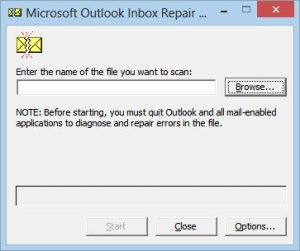
Why Does “Entry Point Not Found” Error Occurrs in MS Outlook?
Before moving towards the reason behind this error first know what exactly this error. Whenever an error occurred while repairing the damaged data file of MS Outlook, ScanPST.exe tool stop to work. Most of the time it occurs due “SCNPST32.dll”, which is a part of broken scanpst.exe files. Therefore, this ScanPST.exe error encountered due to,
- A missing or broken SCNPST32.dll file
- Corruption of Outlook application
- Incomplete installation of MS Outlook
- Oversized PST file
These are some major but genuine reason, and nobody can avoid this issues. Therefore, the upcoming section will discuss all possible solution to troubleshoot the error.
How to Resolve Entry Point Not Found Error?
A user can opt multiple solutions to fix the error. These solutions are as follows:
- Reinstall MS Office
- Run ScanPST from Correct Location
- Run the System File Checker (SFC)
- Use the Expert-Favorite ScanPST alternative
Now, in the upcoming segments of the article, we will further explain each of these methods in detail.
Reinstall Microsoft Office Properly
- First of all close both Inbox Repair Tool as well as MS Outlook
- Go to Start then >> choose Control Panel >> Uninstall Programs option
- Select MS Office from the interface ‘Uninstall or change a program’ and click on Change
- A popup window will display, select “Repair” option and then click on “Continue” button.
- Now, reinstall Microsoft Outlook.
- After performing the above steps, launch ScanPST to repair corrupted Outlook file again.
- If the error has not removed then it will show that MS Office repairing did not work out.
- Therefore, again re-install Office still in the “Uninstall or change a program” window.
- After executing these steps, check whether the error was fixed or not.
Run ScanPST from the Correct Location
Oftentimes, the major reason for the entry point error is when the ScanPST.exe tool is run from the incorrect location or when some required files are not at place or missing. Therefore, make sure that you launch the Inbox Repair Tool from its original directory in orderto resolve this issue. We have mentioend typical ScanPST locations below.
C:\Program Files\Microsoft Office\Office16OR
C:\Program Files (x86)\Microsoft Office\Office16
Now, naigate to the correct folder and launch ScanPST.exe tool directly from there.
Run the System File Checker (SFC)
Windows offers System File Checker (SFC), an in-built tool to scan and repair corrupted system files. Using this tool can help you restore the missing DLL files that may be causing the entry point error. Here are the steps to run SFC:
- Firstly, open the Command Prompt as the Administrator.
- Then, type in the command: sfc /scannow
- After that, press Enter.
- Once done, wait for the scan to complete.
If the scan procedure detects any corrupted or damaged files then, Windows will automatically repair them.
Professional Approach to Fix Entry Point Not Found Error
If the above mentioned manual solutions fail to remove the error then, proceed with an expert-suggested automated solution aka Outlook PST Repair Tool. The utility is safe, secure, and reliable to repair the corrupted Outlook data file.
For Windows
For Mac
Summing Up
In the above article, we have discussed different approaches to troubleshoot the error issue i.e., ScanPST.exe – Entry Point Not Found. Choose either of the solutions provided in the draft. However, for a reliable and secure approach, experts suggest you opt for the automated solution.