Outlook PST File Is In Use and Cannot Be Accessed. Close Any Application That Is Using This File: Error Resolved


Overview:- In this article, we will discuss why you face the error: “outlook pst is in use and cannot be accessed. Close any application that is using this file”. We will discuss the top solutions to fix the error including both manual and automated. Additionally, you will learn the most common reasons why this error happens. So without any delay, let’s get started with the blog post.
Microsoft Outlook saves all information of Outlook in its data files named PST and OST files. In the very beginning when we configured an MS Outlook account with a POP or IMAP email account a default PST file was created automatically at a hidden file location. You can customize the file location and save those files anywhere in your choice of location at the time of configuring the email account.
All databases of Outlook such as email, calendars, contacts, tasks, notes, and everything stored on the PST files. So PST file is an essential part of Outlook and a very useful file for the users for the proper functioning of Outlook and users too. In this article, we will describe “Outlook.pst is in use and cannot be accessed. Close any application” error and its solution.
Sometimes users of MS Outlook may face crashing problems when they try to start Outlook, there is a wide range of errors related to this problem but the most common issue which users face most of the time is:
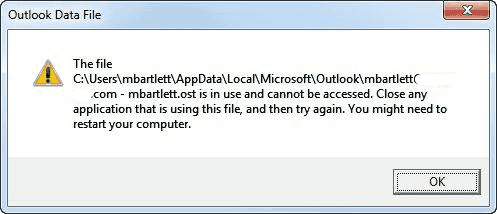
“Can not open your default e-mail folders. The file C:\Users\admin\Documents\Outlook Files\outlook.pst is in use and cannot be accessed. Close any application that is using the file, and then try again. You might need to restart your computer.”
or
“The File C:\Users\admin\Documents\Outlook Files\outlook.pst is in use by another application. Close Microsoft Exchange and all other mail-enabled applications and try again.”
Reasons Why Outlook.pst May Be In Use and Cannot be Accessed
In this segment, we are focusing on the main causes of the .pst file being in use and access error.
- If Outlook hasn’t closed properly this may cause outlook.exe to run in the background as a process.
- When a user performs a backup of their large PST file due to its large size it still runs in the background and takes a large amount of time to complete.
- Due to the conflicting software i.e. integrated with Outlook applications like Lync, Communicator or Ucmapi.exe.
- Outlook PST file corruption keeps popping up due to virus attack or oversized PST file size.
- Sometimes anti-virus and anti-spyware programs also lead to damage to the PST file. While scanning the system they delete those files which have no headers and PST files become inaccessible.
How to Resolve the “Outlook PST File Is In Use and Cannot Be Accessed” Error?
- Run MS Outlook in Safe Mode
- Disable the Cached Exchange Mode
- Create a New Profile
- Run the Inbuilt Inbox Repair Tool
- Follow Manual Troubleshooting Steps
- Use an Advanced Solution Recommended by Experts
Let us describe each of these mentioned solutions in details so you can choose which solutions fulfills your requirements the best.
Run Outlook in Safe Mode
- Press ctrl+R to open run and enter “outlook.exe / safe”. Ensure that there is space between / and safe.
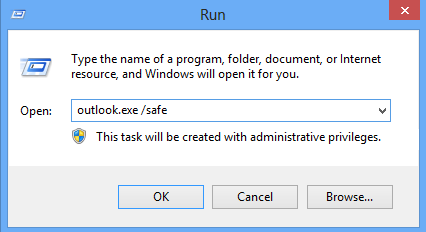
- If Outlook still showing the error then there must be some problem related to Add-ins.
- So Disable all add-ins one by one until Outlook does not become error-free, For add-ins click on File > Option > Add-ins.
- After that, Go and manage all add-ins and then click on ‘Go’.
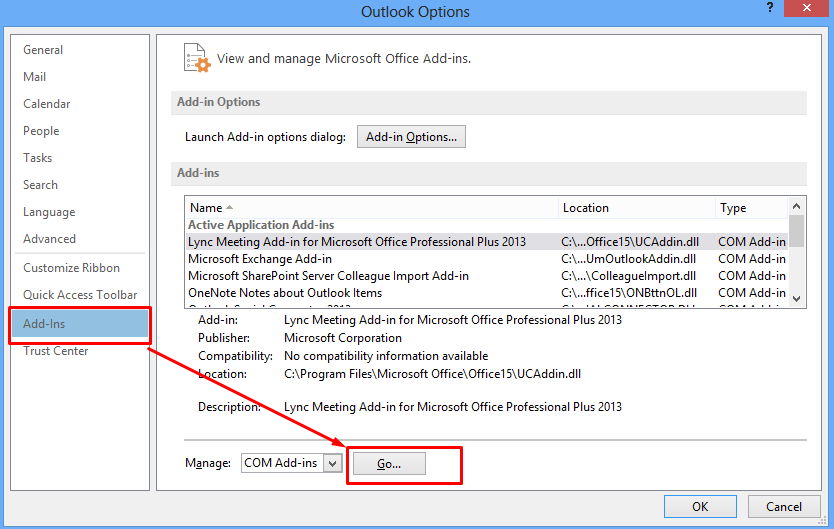
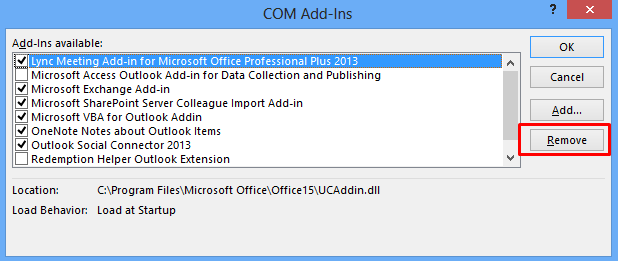
- Unchecked all add-ins one by one until you find the bad add-in to make Outlook error-free. Remove that Add-in as soon as possible.
Disable the Cached Exchange Mode
- Close the MS Outlook if running.
- After that, go to the control panel and choose Mail > Email accounts > Email tab.
- Choose and highlight the email address that is not working. After that, hit on change button.
- Uncheck the option Use Cached Exchange Mode displayed in the box.
- Hit on next > Finish.
- Finally, restart Outlook.
Create a New Profile
The damaged and corrupt profile may also prevent Outlook from opening the associated PST file. To fix this, users can generate a new Outlook profile and delete the corrupt one by following these steps:-
- Close Outlook and open the control panel.
- Hit Mail then show profiles after that hit on Add.
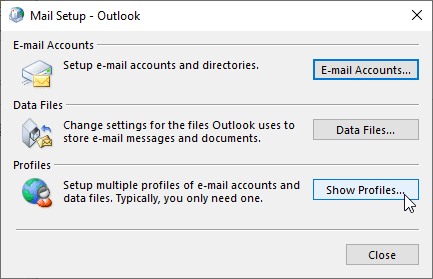
- Write a new profile name and hit on OK button.
- Add your email account by entering the details and following the setup wizard to configure the email profile.
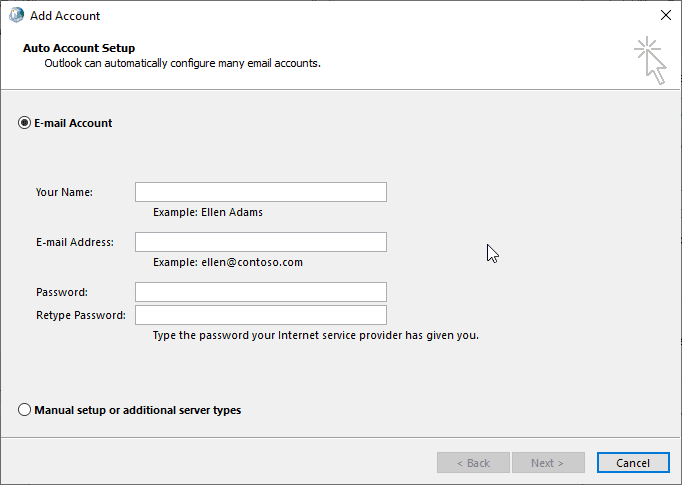
- MS Outlook will attach to the server and begin the synchronization. After the sync, check if complete mail folders are updated and users are capable of accessing all the mail items.
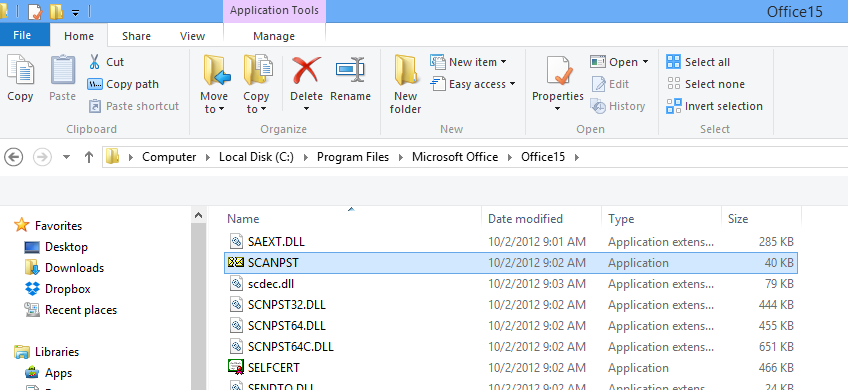
Run Scanpst.exe to Fix the Error
MS Outlook provides an inbuilt tool to repair the damaged PST file i.e. Scanpst.exe. If a user comes to know that PST files have been corrupted due to a virus attack or huge PST file size then the user has to execute scanpst.exe. Sometimes this process leads to data loss problems because this utility removes the bad header files. So whenever to try to execute a scan with this tool user should have to backup their data.
Manual TroubleShooting Steps to Resolve Error: Outlook PST File is in Use and Cannot be Accessed
Follow the given troubleshooting steps to prevent Outlook from this kind of error.
- End all the running tasks in a background related to Outlook
- Press Ctrl+Shift+esc to open task manager
- Choose the Process tab from the menu bar
- Locate anything related or named as ‘outlook’, ‘communicator’, ‘Lync’, ‘UCMAPI’
- Now close Task Manager and then launch MS Outlook
Use This Professional Solution If Manual Approaches Fail
Outlook.pst is in use and cannot be accessed error can happen due to PST file corruption, oversized Outlook mailbox, inaccessible data files, etc. PST file is a default data file of Microsoft Outlook Version 2021, 2019, 2016, 2013, 2010, 2007, and 2003. Outlook PST file stores all user profile emails, contacts, calendars, tasks, etc. Due to corruption in PST files, Microsoft Outlook generally shows the error. There are many Microsoft Outlook errors by PST files getting corrupted, Use the Freeviewer Outlook PST Repair Software to repair damaged PST files.
Download Now
Purchase Now
Tips: If you want to view, open and read Outlook corrupted PST file then, try PST Viewer Tool.
After knowing about how automated tools work. It’s time to make the entire task easier for all the users. So, below we have discussed simple working steps to explore this tool more.
Quick Working Steps to Use the Automated Software
- Step:- Download the advanced ScanPST.exe alternative software on your Windows system.
- Step:- Now, preview recovered PST Data
- Step:- View Deleted “PST File Data Items
- Step:-Finally, save recovered PST data
Let’s Conclude
In this guide, we have discussed all the possible solutions related to how to fix Outlook.pst Is In Use and Cannot Be Accessed. Here, you get an amazing automated tool to easily access and use Outlook.pst files on your Windows OS. And, that reason we have provided behind this issue. Therefore, both technical and non-technical users can easily perform their entire task using this professional tool and its advanced benefits. Just grab this tool and read more in the above article for the same.
Frequently Asked Questions
Q1: Why my Outlook.pst file cannot be accessible?
There are several reasons for Outlook data file corruption like unexpected shutdowns, malware, hardware issues, software bugs, or any other error.
Q2: Is it possible to repair the corrupted Outlook.pst file?
Yes, you can easily repair & restore the damaged Outlook.pst in use and couldn’t be accessed in a very seamless manner using the above-mentioned automated tool.