How to Manage Multiple Calendars in Outlook? Solved Instantly


Are you fed up with several Outlook calendars and want to manage them? If yes, then don’t worry about it. This blog will describe the entire solution to manage multiple calendars in Outlook by combining them into one. Here, we discuss both the solution manual and the automated solution to merge Outlook calendars.
Microsoft Outlook is the most popular and trending email client application for business as well as personal usage. Outlook provides multiple features such as sending or receiving emails, managing contacts, and calendar data, etc. In Outlook, the calendar feature helps users save reminders with titles, dates, times, and locations regarding any meetings, birthdays, etc. Users can make multiple entries in the calendar effortlessly.
User Queries – How Can I Organize Multiple Calendars in Outlook
“Hello, I have been using Outlook 2016 application, and I have multiple calendars in my Outlook to better organize my work. But now, I want to arrange multiple calendars in Outlook and am looking for a way to combine calendars in Outlook into one with all my calendar details. Please guide me on how to merge two Outlook calendars into one.”
Zack Poulin, Canada
“I have 4 Outlook email accounts and am looking to combine all my calendar planning in one. But, unable to find information for joining different calendars. Please let me know how I can manage or handle multiple calendars in Outlook. Thank you very much.”
Anton Thomas, Germany
Manual Solution to Manage Multiple Calendars in Outlook
The manual process to merge calendars in Outlook is divided into two steps. First, export Outlook calendar and then import it. Can I combine two Outlook calendars?
Step 1. Export MS Outlook Calendars
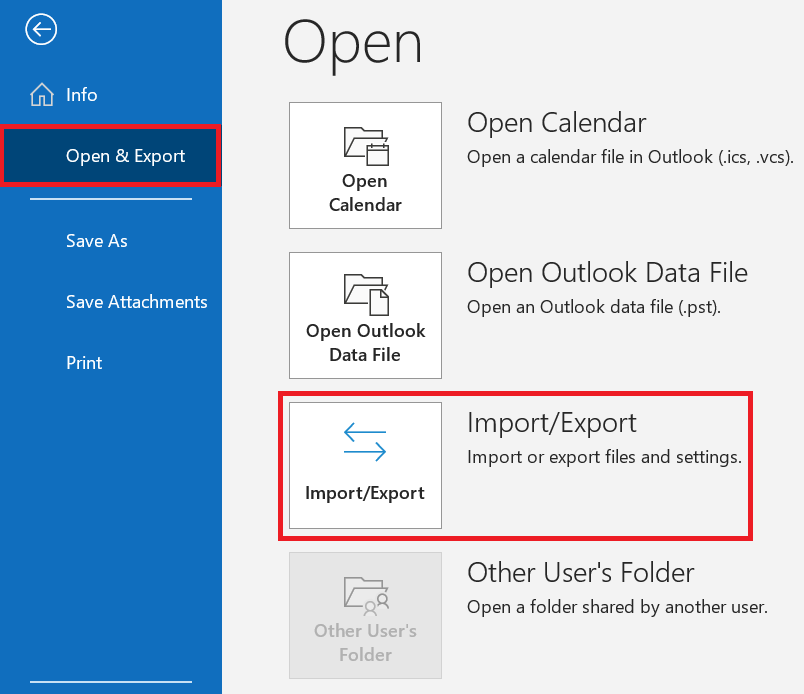
- Open Outlook application and click the File tab, then click Options.
- Click Advanced and choose Export under the Export option.
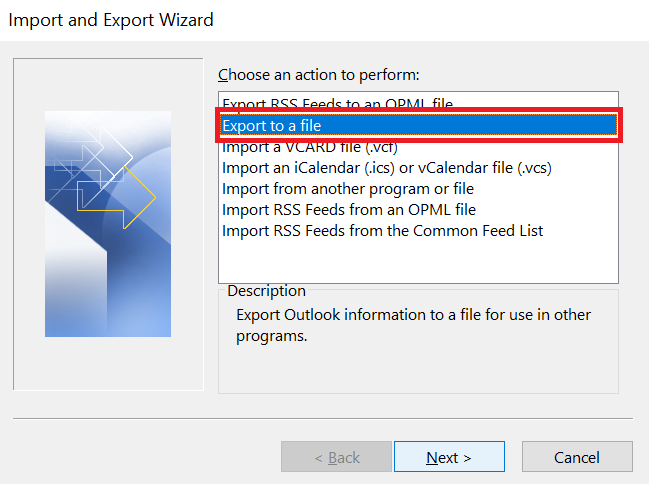
- Next, click Export to a file and click on the Next button to can you merge multiple Outlook calendars into one.
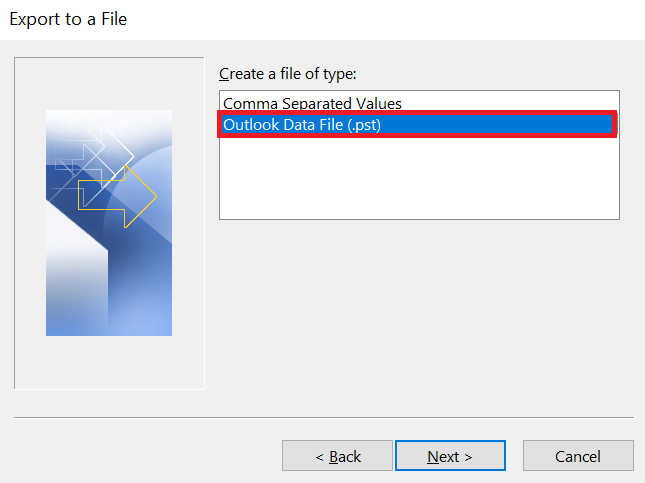
- Click Outlook Data File (.pst) and again press the Next button.
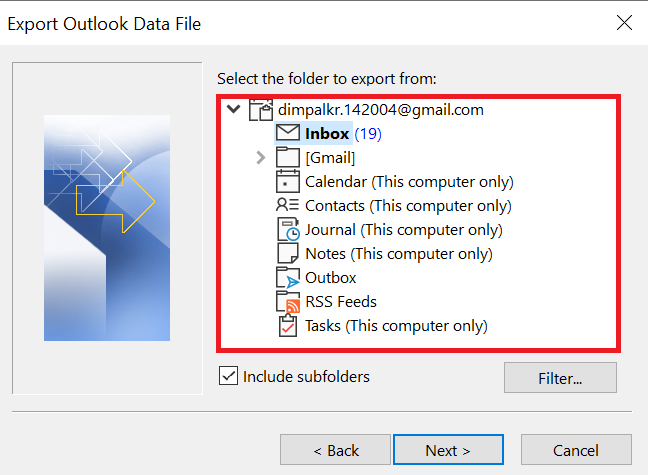
- Select the calendar folder that you want to export, mark or unmark the sub-folder box, and then click Next.
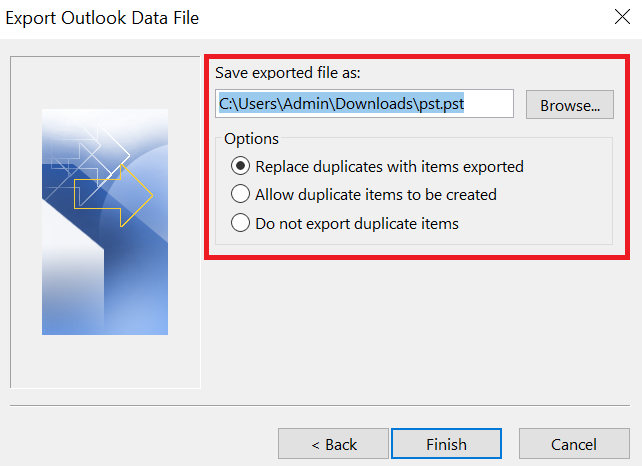
- Click on the Browse button and select the location where you want to export the calendar folder to manage multiple calendars in Outlook.
- In the end, click the Finish button to learn how to merge two Outlook calendars into one.
Step 2. Import MS Outlook Calendars
- Go to the File tab and click the Open button to solve Can I combine two Outlook calendars
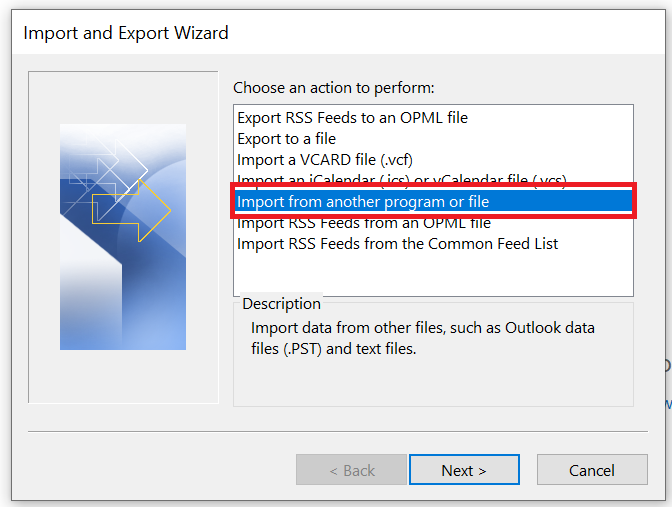
- Import >> Import from another program or file and then click Next.
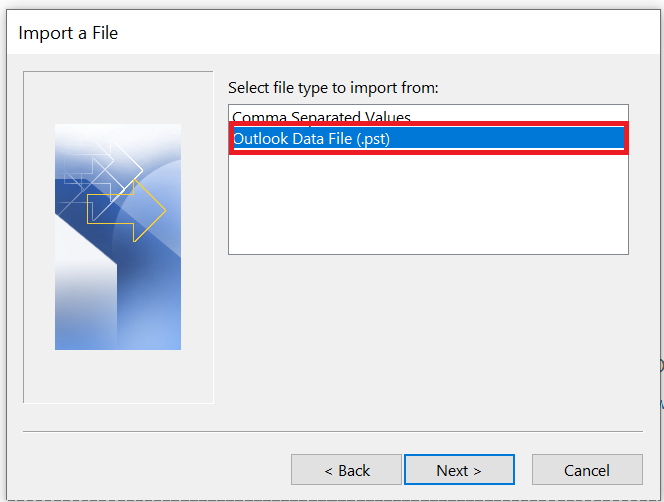
- Select the Outlook Data File (.pst) and then click Next to merge multiple Outlook calendars into one.
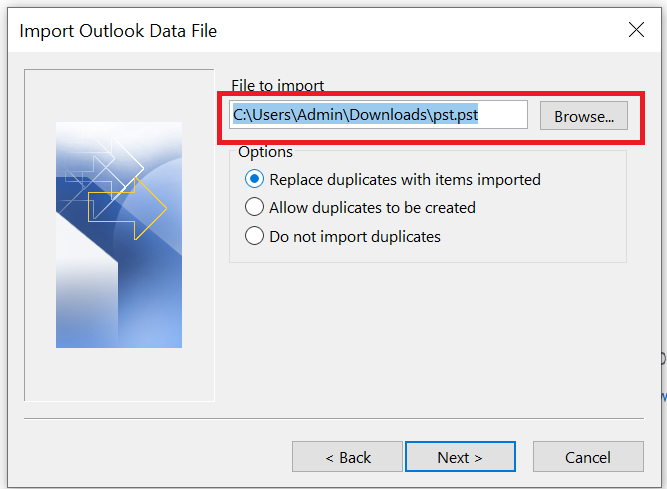
- Click Browse to select the location where the exported file is stored, and click OK
- Now, under Options, select Do not import duplicate items and hit the Next button.
- Under Select the folder to import from, select the Calendar folder
- Select Import items into the same folder and click the Finish button to learn how to merge two Outlook calendars into one.
Automated Solution to Merge Calendars in Outlook
FreeViewer PST File Merger is an excellent utility to organize multiple calendars in Outlook by merging. It has an easy-to-use interface that allows all novice users to combine multiple PST files into one, including calendars, contacts, etc.
The software does not need any external application to combine Outlook calendars and manage multiple calendars in Outlook. It supports all Outlook versions, including Outlook 2021, 2019, 2016, 2013, 2010, 2007, and 2003, as well as their respective editions. This application permits users to use an advanced option to eliminate repeated events when joining. This standalone tool can easily merge multiple Outlook contact folders without duplicates.
Easy Guide to Manage Multiple Calendars in Outlook
- Firstly, you need to download and install the application on your Machine.
- Click Add File to Folder to add an entire folder containing the files you want to combine.
- This software provides two options to combine Outlook .pst files into one file: Join and Merge.
- In Filters section, select item types you want to combine to manage multiple calendars in Outlook.
- To eliminate, select Calendar Fields: Subject, Start Date, End Date, Attachment, Category, To, etc.
- Finally, click Next button to start merging Outlook .pst files into one process.
- When the process is completed, you will see a message saying “PST files have been combined successfully“. Click OK to continue.
- The report is generated in CSV file format and lists all the details of the concatenated items to organize multiple calendars in Outlook.


Features of this Advanced Software
- Provides the option of Add Files and Add Folder to merge and manage multiple calendars in Outlook.
- Two options to merge, i.e., join PST files and merge Outlook PST files.
- Able to combine multiple .pst files of any size without damaging any information.
- Gives the facility to browse and select the location where you want to store merged Outlook data files.
- Maintains data integrity of Outlook PST files while merging two calendars in Outlook into one.
- Offers to combine or join multiple Outlook data files into a single folder.
- It provides an advanced option to merge multiple PST files without Outlook installation.
Expert Tip: If someone is facing problem in combining due to redundant entries, then we recommend using an automated solution, i.e., FreeViewer Outlook Duplicates Remover Tool. It automatically eliminates and handles multiple calendars in Outlook without any repeated events. Want to know more? Kindly navigate to its official website.
Final Verdict
In the above article, we have provided all possible information about how to manage multiple calendars in Outlook using easy and simple methods. If anyone is struggling with this problem, then they can use manual as well as professional solution. Additionally, we listed an expert suggested dedicated software for handling your calendar effectively, which can enhance your calendar management.
Commonly Asked Questions
Q.1 How Do I Merge Two Outlook Calendars Into One?
A. One can use this application that will help you to merge calendars in Outlook 2019, 2016, 2013, 2010, and all earlier editions, which can easily manage multiple calendars in Outlook into a single one with all saved data.
Q.2 Can I Arrange Multiple Calendars in Outlook Without Saved Information?
A. Yes, this mentioned utility offers the facility to merge Outlook calendars with all details like tasks, meetings, reminders, etc.
Q.3 Does This Software Allows Removing Events From Duplicated Calendars?
A. Yes, users can go through this guide to remove duplicate calendar events from Outlook.