How to Remove Print Restriction from PDF in 4 Simple Methods


For both control and accessibility, PDFs are among the best choices for sharing information. Often, document limitations may cause issues when you want to access printable files. Here, you seek how to remove print restriction from PDF to improve sharing or get legitimate rights.
In the following guide, we will discuss the types of print security and the best techniques to unlock a PDF file for printing. So, read this guide whether you’re a student, professional, business person, or anyone seeking to enable full printing.
Overview of PDF Print Restriction & Types
Print security or permission is commonly designed to control the printing rights of viewers. This protection falls under Owner Permissions that limit full access. In PDF print restriction, users can perform all tasks except creating physical copies of the document. This is mainly used to prevent the creation of unauthorized documents.
Moreover, it allows creators to secure the information from misuse or tampering at once. Below are the major types of PDF print security:
- No PDF Printing: Under this protection, document creators revoke complete printing rights. This way, you may address the issue of print option not showing in PDF document.
- Low-Resolution Page Printing: This may allow printing, but puts limitations on quality. Moreover, the print resolution is 150 DPI or below. Hence, the viewer may struggle to view or read the information.
- Quality Resolution and Protection: This may allow PDF printing in quality resolutions with major limitations. Moreover, viewers can’t get full rights to print the PDF document.
Overall, print protection is mainly applied to unauthorized sharing of a PDF document. Depending on the data, professionals may apply types of printing restrictions.
Besides the benefits, this may cause inconvenience when printing in bulk. Now, let’s find out the reasons to remove print protection from PDF files.
Why Remove Print Restriction from PDF?
Removing print security helps regain full printing rights. For future backup, collaboration, and more, you might need a document in a physical state. Unfortunately, the print protection limits anyone from making copies of the document. This way, you can’t extract data or share specific information with the team.
Below are the other reasons to remove printing restrictions from PDF files:
- Regain Full Capabilities: The print security often hinders the workflow, especially when you need to share a physical document for review or other purposes. Removing the print protection, you can easily use the full printing capabilities of the PDF anytime, anywhere.
- Highlight or Read the Document for Free: Whether it is low resolution or printing limitations, both prevent accessibility. Unlocking the PDF for printing allows users to print, highlight, or read the document for free. This way, users can create physical copies using any device.
- Reuse or Archive PDFs: After removing print protection, users can repurpose, archive, or review the physical document with ease. This is among the common practices of accessing or creating a backup of information for future needs.
In summary, removing the print restriction is necessary to improve collaboration or accessibility anytime. Before moving on to the methods, let’s figure out whether PDF actually contains print security or not.
How to Check “My PDF is Print Protected”?
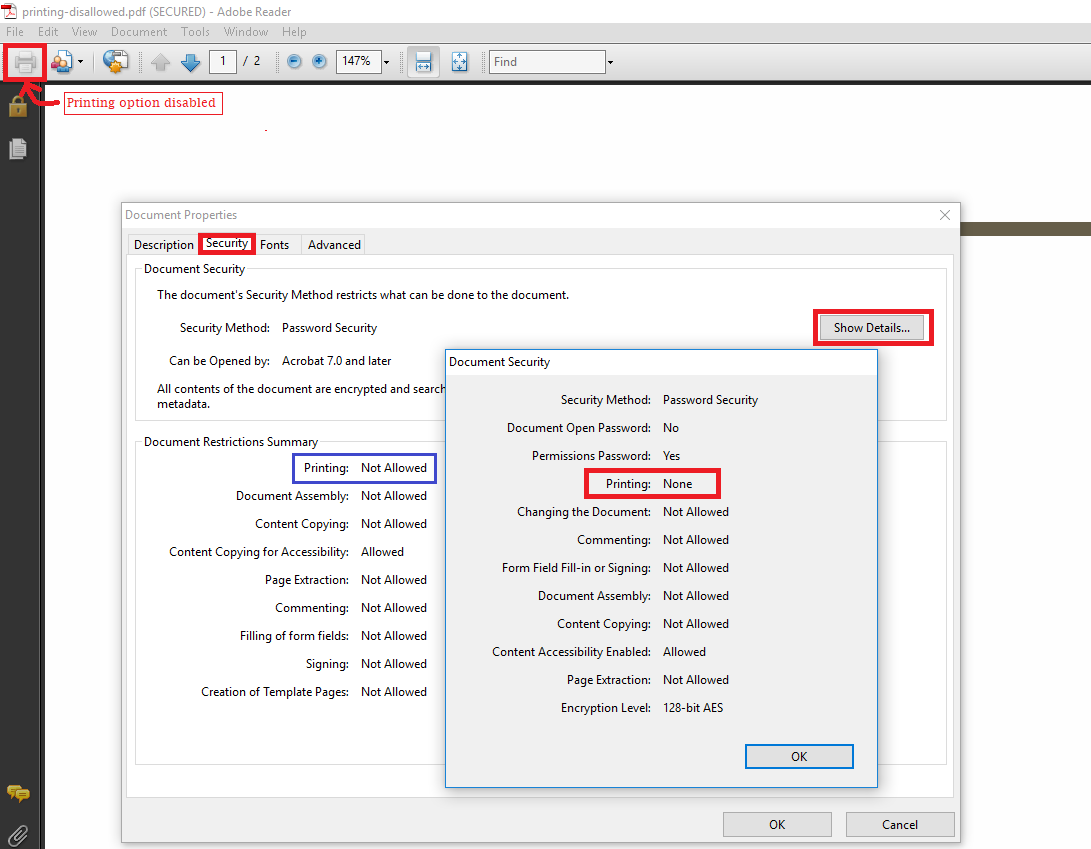
Before choosing the right method, it is equally important to break down the types of PDF restrictions. To check the unwanted PDF print protection, Adobe Reader is among the most preferred solutions.
With this, you can review the print protection with ease. Now, follow the quick steps to does PDF is secured with print permissions or not:
- Start by accessing the necessary PDF on Adobe Reader.
- Either press Ctrl + D or tab File > Properties.
- Look for the Security drop-down> “Document Restriction Summary“.
- Now, check the Print status to see whether it is allowed or not.
- If it says “Not“, then the print is not accessible.
Hence, if the PDF has print restrictions, it won’t allow physical printing. Moreover, it requires a dedicated solution for removing the print protection. So, let’s learn them in the section below.
How to Unlock PDF for Printing Using 4 Best Methods
If you’re wondering how to remove print restriction from PDF file, here are the best techniques to remove the print protection. It includes both a free, premium, and a cost-effective PDF Print Security Remover tool. This way, you can manage or access the rights to get printable files.
Here are the top ways to remove print permissions from PDF file:
- Free Web Browser
- Online PDF Websites
- Adobe Acrobat Software
- Desktop-based PDF Print Restriction Remover
Now, let’s learn these methods one after another.
How to Remove Print Restriction from PDF Using Web Browser (Free)
For beginners, web browsers are among the free and best ways of unlocking the basic print restrictions. Google Chrome is a free browser that can be used to bypass print protection. This way, you can regain access and enable printing instantly. Remember, the method works on simple printing limitations. Here are the steps to unlock PDF for printing using a web browser:
- On a print-secured PDF > press right-click and then, use Open With > select Google Chrome.
- To enable PDF printing feature, tab Ctrl + P (Windows) or Cmd + P (Mac).
- Now, navigate to the feature “Save as PDF or Microsoft Print to PDF“.
- Finally, tab Save to get the printable document.
This is a simple approach to remove print protection from PDF file. But it won’t be effective if it has advanced limitations. Below are the drawbacks of this method:
- Web browsers aren’t the dedicated solution; instead, they act as PDF Viewers to bypass basic protections.
- During the method, this may affect the formatting, including the layout.
- It poses a risk of losing PDF annotation, hyperlinks, or other elements.
How to Remove Print Protection from PDF – Try Online PDF Websites (Fastest)
If you’re wondering how to remove printing restrictions from PDF, try free online PDF tools. These websites are accessible on operating systems like Windows and macOS, as well as on mobile devices.
Using these free solutions, users can remove all types of print protection in one go. Here, you won’t need to install any software application, as it is completely online.
From batch processing to a handy interface, the free tools become the first choice for everyone. Hence, you can regain the printing permissions. Here are the detailed steps on how to print a PDF with limited permissions using online tools:
- Visit any of the free online websites on your device.
- Drag or drop feature to upload the print secured document.
- Finally, press the Remove/ Unlock button to remove print limitations.
Pros of Online Websites
- There is no requirement to install or purchase any third-party tool.
- Simple and fastest way of removing the print protection from PDF.
- Compatible with all operating systems or devices.
Cons of Online PDF Platforms
- Online tools contain a risk of data tampering or loss as they save a copy on the server.
- It may affect the document font, formatting, and other PDF elements.
- Not suitable if your PDF holds highly confidential information.
How to Unlock PDF for Printing – Try Adobe Acrobat (Paid)
To securely remove print restriction from PDF, Adobe Acrobat Pro Software is the most reliable choice. The tool is compatible with removing all types of print protection while keeping the formatting intact. Compared to free options, it is a dedicated yet premium software that handles PDF protection or limitations.
Using the tool, you can bypass basic to advanced print security. Also, it allows you to access or share a print-friendly document. Here is the step-by-step guide to remove print permissions from a PDF file using Acrobat:
- To begin the process, install the Acrobat Pro Tool.
- Navigate to features, such as File, and then Properties > Security.
- Now, tab No Security > remove print protection from PDF.
- Finally, click Save as > download the document with ease.
Pro of Adobe Acrobat Tool:
- It is a premium and industrial-grade software solution for unlocking the print protection.
- The tool protects the PDF file formatting and other necessary elements.
- Using this robust tool, you can remove other file limitations instantly.
Cons of Acrobat Software:
- Adobe Acrobat isn’t a free tool; it is based on a paid subscription.
- The tool causes issues like formatting or performance errors.
How to Remove Print Restriction from PDF File – Automated Tool (Recommended)
To remove print protection from PDF, consider FreeViewer PDF Unlocker, designed for Windows and macOS. The software efficiently removes PDF print protection, including full permissions or low-resolution printing. Besides this, the software is capable of deleting other security. Most importantly, it offers batch processing with basic features.
Also, this is a cost-effective tool that has a demo version. This way, you can download the free version to unlock PDF printing. Here, you can directly print the document while preserving the formatting. Now, let’s move to learn the steps.
Read More: How to Unlock PDF for Editing Instantly.
Fastest Way to Remove Print Protection from PDF Files
- Firstly, install and run the above-mentioned utility on desired operating system.
- “Add Files or Folders” to access the print secured PDF document.

- Navigate to Print to get a printable file.

- Finally, hit the Unlock button to unlock PDF for printing.
Concluding Words
PDF print protection is only suitable if you want to thwart unauthorized copying. To remove print restriction from PDF, we have explained 4 best techniques. Depending on requirements, you can choose any of these solutions. The web browser, online, and Adobe Acrobat have major limitations, considering the automated tool. It is a secure and ethical way of removing the print protection from PDF files.