How to Convert NST File to PST? Complete Guide


Microsoft Outlook creates NST file to store cached Microsoft 365/Outlook group-related data and other locally stored information, just like PST and OST. But whenever it comes to transferring or accessing NST file data, there is no direct method available.
Because Microsoft Outlook doesn’t provide direct Import/Export option to import and export data from NST files, like PST format. So, users are required to convert NST file to PST format to access data, create a backup, transfer data to another Outlook profile, or preserve important emails.
This guide explains what an NST file is, why users are required to convert NST to PST format, how to do it and other complete information one by one.
What is an NST File?
NST stands for Outlook Data File associated with Microsoft 365 Groups and cached data. Outlook creates NST file locally when Microsoft 365 account is connected and certain group-related data is cached.
On the other hand, PST file contains complete mailbox data. It is main format supported by Outlook and it is commonly used for backup, migration, archiving, and transferring data.
Why Convert NST File to PST Format?
Users transform NST files into PST format because PST files are used for multiple purposes such as:
- Access data in Outlook independently.
- Want to create a local backup.
- Transfer Outlook data to another computer.
- May want to open Outlook data after changing profiles.
- Export group-related information.
- Recover data from orphaned NST file.
Can We Directly Convert NST File to PST Format?
No, Outlook doesn’t provide a direct option to import NST file data. So, we have to first convert NST file to PST format and then we can access output data file in Outlook.
For NST to PST conversion, we have to use an automated solution such as FreeViewer OST Recovery Tool. This software doesn’t affect original file data and maintains elements and components of complete mailbox. It works with both OST and NST formats and allows you to save into 5+ different formats including EML, MSG, PST, HTML, PDF, and O365.
It allows you to convert multiple NST files in bulk at the same time. This software provides demo version for free.
How to Convert NST to PST Format using Automated Tool?
- Download and install NST file converter on your machine.

- Select “Add File Options” and import your NST file.

- All your emails in folders will appear.

- Select required emails and choose “Export” option.

- Select saving option as “PST” and select “Adv Settings…” option.

- Apply advanced features accordingly and choose “Save” button.

- Select “Browse” icon to select any saving location.

- Tap on “Export” icon to convert NST file to PST format.

After completing the process, output PST file will be located in the selected location. Now follow the steps to import NST file to Outlook.
- Open your Outlook.
- Go to “File” tab >> “Open & Export” >> “Import / Export” option.
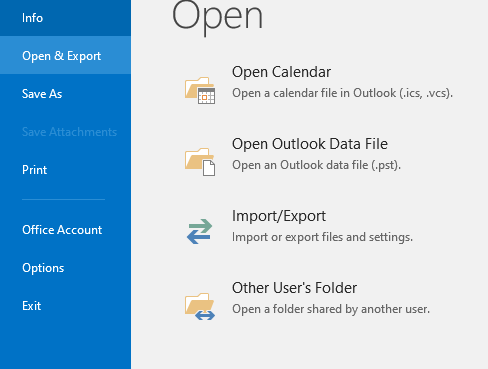
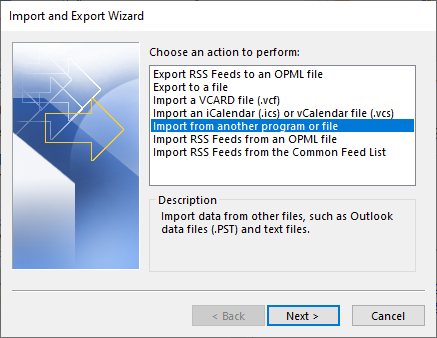
- Choose “Import from Another Program or File” option.
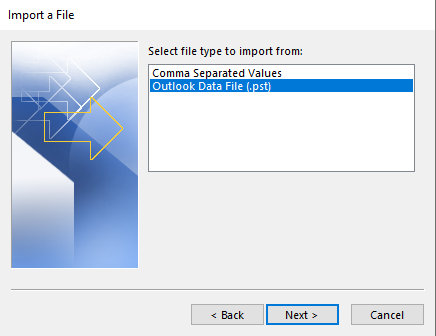
- Select “Outlook Data File (.pst)” format and select “Next” icon.
- Select “Browse” option and choose your output PST file.
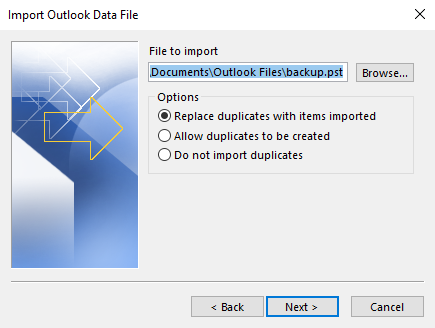
- And select the Finish icon to complete process.
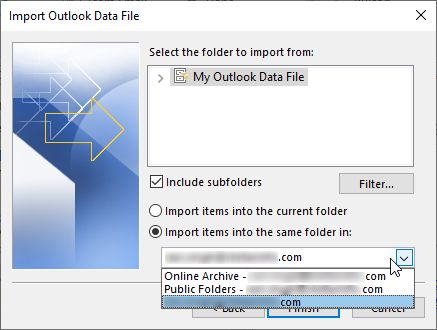
- Now you can analyze NST file data here.
Why Only FreeViewer NST to PST Converter Tool?
- This software allows users to convert NST file to PST in bulk at the same time without repeating the task for each data file.
- After uploading your NST file, all your data will appear on the panel, and users can analyze and select required data.
- This software is capable in decrypt and removing encryption and provide output data file without encryption.
- Also, it supports all types of data files including damaged, corrupted, orphaned, and inaccessible NST files.
- It maintains all the original elements and components including email body & header, contacts, calendar, notes, journals etc.
Conclusion
Outlook provides a direct Import/Export option only for PST format. So, we can’t access NST file data without converting it into PST format to open data. And there is no manual method available for this conversion, so we have taken help of an automated solution. It can easily convert NST file to PST format in bulk with advanced features and settings. You can connect with us through live chat support for any help.