How to Recover Deleted PST File From Hard Drive


If you need to Recover Deleted PST File From Hard Drive then do not start by installing random recovery tools or creating new files on the affected disk. Did you know that there is still a chance of recovering a dedicated Outlook PST file if its data has not been overwritten yet. And the safest approach for this is simply to stop the drive so that no data gets compromised. You need to check the quick and safe recovery options first and then deep scan your hard drive if the PST file is still missing.
Quick Answer: When an Outlook PST file is deleted from your system’s hard drive then Windows only removes its file system reference instead of destroying every piece of the file. This means recovery can be possible until new data overwrites the same storage area.
For this case Recover Deleted PST File From Hard Drive you simply need to follow this simple order:
The sooner you stop writing new data to your affected drive the better your recovery chances will be.
Just Stop Using the Hard Drive!
Before you think of trying to recover anything you need to first protect your deleted PST from being overwritten.
See if your PST file was stored on an external or secondary hard drive simply disconnect it after checking all the basic recovery locations. Now if it was on your Windows drive then you must avoid downloading files, installing applications, copying large files or performing any unnecessary system operations.
REMEMBER: Do not install recovery software on the same drive that contains the deleted PST file as the installation process itself can write new data and potentially overwrite your deleted PST file. So always save recovered PST files to a different and healthy drive.
This is one of the most important rules in any Recover Deleted PST File From Hard Drive situation.
Steps to Recover Deleted PST File From Hard Drive
Recovering data from a hard drive is easy. You simply need to ensure that your data has not been overwritten and then you can easily handle the rest of the process using recovery software and other available methods. Here you can use certain manual and software solutions which help you to recover your deleted Outlook PST file from the hard drive.
Step 1: Check the Recycle Bin
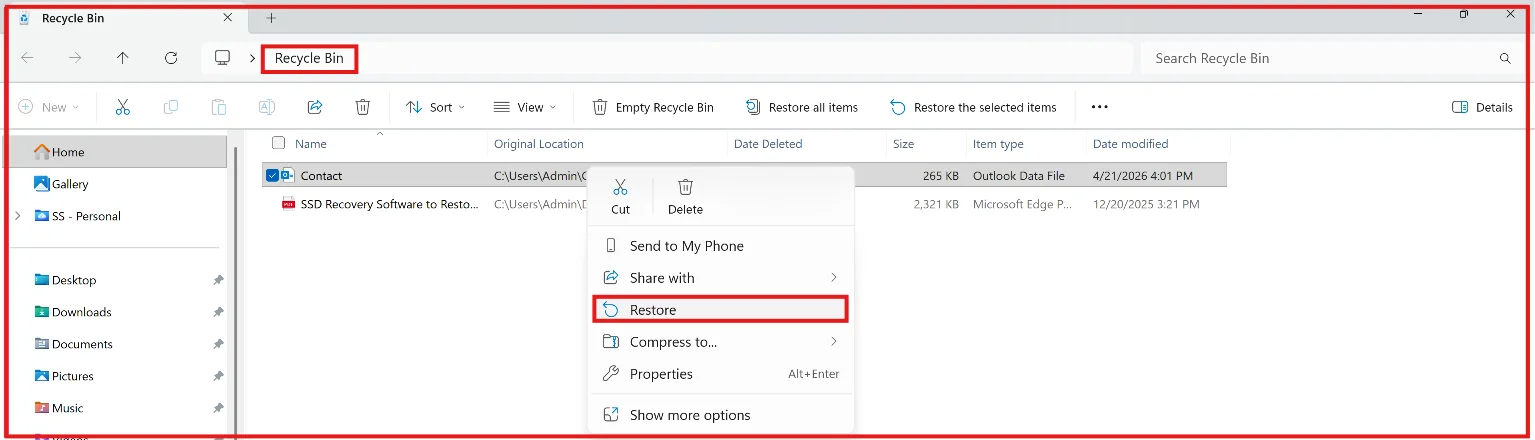
You can start with the simplest option. Just open the Windows Recycle Bin and search for the deleted .pst file. If you find it simply right click on the file and choose the Restore option. Windows should return it to its previous location.
This method is very useful when your PST file was deleted normally and the Recycle Bin has not been emptied.
However the Recycle Bin cannot help you if the PST was permanently deleted, removed using (Shift+Delete) key, deleted after the Recycle Bin was emptied or it is lost because of formatting or file system damage.
Step 2: Look for Another PST Copy

Before scanning the disk you can check if another copy of your mailbox exists or not. You may have an old Outlook archive, Windows backup, File History copy, external backup or cloud synchronized version. So if another working PST exists well then you need to copy that file as it is safer than attempting deleted file recovery.
You can also search for other healthy drives for .pst files and must avoid performing unnecessary operations on the affected drive.
If no usable copy exists there then you can move to the next stage of the Recover Deleted PST File From Hard Drive process.
When Manual Recovery Is Not Enough
Manual methods are good for checking obvious locations but they have a clear limitation as they cannot normally reconstruct your PST file that Windows no longer knows about.
Now changing the file extension, creating a new Outlook profile or trying different Outlook settings will not restore an Outlook PST file that has already been deleted from the file system. This is where you need a proper recovery scan.
Can You Recover PST File From a Formatted Hard Drive?
A recover PST file from formatted hard drive situation can still be recoverable when your previous data has not been overwritten.
After a quick format information from the old file system may be deleted or rebuilt even though some of the underlying data remains on the disk. However if you use it continuously then the formatted drive can overwrite that data.
If you want to Recover Deleted PST File From Hard Drive after formatting then you should not create a new partition, reinstall Windows, copy files to the formatted disk or continue using it as normal storage. A full format, extensive new data, encryption, physical damage and SSD behavior can all reduce recovery chances.
Quick Reading: You can also learn steps to Recover Deleted Files from External Hard Drive in few simple steps.
Automated Recovery Is the Practical Next Step
When the Recycle Bin and backups do not contain the PST file at this stage automated recovery is more practical than attempting a manual method for reconstruction.
A dedicated recovery utility can deeply scan your hard drive for deleted files and completely depending on your drive condition and file system to locate PST data that is no longer visible through Windows. You can check below to see how the entire recovery process works:
- Connect the affected hard drive without using it for normal storage.
- Install the recovery application on another healthy drive.
- Select the affected hard drive as the source.
- Start the scan.
- Search the results for .pst or the original file name.
- Select the required PST.
- And save it to another drive.
The important part is keeping the source and destination separate. For a Recover Deleted PST File From Hard Drive attempt, this keeps the safe recovered data from being written over other potentially recoverable files.
When Should You Use a Deep Scan?
A quick scan will work when your PST was recently deleted and the file system still contains useful information. A deep scan is most useful to you when:
- The PST was permanently deleted.
- The drive was formatted.
- The partition has file system problems.
- The original file name or folder structure is no longer available.
- A quick scan does not find the required PST.
Deep scans can take much longer on high capacity drives as the software may need to examine a much larger amount of storage. So do not interrupt a scan process just because it is taking time. However if the drive starts clicking, disconnecting, freezing Windows or it becomes extremely slow you should stop the process. These directly indicate physical drive problems.
What If the Recovered PST Will Not Open?
Finding a PST file does not always mean that your mailbox structure is perfectly intact. A recovered PST may be damaged and Outlook may show an error when you try to open it. This can happen when portions of the PST were overwritten or when your file was already corrupted before deletion.
So first you must make a backup copy of the recovered PST.
You can then try Microsoft’s Inbox Repair Tool known as (SCANPST.EXE) on the copy. SCANPST is designed to repair certain PST file structure problems and it does not recover your PST file that has already been deleted from a hard drive.
This is the difference which matters when you Recover Deleted PST File From Hard Drive and the recovered file needs a second repair stage.
What If the Hard Drive Is RAW?
A RAW partition is absolutely different from a simple deleted file. When Windows shows a drive or partition as RAW it simply means Windows is not able to recognize that expected file system. If your PST was stored there then you should not immediately format the partition because Windows suggests it.
As formatting can change the file system and it may make recovery more difficult.
Instead you should consider this problem as a file system recovery issue. Even if Windows cannot access the partition normally a recovery software can locate the PST data. For anyone who is trying to Recover Deleted PST File From Hard Drive from a RAW partition there protecting your original drive is more important than making it usable again.
Recover Deleted PST File From Hard Drive With Software
If the basic methods fail in your case then using a dedicated FreeViewer Hard Drive Data Recovery Software is the best option as you can scan your affected storage for deleted and inaccessible files and also scan a hard drive for deleted PST data and recover available all files to a separate storage location. Download this software and perform the recovery steps now.
Before scanning you should make sure that the destination drive has enough free storage space. If you have a large Outlook archive then I would suggest you to use an external drive as it can be a practical destination.
One more thing that the recovery software should be installed on a healthy drive not on the disk where your PST was deleted.
What If the PST Is Not Found?
If this happens to you in such a situation do not immediately assume that your data is gone. You should try a deeper scan if available. Search for .pst rather than relying only on the original file name. Deleted file information can sometimes be lost where the portions of the actual file remain recoverable.
Also check if the recovery software displays results by file type or recovered folders. For a Recover Deleted PST File From Hard Drive case your original folder structure may have some changes. A PST with a different recovered name can still contain useful mailbox data.
Final Takeaway
To Recover Deleted PST File From Hard Drive you must act quickly and protect your affected storage before doing anything else. Check the Recycle Bin and existing backups first because they are simple and do not need a disk scan.
If those options fail then you can simply move to a controlled recovery scan For a Recover Deleted PST File From Hard Drive process you must use another drive to run the recovery software and another healthy location to save your recovered Outlook PST files.
If the drive was formatted, RAW or it is damaged then this situation needs extra care. And if your recovered PST cannot be opened then repair a copy of your file rather than experimenting with the only recovered file.
The key principle is very simple – do not write new data to the drive which contains the deleted PST. Every unnecessary write can reduce the amount of data that remains recoverable.