Migrate Thunderbird to Google Workspace Quickly without Data Loss


Are you looking for an easy way to migrate Thunderbird to G Suite? But not aware of the right secure techniques for transferring your emails, contacts, & other mailbox data from Thunderbird to Google Workspace.
Professional organizations mostly choose Google Workspace over Thunderbird because it offers cloud-based accessibility, improves security, & simplifies management. Whether you are a business owner or an enterprise, switching to Google Workspace helps to improve productivity while reducing limitations of email management.
Whether you are planning to transfer Thunderbird data to a G Suite account to expand your business, or looking for a solution to remotely access your accounts. In this article, we are going to use Mozilla Thunderbird to migrate Thunderbird to Google Workspace manually & an automatic solution to securely migrate the entire data of Thunderbird. At the end of this article, you will know how to transfer the Thunderbird file to G Suite.
Why Users Migrate Thunderbird to G Suite?
Individuals & organizations choose Thunderbird to G Suite migration to get benefits of Google Workspace’s ecosystem. Thunderbird only stores emails locally, while Google Workspace allows users to access their mailbox anytime from any device. Here are listed benefits that Google Workspace provides:
- Cloud Accessibility: Access emails, contacts, & files securely from anywhere.
- Better Collaboration: Work efficiently using Gmail, Google Drive, Docs & Meet, in one integrated platform.
- Email Management: Manage user accounts, permissions, & email settings from single admin.
- Security & Compliance: Benefit from advanced security features, such as two-factor authentication, spam protection, & compliance tools.
- Storage Capacity: Enjoy scalable cloud storage without relying on local system space.
These were the benefits that users get once they Import Thunderbird to Google Workspace. Now moving on to the next section to find a method.
Import Thunderbird Data to G Suite Account Manually
To migrate Thunderbird to G Suite manually, we are using desktop-based email client Mozilla Thunderbird. Via use of account configuration & moving Thunderbird data into G Suite account, we transfer Thunderbird data to G Suite Account. Follow steps listed below carefully for migration.
Steps of Manual Method
- Open Thunderbird Application on Computer PC.
- Click on the “Gear” icon to open Thunderbird settings> Choose account settings.
- Hit the “Add Account” button > Choose the “Mail Account” option.
- Enter “Full Name” > G Suite ID in another field > click the continue button.
- Choose “IMAP” and hit Continue > enter password to verify OAuth 2.0.
- Now wait for a few minutes to configure it completely.
- After that, restart your Thunderbird application on your computer PC.
- Create a new folder inside G Suite Account.
- Then simply select inbox or sent folder to open > choose specific or all emails in folder.
- Finally, simply drag & drop all selected emails inside the newly created folder in G Suite.
- Done, repeat this process one by one for each folder of your Thunderbird.
Challenges That Occur While Using Manual Method
- Using this free manual method users only transfer emails, contacts, & calendars, due to which other mailbox data will not be migrated.
- Users need to manually drag & drop each folder item, which makes this process time-consuming in cases of large mailboxes.
- To use this method users need stable internet connection throughout the complete migration process.
- If users are trying to migrate large mailboxes, this process takes a long time to upload via IMAP.
- While using this method, there is risk of duplication & missed emails if folders are not migrated carefully.
- Using this approach to migrate bulk emails of multiple accounts in a single G Suite account is not suitable.
You might face these listed challenges if you go with a manual solution. If you don’t want any more technical hassles like above or want to make your work easier, you can go with the next solution below.
Automatic Solution to Get Thunderbird File in Google Workspace
We hope that by now you have read the above-described manual method & you are also aware of its drawbacks that come while using it. You can try FreeViewer Thunderbird to G Suite Migrator to migrate Thunderbird to G Suite without putting yourself into technical troubles. This tool quickly imports Thunderbird data to G Suite account without losing data integrity & email attachments, while maintaining fine speed & accuracy in bulk.
Easy Steps of Automated Solution
- Download and run Thunderbird to G Suite Importer on your machine.
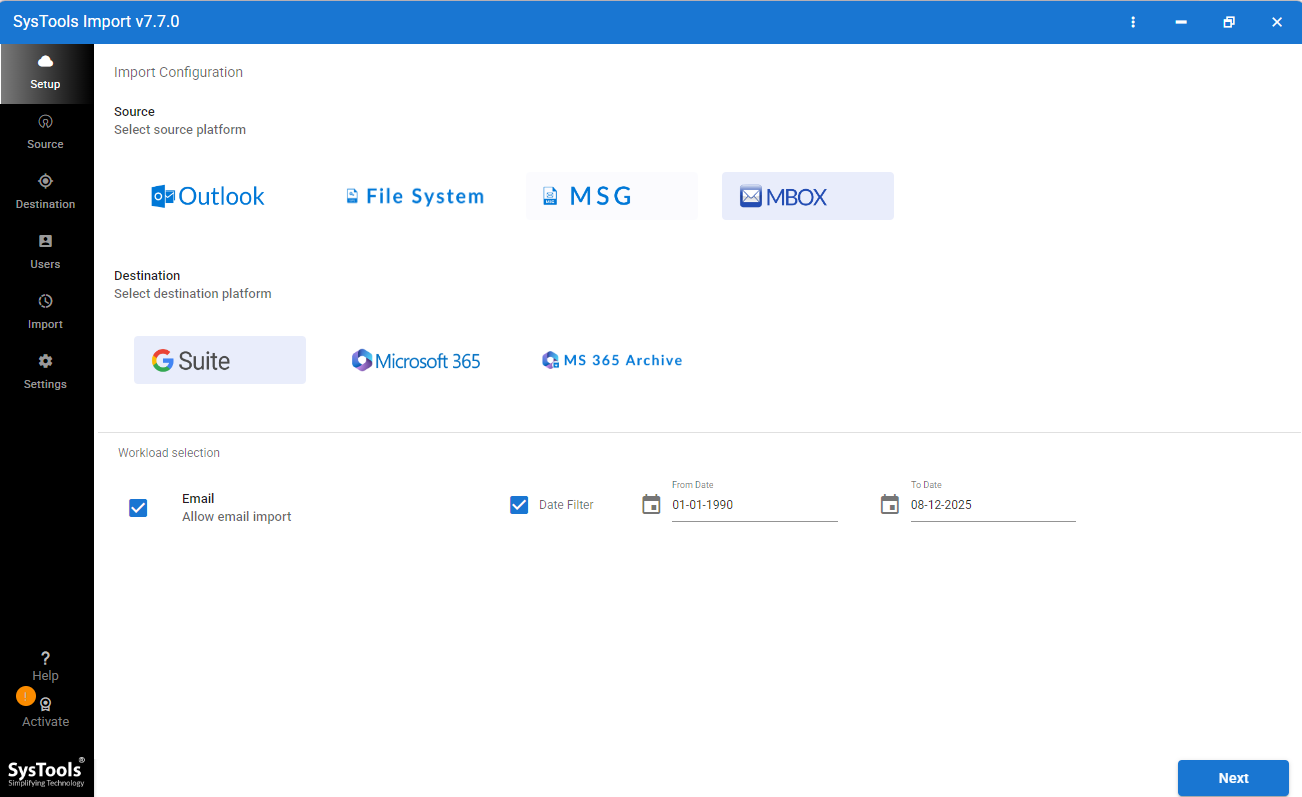
- Select MBOX as source and Google Workspace as destination.
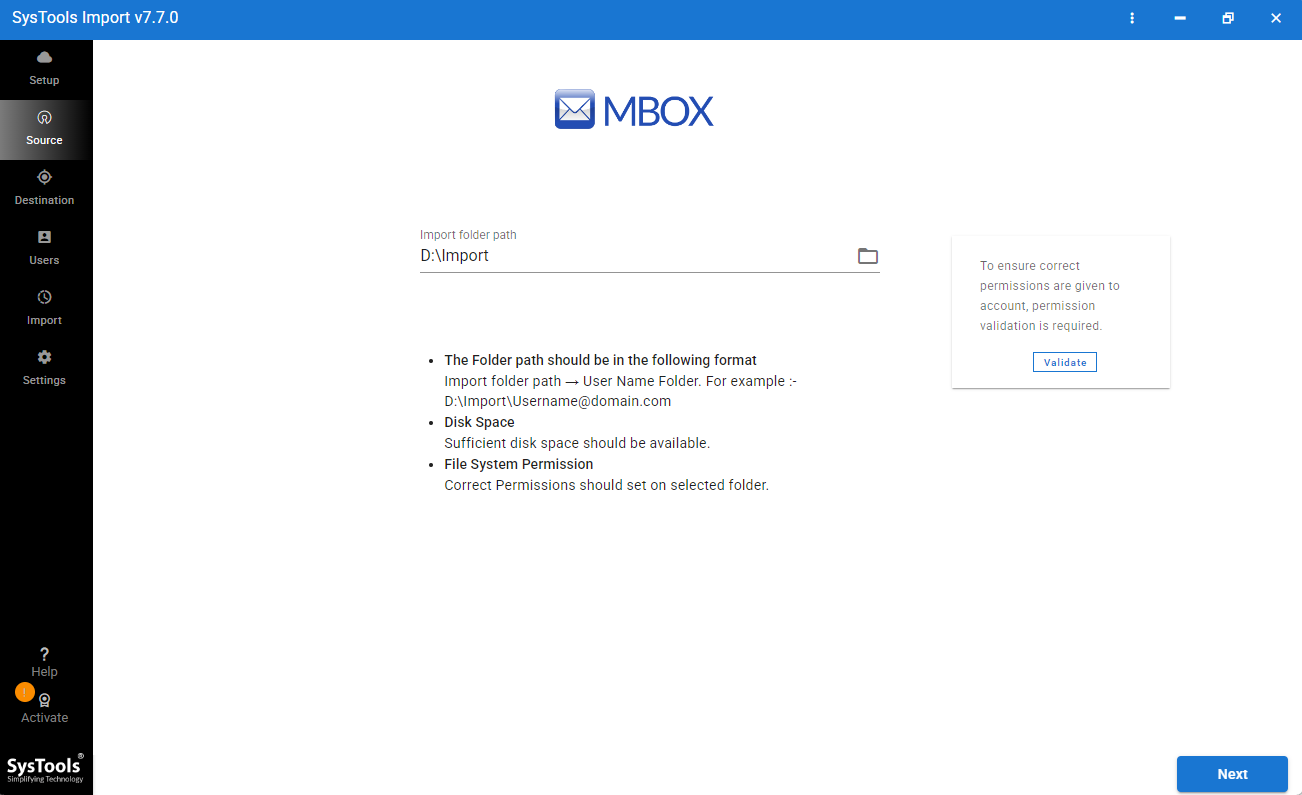
- Browse MBOX file and validate it then click on Next button.
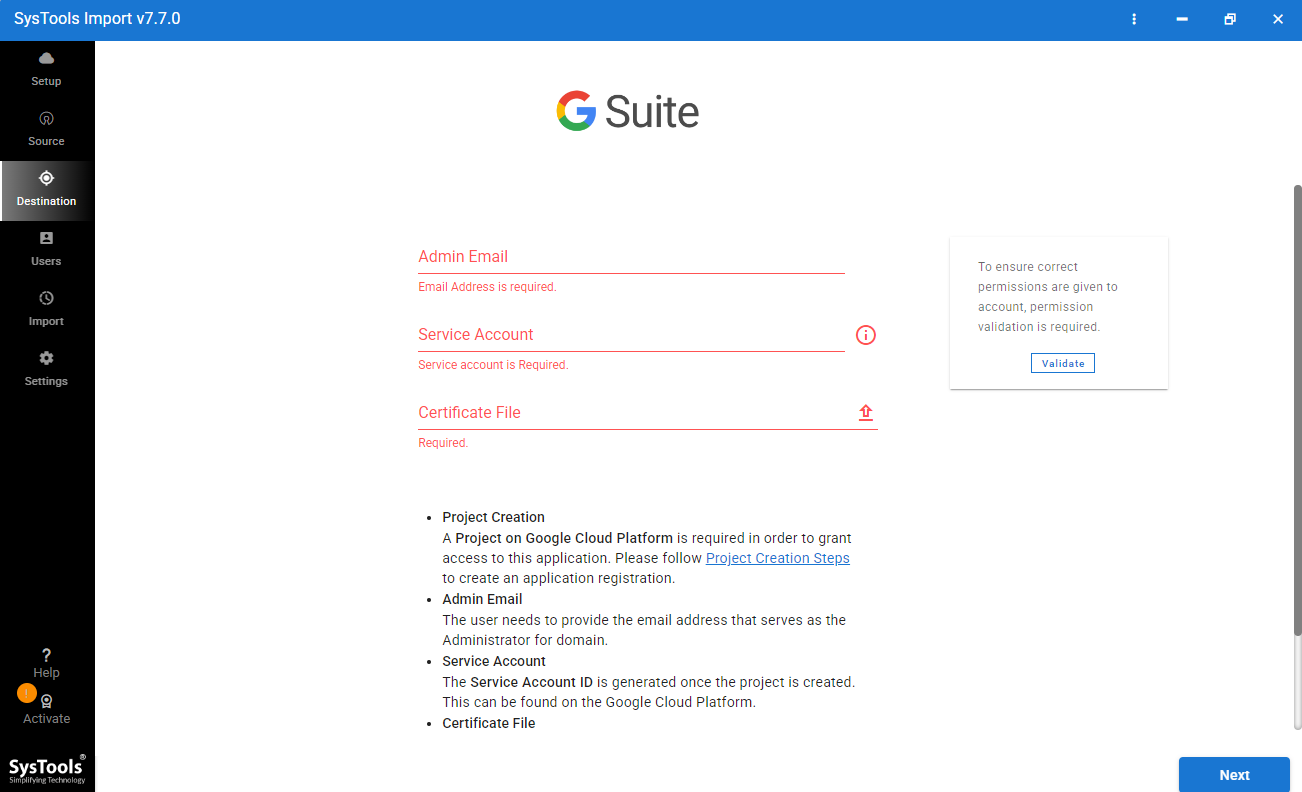
- Enter Google Workspace admin email, certificate file and service account.
- Click on Start Import to start migrate Thunderbird to Google Workspace.
Advantages That Users Get While Using Automatic Solution
- Simple Interface: Its simple interface makes the import process easy for both technical & non-technical users.
- Quick Import: This tool imports bulk data instantly while maintaining system performance.
- Supports Multiple Files: Tool is compatible with all file formats, such as PST, EML, MBOX, MSG, CSV, & more.
- Data Integrity: This tool preserves original folder hierarchy, metadata, email properties, & attachments, while importing & exporting process.
- Bulk Import: Tool allows users to import multiple files at once, which saves users time & effort.
Manual vs Automated Thunderbird to G Suite Migration
| Feature | Manual Method | Automatic Solution |
| Speed | Slow, depends on IMAP | Fast for both single & bulk |
| Bulk migration | Not suitable | Supported |
| Multiple accounts | Repetitive setup required | Handles multiple accounts/files |
| Folder structure | Break during drag & drop | Preserved |
| Attachments | Risk of missing | Migrated reliably |
| Metadata | Lost | Preserved |
| Ease of use | Complex, manual effort | Simple, guided process |
| Duplicates | Possible | Minimized |
| Technical skill | Moderate–high | Low |
| Success rate | Lower for large data | Higher for bulk migration |
Frequently Asked Questions
How do I migrate Thunderbird to G Suite?
You can migrate Thunderbird to Google Workspace via using both manual & automatic solutions, but you need to follow both of them carefully.
Can I import Thunderbird emails directly into Google Workspace?
No, you cannot import Thunderbird emails directly to Google Workspace, but you can try any one technique described above in this article for migration of Thunderbird to G Suit.
Which is the best Thunderbird to Gmail migration tool?
You can try FreeViewer Thunderbird to Google Workspace Importer for Thunderbird to G Suite migration, this tool quickly imports Thunderbird data to Google Workspace without any data loss in batches at once.
Can I migrate multiple Thunderbird profiles?
Yes, you can migrate multiple Thunderbird profiles at once via use of the suggested automatic solution, because the manual approach does not support multiple Thunderbird profiles at one attempt.
Final Thoughts
In this article, we have covered major reasons to migrate Thunderbird to G Suite, along with two approaches. We practically tested manual & automatic techniques to import Thunderbird to Google Workspace. Found while using manual approach, non-technical & the users who are looking for trouble-free solution will face uncertain challenges. Including time-consumption, repetition of manual steps multiple times & chance of mistakes. This is because a manual method is not recommended if you are a newbie or want a quick solution.
On the other hand, the mentioned desktop-based powerful tool works well over the manual workaround & gives instant results without compromising data. You can choose between manual and an automatic approach to migrate Thunderbird data to Google Workspace Account.