Box

(Average Rating 4.8 Based on 483 Reviews)

Screens

Guide

FreeViewer
SQL Server Backup Recovery

Advanced SQL BAK File Recovery Software to repair backup files of MS SQL Server 2025, 2022, 2019, and older versions with complete precision and accuracy.

Download Now
Safe & Secure

Purchase Now
30-Days Money Back*

  • Repair and restore highly corrupted SQL Server Backup (.bak) files
  • Recover SQL Server Objects: Tables, Views, Stored Procedures, etc.
  • Allows to repair complete data from corrupt backup file which includes MDF & NDF files
  • Ability to recover Compressed Backup Files in MS SQL Server
  • Recover deleted table records and deleted SQL Server database objects easily
  • Preview deleted database components and deleted records in red color
  • Easily restore SQL Server backup to new database or an existing database
  • Recover BAK files of any versions of Microsoft SQL Server
  • Provides two Export Options: SQL Server Database or SQL Compatible Script
  • No limitation on file size: Tested with 1.4 TB sized SQL Server.bak file
🔐

Trusted and Reliable SQL Server Backup Recovery Software
Restore corrupt or damaged SQL BAK files along with database objects like tables, triggers, views, stored procedures, etc.


FreeViewer Awards & Reviews

SQL Backup Recovery is Trusted for Its Precision & Accuracy

One-Click

“Software Suggest has rewarded SQL Server Backup Recovery as the Best Product to repair and restore data from corrupt SQL backup files.”

One-Click

“According to Software Informer SQL BAK Recovery Software is a safe and secure solution to restore corrupted .bak files of SQL database.”

One-Click

“FreeViewer SQL Server Backup Recovery is honored as the Best Buy Solution by Softpedia and rewarded with a five-star rating for its performance.”

How SQL BAK File Recovery Works?

Know the Quick 3 Steps to Restore Corrupted SQL Server BAK Files

1

Browse SQL BAK File

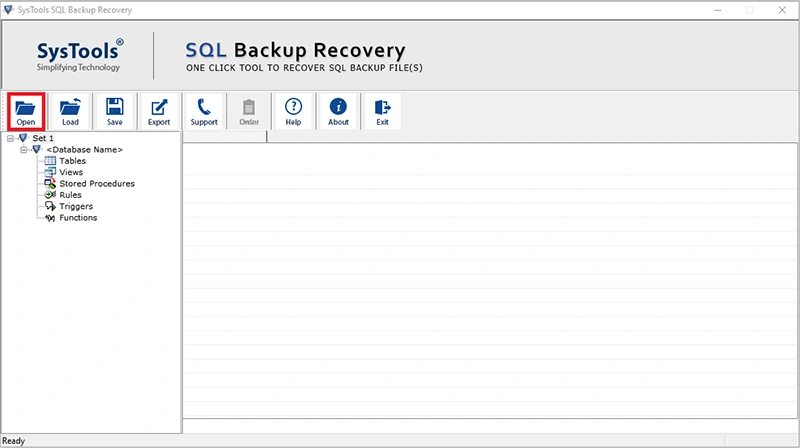
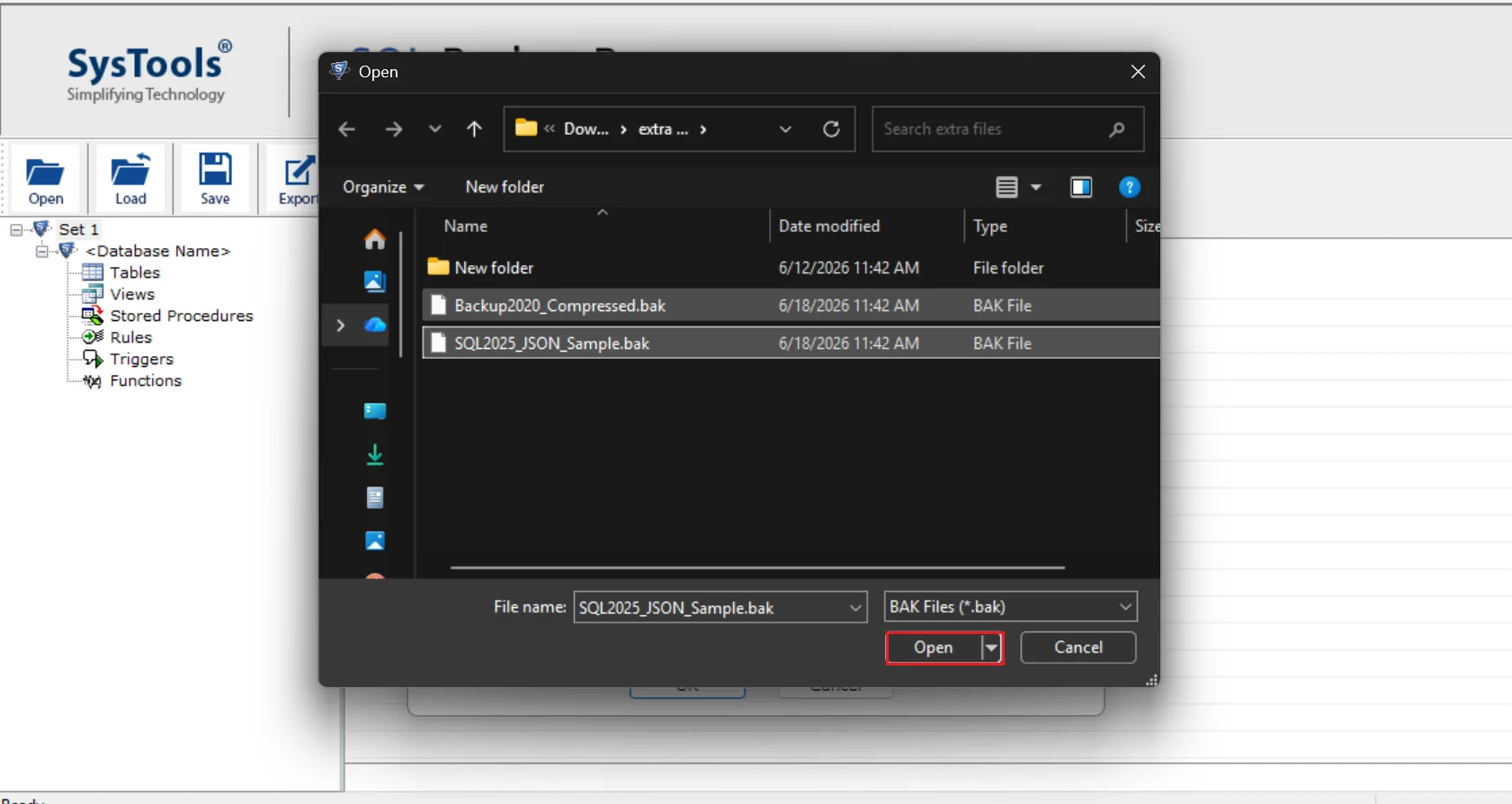
Install and Launch SQL Server Backup Recovery Tool and add corrupted BAK file in the software panel

2

Repair Corrupt SQL BAK File

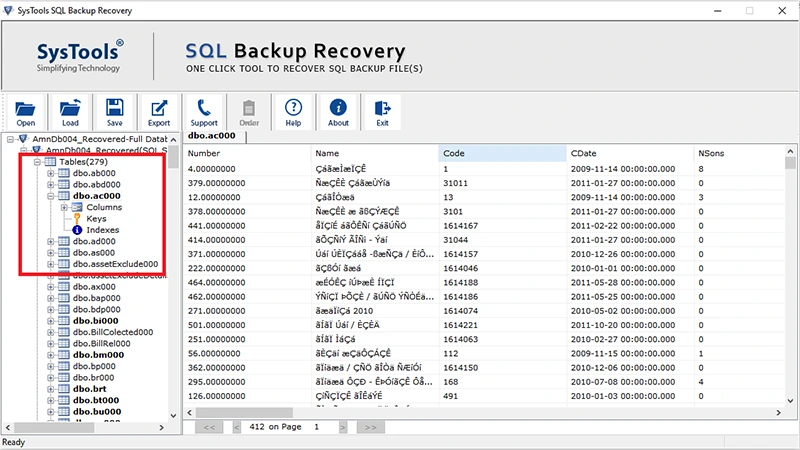
Scan the browsed SQL .bak files and check entire recovered data items from damaged SQL backup file

3

Export Healthy BAK File

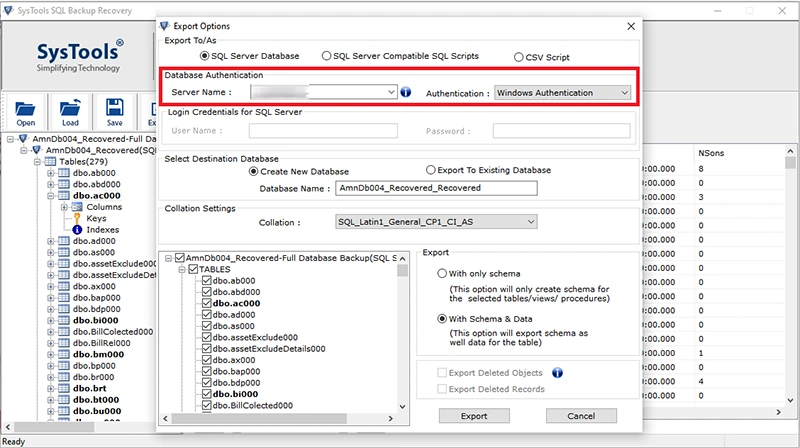
Finally Export repaired SQL .bak files to SQL Server Database or SQL Server Compatible SQL Scripts accordingly.

SQL BAK File Recovery – Overview

Learn More About the SQL Server Backup Recovery Software

Repair SQL Server Backup Files Effectively

Some of us are used to take regular SQL database backups and some unexpected factors like hard disk failure, corruption, etc. makes SQL .bak files inaccessible. But, now you can repair and restore corrupted SQL database backup files simply using FreeViewer SQL Backup File Repair Tool. It allows to repair corrupt SQL backup file generated by SQL Server 2025, 2022, 2019, 2017, 2016, 2014, 2012, 2008 and all below versions. Using this, one can recover the following files:

  • Primary Data Files: SQL backup Master Database File (MDF) is the primary data file that contains all the database objects like tables, stored procedures, triggers, views, etc. that can be recovered using this application.
  • Secondary Data Files: SQL backup Named Database File (NDF) is the secondary data file that comprise all the data files other than primary data file can also be recovered using this software. It can repair & restore multiple .bak files.

Restore SQL Server Backup to New Database/Existing Database

When SQL Server databases get damaged or inaccessible, the most common solution is to restore it using SQL BAK files. However, if the SQL backup file is corrupted itself, it can become impossible for users to restore the database. In such situations, FreeViewer SQL Server Backup Recovery Software helps you with complete recovery of SQL BAK files. Furthermore, the tool also helps overcome common SQL errors like SQL Server error 3041, 3154, 3241, etc. After restoring SQL BAK data, users can save the data in:

  • New Database: The software provides an option to Create New Database to export the recovered .bak files directly to the SQL Server Database from the software panel. One can do this just by entering the name which has not been already created in SQL Server database.
  • Existing Database: In case someone wants to save the recovered SQL BAK files to the existing database and overwrite the recovered BAK files then, this also can be done using this utility.

Highlighted Features of Smart Utility

Features of SQL Server Backup Recovery to Fix Corrupt Backup File

recover sql backup

Efficient MS SQL Backup Recovery

The software has the capability to repair and restore data from multiple damaged or corrupt .bak files in a single attempt. The tool restores SQL Server database objects like Tables, Views, Stored Procedures, Triggers, Rules, Functions, etc. With this application, users can easily restore the deleted database objects from SQL Backup files as well.

repair sql mdf and ndf

Repair MDF, NDF and LDF Database Files

The SQL BAK File Recovery software is capable enough to repair SQL Backup files including SQL Server MDF, NDF and LDF data in just a few simple clicks. After the BAK file recovery process, the tool allows to export data to an existing SQL Database or as SQL Scripts. The tool also preserves the original formatting of database throughout the recovery process.

preview sql backup data

Preview Database Components

The SQL Server Backup Recovery Tool firstly scans and repairs the damaged SQL Server backup file. After the recovery process is finished, the software displays a preview of all the repaired database objects such as Tables, Stored Procedures, Triggers, Keys, Functions, Columns etc. The preview of deleted records and deleted database objects is displayed in Red Color.

recover compressed backup files

Recover Compressed SQL Backup Files

With the help of this utility, users can precisely decompress a compressed BAK file in SQL Server and further restore the healthy data to the desired destination. To decompress the compressed backup, the tool will display a prompt to authenticate using SQL Server Authentication mode for complete ease and efficiency.

export schema and data

Export Schema & Data Both

The application allows to repair and export the SQL backup files in two ways. Export with Schema Only that will export only the schema of table and Export with Schema & Data option which will allow to export SQL backup file with both schema and selected table objects.

multiple export options

Multiple Export Options

SQL Server Backup Recovery tool offers three options to export the recovered data. Database administrators can directy export the data to Live SQL Server Database, or save it as SQL Server Compatible SQL Scripts, or as CSV files for easy management and sharing.

auto detect version

Auto Detect SQL Server BAK File Version

The SQL Server Backup Recovery software has the advanced option to automatically detect the version of SQL Server BAK file. If you know the actual version of your SQL Server Backup file, select the right SQL Server version manually. The tool also offers multiple backup file options to repair and restore multiple .BAK files.

selectove data export

Export Selective BAK File Records

Once BAK file scanning and repairing process is completed, users can select desired tables, views, columns and export only the selected objects to the desired database. In addition, the tool also allows to batch export SQL backup file data items.

SQL Server Backup Recovery Tool - Specifications

Install SQL BAK File Repair Tool to Restore .bak File in SQL Server

Processor

Processor

Intel® Core™ 2 Duo CPU E4600 @ 2.40GHz

Memory & Storage

Memory & Storage

4GB of RAM | 100 MB of free hard disk space required

Deployment Prerequisites Deployment Prerequisites

Supported Editions

Supported Editions

FAQs

Q: Is Anti-Virus blocking the export process?

Disable Anti-Virus temporarily or whitelist the software in your settings for proper functionality.

Q: Unable to create output in destination?

Avoid using NAS, SAN, or Network drives. Ensure the source file is on the local migration machine to perform successful migration.

Software Download

Release v12.0 | File Size: 18.40 MB

Download Now

Trial Limitations

Free SQL Server Backup Recovery software supports to export only 25 records of each table and 5 other categories.


Electronic Delivery

Electronic Delivery

The delivery of product is automated. You will receive an email containing both the link to download and the activation key within few minutes.

SQL Server Backup Recovery Order Now

Get an Overview of SQL BAK File Repair Tool Features - DEMO and Licensed Version

Features

DEMO Version

FULL Version

Browse Multiple SQL BAK Files

Supports SQL Version 2000, 2005, 2008, 2012, 2014, 2016, 2017, 2019, 2022, 2025

Preview All Recovered objects from BAK File

Preview deleted records and deleted objects in red color

Supports Windows 11 & All Other Previous Windows Version

Restores Compressed SQL Backup Files

Export with Schema or Schema & Data

Export to SQL Server Database

Export as SQL Server Compatible SQL Scripts

Cost Free $149

Frequently Asked Questions

Listed Commonly Asked Questions and Answers

What Customers Are Saying

Read Reviews From Our Clients

4.8
483 Ratings
5 Star 88.2%
4 Star 8.3%
3 Star 2.7%
2 Star 0.4%
1 Star 0.4%