Can ChatGPT Analyze CSV Files? Everything You Need to Know


CSV (Comma Separated Values) files are one of the most common formats for storing structured data. Businesses use them for customer records, sales reports, inventory, financial data, CRM exports and much more. As popular AI tools like ChatGPT and Google Gemini become part of everyday workflows and now many users ask, “Can ChatGPT Analyze CSV Files?” The short answer is yes but with some important limitations that you will know in this article.
Whether you want to summarize a dataset, identify trends, answer questions about your data or even compare two CSV files using ChatGPT well understanding what ChatGPT can and cannot do will help you get better results. In this simple guide we will explain you everything including when AI is enough and when you should use dedicated software instead.
Can ChatGPT Analyze CSV Files?
The simple answer is Yes. ChatGPT can analyze your CSV files you just need to upload it during a chat. Additionally it can read data you have provided, understand the column structure, identify patterns, summarize information, answer questions and also help you understand your dataset better without needing any advanced excel skills.
For example – if you upload a your sales report now you can ask questions like:
- Which product generated the highest revenue?
- What are the top selling categories in my file?
- Which month had the lowest sales record?
- Are there any missing values?
- Can you summarize this data?
Instead of manually filtering rows in Excel ChatGPT provides you quick answers based on the uploaded CSV file. However the quality of the results depends heavily on how clean and organized your CSV file is.
What Can ChatGPT Do with CSV Files?
If your dataset is well structured then ChatGPT can analyze CSV data in several useful ways. So let’s first understand the structure.
After uploading a CSV file ChatGPT can explain to you details like Column names, Number of records, Types of data, Relationships between columns and If there are missing or empty fields. This is more useful when you are working with CSV files that are received from someone else.
1. Summarize Large Datasets
Instead of reviewing thousands of rows manually ChatGPT can provide you overall summaries of your csv file such as:
- Total number of records
- Average values
- Highest and lowest numbers
- Distribution of categories
- And overall trends
This helps users to understand the complete dataset with facts and figures before performing deeper analysis.
2. Answer Questions About Your Data
One of the biggest advantages of using ChatGPT is conversational analysis so instead of writing formulas for your task you can simply ask the questions like:
- Which customers placed the largest orders?
- Which products are out of stock?
- Which cities generated the highest sales?
- Show all records with missing email addresses.
ChatGPT interprets all the requests given by you and simply analyzes the CSV accordingly.
3. Find Trends and Insights
There is another reason people ask “Can ChatGPT Analyze CSV Files” is because AI can identify trends much faster compared to manually scanning spreadsheets.
For example ChatGPT may highlight the following data:
- Seasonal sales patterns
- Frequently occurring values
- Customer purchasing behavior
- Revenue changes over time
- Categories with unusual activity
These important insights can help users to make quicker and relevant business decisions.
Can ChatGPT Read CSV Files?
Yes. Can ChatGPT read CSV files? Absolutely.
Once you upload a CSV file into ChatGPT it simply reads structured data and interprets rows and columns. It does not simply read the file as plain text as it understands the table format which makes it easier to answer users questions or perform analysis as per the instructions given by the user.
This is one of the core reasons nowadays why many professionals use ChatGPT alongside Excel and also Google Sheets for faster data exploration.
Important: ChatGPT can analyze uploaded CSV files but still you should avoid uploading any confidential business data, customer information, passwords or financial records unless you are comfortable with your organization’s AI usage policy.
Can ChatGPT Compare CSV Files?
Another common question is whether you can compare CSV files using ChatGPT or not. Well the answer is yes you can compare by uploading your both csv files.
ChatGPT can help compare:
- Missing records
- Added rows
- Deleted entries
- Changed values
- Matching IDs
- Different column values
For example: If you have two customer databases exported at different times so you can use ChatGPT to understand the differences between them and identify updated records. Also remember for small and medium sized datasets this works quite well but if you have large csv data then you must take help of a professional tool.
What ChatGPT Cannot Do
Although Can ChatGPT Analyze CSV Files is answered with “yes” and there are practical limitations which you should also know. ChatGPT is excellent for understanding and explaining data but also it is not a replacement for dedicated data management software. There are some limitations that you must know before moving forward:
- Extremely large CSV files may take longer to process.
- Poorly formatted CSV files can produce inaccurate results.
- Duplicate records can affect summaries and calculations.
- Corrupted CSV files may not be readable.
- AI is not always able to figure out which duplicate records should be removed automatically.
- If you have complex and enterprise level data then validation may require specialized tools.
Because of these limitations cleaning your data before analysis often produces much better results for you.
Can ChatGPT Remove Duplicate CSV Data?
This is one of the popular questions that many users ask these days: Can ChatGPT remove duplicate CSV data? The answer is yes, but only if you have a small csv file size.
If your CSV file is small and well structured then ChatGPT will help you identify duplicate rows, explain why they are duplicates, suggest to you which records to keep and even generate cleaned data based on your given instructions.
For example you can ask ChatGPT to:
- Remove duplicate rows based on Email ID.
- Keep only the latest record using the Date column.
- Ask to find duplicate Customer IDs.
- List if there are any duplicate values without deleting them.
- And simply to identify records that appear more than once.
This works well for small datasets or one time csv file analysis.
However if your CSV file has thousands of records or gigabytes of data then AI might slow down or reach its processing limits. In such cases you must use dedicated software to Remover Duplicate Rows or Column entries as this is generally the best option.
Best Prompt to Analyze CSV Files Using ChatGPT
The quality of ChatGPT’s results completely depends on the prompt you provide. Instead of asking several separate questions it is better to use a detailed prompt that combines all your requirements. This will help ChatGPT to understand the context of your dataset and perform multiple tasks in a single response. A well written prompt can save your time and produce more accurate results.
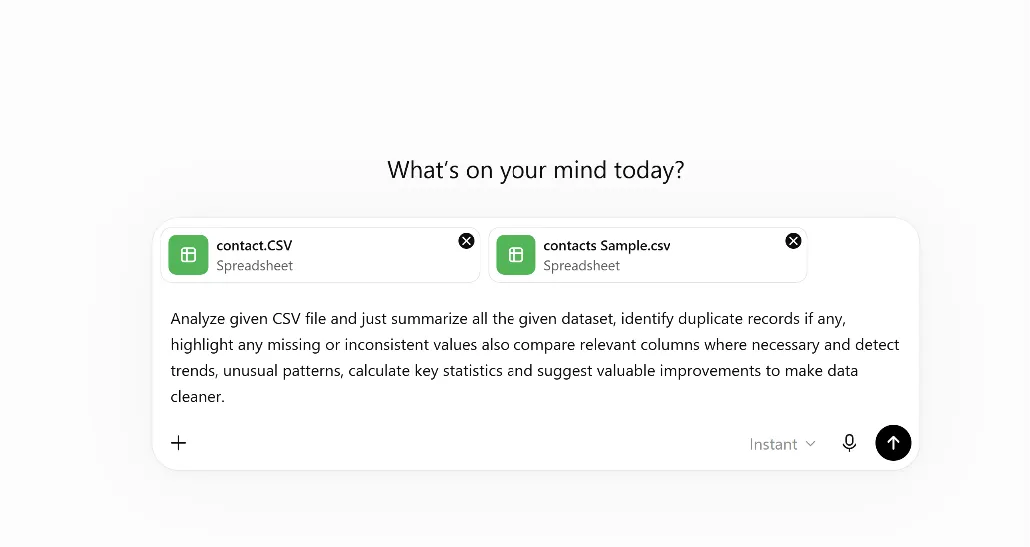
Prompt: Analyze given CSV file and just summarize all the given dataset, identify duplicate records if any, highlight any missing or inconsistent values also compare relevant columns where necessary and detect trends, unusual patterns, calculate key statistics and suggest valuable improvements to make data cleaner.
If you are using a comprehensive prompt as given above will help ChatGPT to perform multiple analytical tasks within a single conversation rather than using multiple separate requests.
ChatGPT vs Excel for CSV Analysis
Many users want to know whether ChatGPT can replace Excel completely or not. Well the answer is not entirely.
Excel remains one of the best tools for manual editing, formulas, charts and spreadsheet calculations. ChatGPT on the other hand is designed to understand the given data through natural language. So instead of remembering formulas or applying any complex filters you must simply ask questions and receive explanations.
You can check below how a practical workflow looks like:
- Using Excel to review and edit your spreadsheets.
- You can use ChatGPT to analyze CSV data and explain trends.
- Use dedicated software if your need is to clean up for a large dataset.
Clean Your CSV File Before AI Analysis
One important lesson many users learn is that AI performs better when the data is already clean. If your CSV file contains:
- Duplicate rows
- Repeated customer records
- Duplicate email addresses
- Empty fields
- And any Inconsistent values
Then the analysis may become less accurate because those duplicate records influence totals, averages and also summaries. For those who are working with large business datasets then removing duplicate entries before uploading CSV files to ChatGPT is generally considered best practice.
For example FreeViewer CSV Duplicate Remover Tool allows to easily detect and remove any duplicate rows from large CSV files by simply comparing one or multiple columns without modifying any original data values. If you clean your dataset before uploading a file will help ChatGPT to generate more reliable summaries, reports and insights for you.
Conclusion
Can ChatGPT Analyze CSV Files? Yes it can. ChatGPT is an excellent tool for understanding, summarizing, comparing and exploring CSV data through simple conversations. However its results are only as good as the quality of the data you provide. If your CSV contains duplicate records, inconsistent values or having any formatting issues then cleaning it before analysis can improve its accuracy. By combining ChatGPT’s AI capabilities with well prepared CSV data you can save your time, gain meaningful insights and make better data driven decisions.