json converter

(Average Rating 4.9 Based on 1127 Reviews)

Screens

Video

Guide

JSON File Converter Tool

All-in-one software to convert JSON files into 13+ file formats in batch mode. It offers smart features to convert complex & nested .json files into readable formats, including CSQL Script, XML, YAML, DBF, CSV, PDF, HTML, DOC, DOCX, XLSX, XLS, TXT, ACCDB, MDB, Parquet, SQLite DB, and DB3 and more effortlessly.

Purchase Now for Mac 30 Days Money Back*
  • Export JSON Data into Multiple 13+ File Formats Efficiently.
  • Dual Feature, i.e., Add Files or Folders to Browse JSON Files.
  • Effectively Preserve File Formatting, Layout, and Original Structure.
  • Best Tool to Transform Complex, Nested, and NDJSON Files Seamlessly.
  • JSON File Converter Provides a User-Centric Interface for All Users.
  • Instantly Delete Unwanted Files Using “Remove or Remove All” Options.
  • Offers Advanced and Flexible Features to Convert Raw Data Quickly.
  • Download Full JSON Converter for Windows or MacOS to Make Conversion.

How to Convert JSON File for Free in 4 Steps

JSON Converter Software for Converting JSON Files into Different Formats Instantly

1

Download and Start

Launch the FreeViewer JSON File Converter Tool on your operating system.

2

Browse and Upload the JSON

Pick any options: Add Files or Folders to upload structured JSON files in the dashboard.

3

Select File Format

Choose the desired File Format (PDF, CSV, TXT) to convert .json file into readable format.

4

Hit Export Button

Finally, press the Export button to make conversion and view the output file in a single click.

Why Choose FreeViewer JSON File Converter Tool?

Trusted Free JSON Converter to Transform Raw Files into Application - Ready Formats

Batch File Processing

Batch File Processing

The proficient software allows users to convert JSON data into multiple formats in bulk mode. It saves both time and effort of users. Instead of converting files one by one, users can add a complete folder and perform the conversion task in a single click.

Handles Complex, Nested

Handles Complex, Nested, NDJSON Structures

FreeViewer JSON File Converter is designed to manage complex files, including deeply nested structures and NDJSON ( Newline Delimited JSON). It maintains all data elements and key- value pairs accurately during conversion. It is an ideal choice for developers and technical users.

Folder Hierarchy

Maintain Original Folder Hierarchy

The JSON Data Conversion Software preserves the folder tree while processing multiple files. It provides the converted output file in original structured format as the source. This makes it easy for users to analyze, edit, and open JSON files.

Offline Vs Online

Offline Vs Online JSON File Converter

The Online JSON Converter Tools are not reliable due to privacy concerns. Whereas the FreeViewer Software is secure and locally handles the data to minimize risk. It also provides fast and accurate results after completing conversion process.

One-Click JSON

One-Click JSON Data Conversion

FreeViewer Mac JSON File Converter is available for a demo and a full version. With minimal steps and quick processing, you can convert JSON files into desired file formats in just a few seconds. The robust tool simplifies the process with a single-click operation.

Simple Interface

Simple Interface & Features

JSON Converter provides a clean and navigational dashboard with easy -to-use features. Users with zero technical expertise can run the software smoothly and perform conversion task effortlessly. Using this tool, users can convert JSON files without facing any challenges.

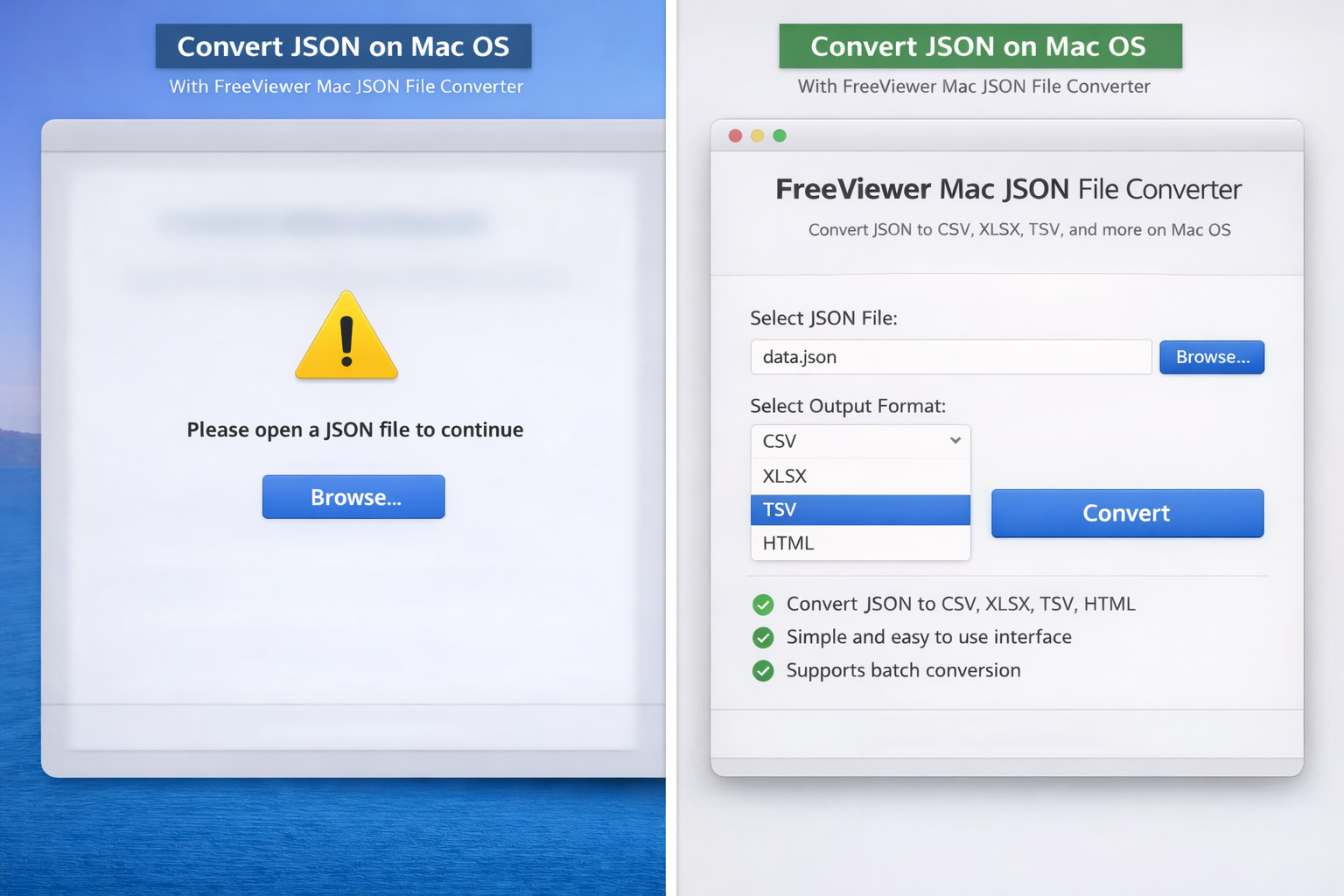
Convert JSON on Mac OS With FreeViewer Mac JSON File Converter

If you are wondering how to transform JSON file on Mac OS, try FreeViewer JSON Converter Mac OS, one of the most powerful and reliable software solutions. Using this proficient tool, users can convert JSON file into 13+ different formats without compromising originality or formatting. The smart software is capable of working with complex and large JSON files, including nested structures and NDJSON data.

Using this advanced utility, users can export converted file while keeping the structure intact. Moreover, it supports the conversion of JSON files at once using batch mode feature. Without any hassle or risk, users can convert raw data on Mac OS completely offline in a secure and accurate way. Below are the prime features of Mac JSON File Converter Tool:

  • Supports Conversion of JSON into 13+ Ready-to-Use Formats on Mac.
  • Offers Navigational Interface, Ensuring Compatibility with All Mac OS X.
  • Mac JSON Converter Transform Raw Data into Readable File Formats.
  • Works Offline, Reduces the Risk of Data Leakage or Misuse of Data.
  • Allow Users to Modify, Edit, and Analyze the Converted Output File.
  • Offers a Preview Option to View JSON Data Before Conversion.
mac json file converter

Top Features of FreeViewer JSON File Converter Tool

Discover Best Features to Convert JSON File with 100% Data Accuracy.

13+ Formats

Transform JSON Data to 13+ Formats

The JSON Converter Tool is among the most dedicated software for converting .json files into multiple web-friendly formats in a hassle-free way. Using this utility, users can convert JSON to CSV, PDF, TXT, HTML, MDB, ACCDB, and more to make conversion easy. It allows users to use JSON data across different platforms and applications after performing conversion task without facing compatibility issues.

Support Large & Complex

Support Large & Complex Files

This JSON File Converter is built to handle complex files that contain key-value pairs and all data elements. This proficient tool can work with multiple or large JSON files by using its batch conversion feature. It allows users to convert JSON data into readable formats smoothly and becomes an ideal choice for enterprise-level tasks. So, users with minimal effort can transform raw data quickly.

Handle Nested Structure

Handle Nested Structure & NDJSON

The Free JSON Data Converter Tool supports deeply nested structures and NDJSON (Newline Delimited JSON) files. It maintains all data relationships during the conversion process. This makes users suitable for handling API responses and large-scale JSON files. It allows users to upload and process both files effectively. These structures contain objects and arrays that can be difficult to manage manually.

13+ Formats

Remove & Remove All Options

With the advanced software, users can delete selected files or remove the entire files instantly by using the remove and remove all features. This is one of the best feature which help users to remove all unwanted JSON files in just a few seconds and provides full control over the conversion process. It improves efficiency, especially when working with large or multiple JSON datasets.

Offline and Secure

Offline and Secure Conversion

This utility completely works offline on the local system. The FreeViewer JSON File Converter Software ensures that JSON data is not uploaded to external servers to maintain privacy of sensitive or confidential documents. It eliminates risks related to data leakage, unauthorized access, and others. This robust tool does not require any technical expertise or a stable internet connection during conversion.

Preserve Formatting

Preserve Formatting & Layout

With this free JSON Converter utility, you can ensure exact data formatting, content structure, and layout during the process. Moreover, all data elements, objects, arrays, and key-value pairs remain in their original layout. In other words, there is no visual distortion, and it is a secure and dedicated free utility to convert JSON files into 13+ file formats with ease. So, download the tool to open JSON file.

24*7 Technical Support

24*7 Technical Support

Using the Mac JSON Data Converter, users can rely on dedicated 24*7 customer support to solve any issue related to the software while performing tasks. Whether you face any technical issues or need help at the time of installation of product, our team members are always available to provide guidance. The continuous support will enhance your confidence and ensure a smooth experience.

Free & Offline

Free & Offline Utility for Windows or MacOS

Download FreeViwer JSON File Converter for free on a Windows or macOS machine. This is a completely offline solution that prioritizes security and file protection while converting JSON. The process runs directly on your local system and minimizes the chances of risk. Moreover, it is fully compatible with all Windows and macOS versions, making it a reliable and trusted choice for both technical and non-technical users.

Explore Specifications of Best JSON Converter Software

Download the JSON File Converter Tool to Convert JSON File into Multiple Formats

Processor

Processor

Intel® Core™ 2 Duo CPU E4600 @ 2.40GHz 2.39GHz

Memory & Storage

Memory & Storage

4 GB of RAM (4 GB is recommended) | 300 MB of free hard disk space required

Deployment Prerequisites Deployment Prerequisites

Supported Editions

Supported Editions

Windows 11 (64 bit), 10 (64 bit). & Windows Server 2022, 2019, 2016, 2012 R2, 2008

FAQs

Q: Is Anti-Virus blocking the export process?

Disable Anti-Virus temporarily or whitelist the software in your settings for proper functionality.

Q: Unable to create output in destination?

Avoid using NAS, SAN, or Network drives. Ensure the source file is on the local migration machine to perform successful migration.

Software Download

Release v4.0 | File Size: 209.55 MB | MD5: c8a69b3f6082a401697ce4494fff5640

Download For Windows Download For Mac
Trial Limitations Demo version will only convert 10 records per JSON file.

Electronic Delivery

Electronic Delivery

The delivery of product is automated. You will receive an email containing both the link to download and the activation key within few minutes.

Free vs Pro Edition of FreeViewer JSON Data Converter Tool

Discover the Benefits of Using Demo and Full Version of Smart Software

Characteristics

Free Version

Full Version

Support Dual Feature to Upload JSON

Option to Choose Desired Location Path

Preserve File Formatting and Original Structure

Download JSON Converter on Win & macOS

Export JSON Data into 13+ File Formats Only Convert 10 Records Unlimited
Cost FREE ₹4457

FAQs for FreeViewer Full JSON File Converter Tool

Listed Commonly Asked Questions and Answers

What Customers Are Saying on Freeware JSON Converter

See What Experts and Clients Say About the Tool

4.9
1127 Ratings
5 Star 87%
4 Star 12%
3 Star 0%
2 Star 0%
1 Star 1%