ICS Converter Tool

Screens

Guide

FreeViewer ICS Converter Software

Expert Software to convert ICS files into many other formats on both Windows & Mac OS

(Average Rating 4.7 Based on 52 Reviews)
  • Verified tool to convert ICS files to Email Formats like PST and MSG.
  • Contains Options to create a Single Output File for every ICS folder
  • Exports in different file formats: PST, PDF, HTML, iCal, TXT, CSV, VCS, Print, and ICS
  • Supports Advanced Settings to convert the selected ICS File
  • Preserve the Folder Hierarchy during the conversion
  • Apply the options of Bates Number and Page Layout while exporting into PDF Format
  • ICS Converter Software is compatible with All Versions of Mac & Windows OS
  • The tool has no restriction on the file size to be converted

FreeViewer Awards & Reviews

This is a Reliable Tool to Convert ICS File Into Different Export Options

Import and Export File Types For Conversion

import format

Import Format

The ICS Converter tool supports the ICS file as input for the conversion process to begin.

export formats

Export Format

PDF, PST, MSG, iCAL, VCS, CSV, HTML, TXT, Print, ICS,

Elaborated Features Of ICS Converter Tool

Key Features to the Software to Export ICS Files to the Desired Formats

multiple export options

Offers Multiple Export Options

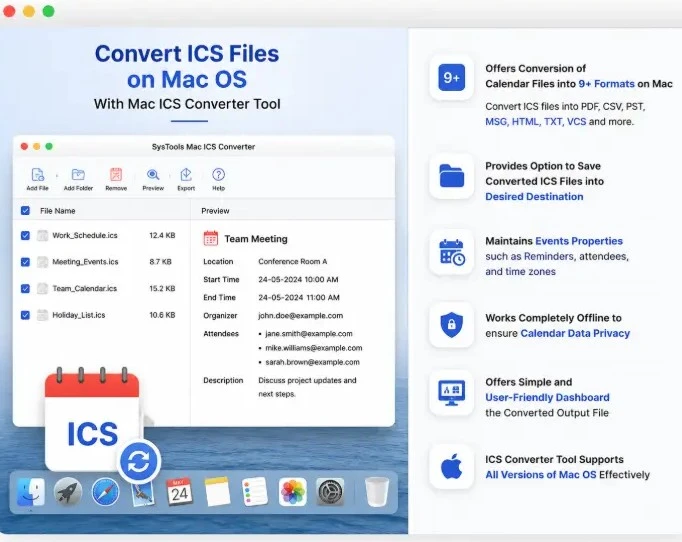
ICS Converter Software gives many export options to convert the ICS file into the preferred format. The export option includes PST, PDF, MSG, TXT, HTML, iCal, and CSV file formats. You can use any file format according to your needs.

 converts many ics files in bulk

Converts Multiple ICS Files

This tool is compatible with exporting multiple ICS files in bulk. You can select the Add File or Add Folder option for inserting the file or folder that contains one or more ICS Files for Bulk conversion.

 give complete export reports

Complete Export Report

Once the conversion is finished, the Window ICS file converter software makes the export report to show the details of the process. The report contains the selected path of the output file, Calendar count, and Fail count (if any), and then the export status will be shown as completed.

advance setting options

Offers Advanced Settings

The ICS Converter Software is for both Windows and Mac and is designed with an Advanced Settings, which gives many advance filters like:

  • Date Filter: It applies Date Filters to convert only the specific time of the calendar items. You can set the date, and it will only convert the specified date ICS calendar entries.
  • Naming Convention: Users can choose the file Naming Convention filter to save the output file, which gives options like Subject, Subject + Date, and AutoIncrement.
  • supoorted by all mac os

    Compatible With All Mac OS

    ICS Converter tool can be used to convert multiple ICS files on multiple versions of Mac. It supports conversion on MacOS X 11.0 (Big Sur), MacOS X 12.0 (Monterey), MacOS X 13.0 (Ventura), MacOS X 14 (Sonoma), MacOS X 15.0 (Sequoia) and above versions., and above versions.

    provides draw out the files

    Offer Option to Draw out the Files

    If there are any files that have been added to the ICS Converter Software that are not meant to be, this window ICS converter tool allows users to take out these files. It gives you access to draw out a single file or a few files by choosing the remove option.

     merge ics files

    Merge ICS files

    ICS Converter Software joins multiple ICS Files into a single ICS file without altering the previous ICS file. It uses the advanced option for approving several ICS Files at a time to combine into one file without taking much time.

    break files by size

    Break ICS File by Size

    The software gives a feature named Split ICS After option, once the conversion is completed. By using this, user can easily divide their ICS File with the required file size in MB.

    Specifications of ICS Converter Software
    Free Download Demo Version of ICS Converter Tool

    Software Download

    Size: 59.51 MB

    Version: 3.0

    Trial Limitations

    Limitations
    The demo version of the ICS Converter Tool will convert only 10 Calendar items for both Windows and MacOS.

    System Specifications

    Hard Disk Space
    100 MB of free hard disk space required

    RAM
    4 GB of RAM (4 GB is Recommended)

    Processor
    1 GHz processor (2.4 GHz is Recommended)

    Application Pre-Requisites

    Pre-Requisites
    If you are using Windows 11/10/8/7, then please launch the tool as "Run as Administrator".
    Microsoft .NET framework 4.5 and Above Version

    Supported Versions

    Supports Windows OS – Windows 7 (32 bit or 64 bit), 8, 10, 11 (64 bit).
    MacOS- MacOS X 12.0 (Monterey), MacOS X 11.0 (Big Sur), MacOS X 14 (Sonoma), MacOS X 13.0 (Ventura), MacOS X 15.0 (Sequoia) and above versions.

    FAQs

    icsicsconvert ics files
    mac icsconvertwindowics fileconversion

    convertfiles
    ics
    mac ics conversionmultiple export optionsconversion

    Electronic Delivery

    ics filesics convertermac ics
    ics file formatmac icsconverter

    ICS Converter Tool - Comparison of Features
    Overview of ICS Converter Software Features for Both Demo and Licensed Version
    Features Trial Version Full Version
    Add Multiple ICS Files
    Offers Folder Preview Options
    Offers Advanced Filters Options
    Provides the option of Split Output File
    PDF Filter Options
    Compatible with Both Windows and MacOS Versions
    Converts ICS Files into Many Export Formats 10 Calendar Items All Items
    Cost Trial
    Commonly Asked Questions
    Listed Frequently Asked Questions and Answers
    How does this ICS Converter tool works?

    ics conversion

    ICS Converter Software is used for converting .ics files without any data loss into your desired output file.

    • Step 1: Download and Launch the Software.
    • Step 2: Next, click on the Add File option.
    • Step 3: Get Preview of your data before exporting.
    • Step 4: Finally, click on Export option to select the output file type.
    Yes, you can convert your ICS File into PST or MSG format using this reliable tool. After that, you can easily import them into Microsoft Outlook without any data loss.
    Absolutely yes, the recurring events are fully supported and converted accurately without any changes.
    No, this reliable tool maintains the structure hierarchy during the conversion without any data loss.
    No, it offers no file size restriction for an efficient conversion process.
    Client Testimonials
    FreeViewer ICS Converter tool Verified Purchase Reviews
    4.7
    52 Ratings
    5 Star
    85%
    4 Star
    10%
    3 Star
    2%
    2 Star
    0%
    1 Star
    4%

    Why Choose FREEVIEWER?

    3M+

    Happy Clients

    250+

    Products

    100+

    Countries

    15+

    Years of Experience