JSON File Not Uploading in GST Portal? Here’s How to Fix It


If your JSON file is not uploading, the error is caused by invalid entries, GST return formats, or large file sizes. In most situations, you can resolve the problem by validating the .json file, correcting data entries, or reducing the size of the JSON file using an automated solution. This is a common issue faced by thousands of users when filing GST returns. The good news is that most “JSON file not uploading in GST portal” errors can be identified and fixed easily by using manual and advanced approaches. In this guide, we will discuss the methods and root causes behind the issue to resolve them effortlessly.
Why JSON File is Not Uploading in GST Portal?
The GST (Goods and Services Tax) portal has strict guidelines for uploading JSON data. When any of those requirements are not met, the portal will reject the file or show an error message. Here are the root causes you need to know while uploading files:
- File Size Restrictions: The GST portal allows max 5MB file size for uploading. If the generated file exceeds the limit, the upload process may fail. In such cases, consider breaking the data into smaller batches using software solutions.
- Inappropriate JSON Structure: The JSON structure for Inter-state (CGST/SGST) and Inter-state (IGST) got corrupted. JSON file must follow a specific hierarchy by GST system. Missing brackets, duplicate entries, and improper nesting can make JSON invalid.
- Schema Version: GST portal updates its return filing and JSON schemas regularly. Using an outdated utility for creating JSON file, its schema does not match the current portal requirements. As a result, the file may be rejected for uploading.
- Slow Connection: An unstable internet connection can disrupt the workflow when dealing with large volumes of files. The upload process may freeze or fail before completion. Ensuring a stable and high-speed connection can help users to prevent the JSON file not uploading in GST portal error.
- Special Characters in Filename: If you use special characters such as (@, #, %, &,) or spaces in the JSON filename, this can cause compatibility problems during upload. To eliminate errors, rename the file using only numbers and letters before uploading to the GST portal. An invalid or missing GSTIN can also create errors during upload.
Overall, understanding the root causes can resolve JSON file upload errors in the GST portal quickly. Now, follow the methods that will be explained in the sections below to help you resolve the issue in a few minutes without any delays. Now, let’s begin the discussion.
How to Upload JSON File in GST Portal – 3 Effective Ways
If you are seeking a solution to resolve the “JSON file not uploading in GST portal” error, here are the detailed methods. It includes both manual and automated approaches to upload JSON files securely and quickly. Here are the reliable techniques to resolve the issue:
- Validate & Fix JSON Structures
- Fix Browser & System Issues
- Reduce JSON File Size
Now, let’s dive into these best methods.
#1 Fix “JSON File Upload in GST Portal” Error by Validating File
If the error is an invalid format or schema validation failed, the structure of your JSON file has issues that need to be corrected before initiating the upload process. This error mainly occurs when the file contains missing fields, improper data types, duplicate entries, or mismatched values that are not suitable for GST portal requirements. Now, follow the working steps:
- Use an online JSON validator.
- Identify errors and fix all of them.
- Check & verify against GST schema.
- Review the report and save the updated file.
- Now, upload JSON file to GST portal.
Limitations:
- Requires basic understanding of JSON structure and formatting.
- Online tools bring risk of data loss and fear of backups on third-party tools.
- Free tools have file size limitations and cannot handle nested structures.
- Manual editing can be time-consuming for handling large JSON files.
- Error text may be difficult to understand for non-technical users.
#2 Fix “JSON File Not Uploading in GST Portal” Issue by Browser & System Level
Sometimes the JSON file is not correctly verified, but the error lies in the browser, system settings, or network area. Here are the fixes:
Browser Fixes:
- Use latest version of Google Chrome because GST portal is optimized for it.
- Always remember to clear Browser Cache & Cookies and then restart Chrome.
- Disable all extensions such as Ad blockers, VPN, and more before uploading.
- Enable JavaScript on which the GST portal relies heavily.
- An incorrect date and time can cause errors and block uploads.
Network Fixes:
- Try to use wired connections, which are more stable when performing an upload task.
- Upload JSON data file during non-peak hours to eliminate chances of server failures.
- Turn off VPN or any other service that may disrupt the GST portal upload process.
#3 JSON File Upload Error in GST Portal – Try Expert Solution
One of the major reasons behind the issue is excessive file size. Businesses that produce many invoices and transactions often end up with large JSON files that can exceed the portal’s processing limits, causing upload failures, timeouts, or validation errors. In such cases, splitting a large file into manageable parts can be beneficial. The trusted FreeViewer JSON File Splitter tool is designed to break oversized JSON files into small chunks in just a few clicks.
This is a standalone choice for both professionals and beginners. It reduces the file size while maintaining original folder structure and integrity. The smart solution can handle both complex and deeply nested structures with ease. This allows users to upload and process files within GST portal without facing file-size related issues.
Fastest Way to Split JSON File into Chunks
- Download the aforementioned software on your machine.

- Use any option: Add Files or Folders to browse JSON file.

- Choose Split Mode: Split by Size or Record Count.

- Select destination path and hit on Split button.

- Now, click Ok and tap on View Report option.

- Lastly, Upload each file to GST Portal.
How to Upload Multiple JSON Files on GST Portal?
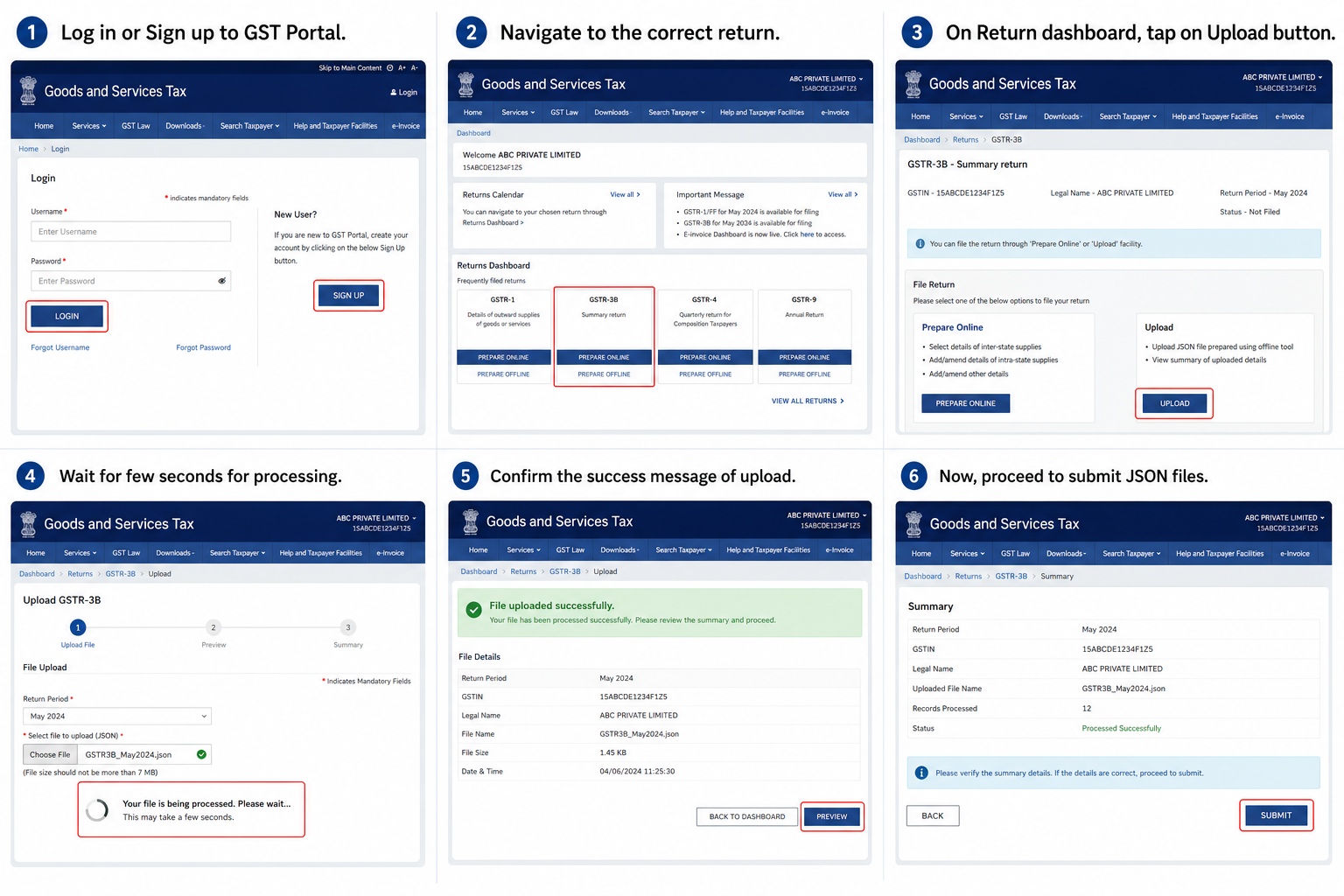
Once you have prepared your JSON file (validated, correct size, proper format), here is the step-by-step process to upload it successfully to the GST portal:
- Log in or Sign up to GST Portal.
- Navigate to the correct return.
- On Return dashboard, tap on Upload button.
- Wait for a few seconds for processing.
- Confirm the success message of upload.
- Now, proceed to submit JSON files.
Bonus Tip: Can’t Read, Edit, or Analyze JSON Data After Upload?
Now, after successfully uploading the JSON file to the GST portal, some users face an issue where they are unable to read, edit, view, or analyze JSON data easily because the file format is machine-readable. In this situation, using an advanced utility like the FreeViewer JSON File Converter Tool allows users to convert complex structured data into readable file formats such as PDF, CSV, XLS, XLSX, DOC, DOCX, and many more. Now, follow the steps mentioned below:
- Download and launch the tool on your system.
- Pick any option: Add File or Folder to upload JSON.
- Now, choose desired readable file format.
- Set location path and click on Export icon.
- Lastly, tap on View Report to open new file.
Final Words!
In the above guide, we have shared 3 different techniques to fix the “JSON File Not Uploading in GST Portal” issue in a hassle-free way. Remember, manual approaches do not guarantee success and have major limitations; use the automated utility to perform tasks cost-effectively. So, download the solution and easily upload JSON file on GST portal effortlessly.