List of Explanatory Features of Mac PDF Restriction Remover Tool

Unlock PDF Security On Mac
With PDF File Unlocker tool has a feature to unlock the secured PDF files. It allows removing the various restrictions like copying, printing, editing, extraction, etc. In addition, the tool also removes other PDF protection like commenting, signing, document assembly without facing any issues.

Unlock Password from Multiple PDFs
Mac PDF unlocker software provides an Add Files or Add Folders option to load several secured PDF files to the tool. After that, this application resets the password of all PDF files within a single click. Also, users can remove the unnecessary PDF files by using the Remove option.

Create PDF Unlocking Status Report
After doing the PDF file security unlock process, the Mac PDF Password Unlocker tool generates a complete status & permission report. Basically, this status changes to "Complete" and permission changes to "Enabled" after processing all PDF files successfully. You also get the 'Export Report' in .csv file format and 'Unlocked PDF Files'.

Eliminate 8 Types of Restrictions
There are various types of PDF restrictions removed by Mac PDF File Unlocker tool. It includes printing, commenting, content copying, content copying for accessibility, document assembly, signing, page extraction, filling of form fields, and template pages creation. User need to enter PDF password at once and remove user level password completely.

Keeps PDF Formatting & Attachments
With the help of this Mac PDF unlocker Tool, users can maintain their original file formatting like object forms, graphics, hyperlinks, images, etc. even after removing the restrictions from the PDF files. It will also preserve the PDF attachments and data integrity. There will not be any loss of information during PDF restriction removal process.

Support Several Versions of Mac OS X
The Mac PDF Unlocker software is compatible to work with Mac OS X 10.15 Catalina, Mac OS X 10.14 Mojave, Mac OS X 10.13 High Sierra, Mac OS X 10.12 Sierra, OS X 10.11 El Capitan, Mac OS X 10.10 Yosemite, OS X 10.9 Mavericks, OS X 10.8 Mountain Lion. Moreover, PDF Security Remover utility is designed with a user-friendly interface which makes easy for users to work with it.

Save / Print Unrestricted PDF
Mac PDF Restriction remover allows users to save unlocked PDF document at any desired location. With the help of Change option of the tool users can select the destination location for saving the resultant PDF document. Also, by using the Print option users can print the unsecured PDF document.

Retains PDF File Password
The PDF File Unlocker Tool for Mac provides the advanced option i.e. “Keeps Source PDF Password in Output PDF” option for retaining the original PDF document password in the unlocked PDF file. When the user selects this option the output file contains the original password..
Mac PDF Security Unlocker Software Specifications
Trial Limitations
Limitations
Demo version of Mac PDF Unlocker software will remove restrictions from 5 PDF files, but while saving you will get Demo watermark on output PDF Files.
System Specifications
Hard Disk Space
100 MB of free hard disk space required
RAM
4 GB of RAM (4 GB is recommended)
Processor
Intel® Core™ 2 Duo CPU E4600 @ 2.40GHz 2.39GHz
Supported Editions
Windows OS
Mac Support - MAC OS X 10.8 (Mountain Lion), MAC OS X 10.8 (Mavericks), Mac OS X 10.10 (Yosemite), Mac OS X 10.11 (El Capitan), Mac OS 10.12 (Sierra), Mac OS 10.13 (High Sierra), Mac OS 10.14 (Mojave), Mac OS X 10.15 (Catalina)
FAQ's


Electronic Delivery


Get an Overview of Mac PDF Unlocker Features – Free vs Full
| Features | Free Version | Full Version |
|---|---|---|
| Add PDF Files / Add Folder | ||
| Unlock PDF Security | ||
| Enable PDF Printing Permission | ||
| Unlock Copy & Edit Permissions from Protected PDF | ||
| Remove PDF Commenting and Signing restrictions | ||
| Enable PDF Form Filling & Document Assembly | ||
| Supports Mac OS X 10.8 (Mountain Lion) & Above Versions | ||
| Save / Print Unlocked PDF Document | ||
| Export without Demo Watermark | ||
| Cost | Free | $39 |
| Download | Purchase |
Listed Commonly Asked Questions and Answers
Following steps will tell you how to Unlock PDF Security:
The software provides diverse functionality to Mac unlock PDF security properties. Some of the core functionalities of the tool are given below:
Listed are the features exhibits by the Mac PDF File Unlocker Tool:
PDF Unlocker Software supports PDF file of Adobe Acrobat Pro DC, 11.0, 10.0, 9.0, 8.0, 7.0, 6.0, 5.0, 4.0, 3.0, 2.0, 1.0 Versions
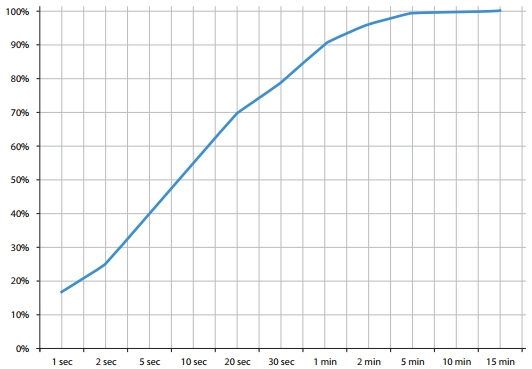
PDF file unlocking takes some minutes or seconds and is directly proportional to the complexity of the algorithm used and password set by the users. So you might have to wait for some time in some cases to get the unlocked version of the concerned PDF document.

General time is taken for PDF Document Unlocking
Yes, this PDF pdf unlocker software enables the permissions to modify the protected PDF files. Moreover, users can also print, copy and extract PDF file data.
Yes, this tool can remove owner level password security from PDF documents & enable all the permissions like print, edit, copy, sign, comment, etc.
User level password prevents PDF files from being accessed by unauthorized users. It is also known as document open password.
Owner level password is also known as the master password. It protects PDF files from being copied, edit and print.
Yes, the tool provides the functionality to insert multiple PDF documents for the unlocking purpose.
No, the tool does not allow the removal of encryption from unhealthy PDF files. Therefore, first users have to repair them.
Yes, the tool Mac PDF Restriction Remover Tool is compatible with Windows OS i.e. 10 and all below versions to unrestrict PDF files.
Get User Reviews of the Tool to Remove PDF Restrictions
Why Choose FREEVIEWER?
3M+
Happy Clients
250+
Products
100+
Countries
15+
Years of Experience